Unclaimed: Are you working at QuickBooks Desktop Pro?
QuickBooks Desktop Pro Reviews: 4.3/5 — Solid Choice
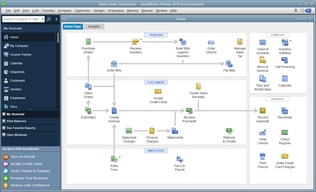
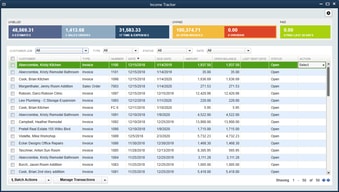
QuickBooks Desktop Pro is a platform that lets users automate key processes in the accounting system, including billing and invoicing. With Desktop Pro, users have the option to link bank accounts, define workflows, and make automated payments for efficiency. This solution also lets users manage employee payrolls via a single application. Other key features include business expense tracking, report generation, and time tracking.
| Company | Intuit Inc. |
|---|---|
| Year founded | 1983 |
| Company size | 10,001+ employees |
| Headquarters | Mountain View, California, United States |
| Social Media |

| Capabilities |
API
|
|---|---|
| Segment |
Small Business
Mid Market
Enterprise
|
| Deployment | Cloud / SaaS / Web-Based, Desktop Windows, On-Premise Windows |
| Support | 24/7 (Live rep), Chat, Email/Help Desk, FAQs/Forum, Knowledge Base, Phone Support |
| Training | Documentation |
| Languages | English |






Compare QuickBooks Desktop Pro with other popular tools in the same category.
Easy to use and switch between various companies we have.
Asking me every time I run a report if I want it saved as a custom report.
Easily prepared accurate accounts for CPA to reduce external accounting charges.
The software is very easy to use and navigate. I taught my niece the basics in under 20 minutes to the point she could input through the register and post deposits, including making journal entries.
Trying to void deposits and/or accounts payable gets tricky. Not sure if it it's me or the software, but more times than not, I end up with undeposited funds when there really aren't any. Trying to correct that is a mess.
Budget issues are easy when you change the view of the reports. (Month by month, quarter by quarter, etc). Saves a lot of time when you don't have to export it and manually manipulate it in Excel.

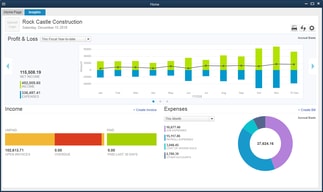
WHat I like the most about Quickbooks Desktop Pro is how easy the tabs are to click so that you can find the correct information needed. You do not have to search around for reports, queries or information. I really realy like the Account Center, it shows everything that the CFO or CEO needs to make adequate decisions.
I would like to see the Merging of vendors and customers to be a little bit more intuitive.
Right now, I am not solving anyproblems with with the software.

I like how I can do bookkeeping, payroll, run reports, run W2s & 1099s, and more all in one program! I like how I can easily manage employees and vendors in one places. I can use the direct deposit feature to easily deposit paychecks weekly into the correct account. I also like how it memorizes accounts used often in order to easily make sure all transactions are going to the same location and cuts out a lot of time. At the end of the year, QB makes it easy to generate 1099s & W2s for employees.
I dislike how in the payroll cloud system you can't see paystubs from anytime before the account was created. The price is very high for the Payroll addition which my company needs. I wish it was possible to move multiple payments and deposits to a different account when realizing they were classified wrong.
It saves me time by sending out paystubs to W2 employees each week using the Intuit cloud system. It solves the issue with bookkeeping and keeping accounts straight. It keeps up with account balances and vendors as well.

Quickbooks allows us to easily keep track our our spending. We can write checks, balance accounts and generate spending reports. We can easily keep track of our spending vs. our budget and give accurate and detail accounting information to our parishioners
I wish the home screen was a little more user friendly. It needs to be more intuitive for users to locate the area of the system they need to access.
Allows us to manage our income and payable system, track invoices and provide accurate accounting of our spending and income.
I like having everything in one program to keep up with business transactions
It's taken me a while to find previous bill transactions and find previous payrolls.
I'm able to track orders sent to our vendors
QuickBooks is a very easy to navigate software without all of the extras. It is priced appropriately and easy to each almost anyone how to use for small companies.
It is not as robust as other softwares that I have used. If your company grows it may need meet all of your needs. The reporting ability is also limited.
We are able to do the financials for our small entities with less monthly transactions. It is a quick software that allows us to report these financials in less than a day.
It is user friendly, most convenient and the easiest software that any organization can use, whether small or large.The home page alone directs even the newest user on how to operate the software,
It is expensive for start up and small organizations, hence discouraging despite of the many benefits.
Reports are automatically generated once data is entered, one is able to know the financial position of the business, whether its being financed by assets or liabilities of the company. Reports on accounts receivables and payables are also generated with ease. With the software one can also generate and send statement of accounts to customers and a follow up on payments. Time and inventories are easy to track,
The overall thoroughness and usability of the software to have full control of the finances of a business.
The lack of access to prior month reconciliations for review and reprints/re-saves.
The ability to capture a full cycle accounting view of a business, and track all inflows and outflows. The export feature to Excel is very useful. In addition, the ability to import transactions from our financial institution is convenient.
The best part about QuickBooks Desktop Pro is the fact that everything is so simple to find. There are no tricks to using this software everything is laid out in a way that is very easy to navigate and understand. It makes the AP and AR process work incredibly smoothly. I love the way you can move through the AR process seamlessly and it copies all the previous information that was on your sales order right to the invoice.
There has been nothing I have encountered while using QuickBooks Desktop Pro that I have disliked. This was the first financial program I have ever used and I had it figured out in just a few hours. I can't say enough great things about it.
The most obvious problem I have been able to solve with QuickBooks Desktop Pro are organizational issues. Tracking purchase orders, what customers owe, sales orders, and invoices has never been easier. The benefits have been making my work day more productive. I don't ever have to spend time digging or searching for paper documents, I just open the QuickBooks search bar!
Easy to learn & use. The help it give when entering information that may not be correct. We use the job profitability report to tell where we are on out jobs. This is of great importance to our particular industry.
Takes too many steps to email an invoice. I have difficulty using the quote to invoice feature. Also, when using a credit to an accounts payable bill the check number reverts to the credit memo number. This is super annoying.
We no longer have to keep our books by hand. It is a time saver as well as a good interface now with our accountant.
Quickbooks desktop is a powerhouse accounting software which allows for all aspects of our accounting department to work efficiently. It is able to differentiate revenue streams, projects and pull many different reports which can be downloaded right into excel. Quickbooks also has a very good customer service line which will help with questions you have or issues you face.
It only allows a maximum number of jobs or projects before having to upgrade. Also, sometimes the project costing does not always work when we refer to freight. The revenue stream of freight sometimes gets mixed into the parts or whichever revenue stream you use.
It is our prime accouting software. It formulates all reports, cash flows, expenses and even payroll. It helps better organize our inventory, our projects and much more. We are able to keep up with costing and seeing which revenue stream needs work as quickbooks custom reports deliver exactly what we need.
Quickbooks is best for keeping all your account and bookkeeping records.
To be honest there isn't much I don't like about the program. Maybe the fact that the playback sound when saving entries is to loud but that's about it.
We are solving the problem of keeping all our records and books up to date. With quickbooks, it makes it easy to go paperless.
I have been working with QuickBooks for years and started out as a novice and have been able to advance to an intermediate user quickly, I'm not sure as I will be an expert since it is an ever-growing software with addons being added. The integration with other Softwares makes my life easier, especially for payroll using Tsheets.
Getting to support can be difficult when trying to reach someone over the phone, however, I have found that being able to message for help works a lot better.
Payroll processing and wage garnishment, with the labor laws, always changing the addition of paid time off laws. its assist me in keep track and staying on top of the latest deduction and laws that need to be implemented for my state.
There was a lot with quickbooks you could do but I enjoyed being able to fluidly create, print and accept payment all within the software.
I disliked the window in window look. Especially because some windows would overlap and there is no task bar for QB like with a normal desktop.
Keeping track of client invoices, payments and contracted payment terms
The search bar allows for you to find things fast
The switch from peach tree to quickbooks was difficult
It allows for easy management of invoices
I love QB Pro. It helps keep things organized and simple. I can easily add new employees to payroll, change them to weekly,biweekly, monthly, act/inactive without having to search all over to find out how to do so. I also enjoy being able to print out the checks and sign electronically. We are looking into direct deposit though, so that would still be a bonus for the times when we do not need to electronically deposit a payment.
There is nothing to dislike. However, I have not researched this, but if they had a platform that I could use to put in church donations instead of using a separate program to do so, that would be amazing.
It gives me an instant idea on where our finances are at any given moment, so when a staff member wants to utilize a specific fund, I can quickly tell them where we are financially without having to "get back to them".
The ability to send invoices directly from the program and the ease of entering journal notes is unmatched in any other accounting software I've used. The ability to run various reports or look at information based on different parameters quickly and easily. The payroll function was wonderful, intuitive, easy to use, and while our corporation did switch to another payroll modality, most if not all employees who use the function regularly are unhappy with the change and we are hoping to see a switch back to QB Payroll before too long.
Their support team was not overly impressive the few times we have had to reach out, and that is really the only complaint I have.
Our company uses quickbooks as secondary accounting source, and is our primary accounting source for international business. The program is second-to-none, in our experience, for tracking international transactions.

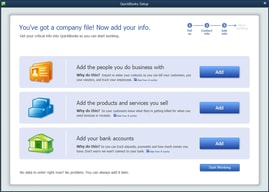
I like that it is a powerful accounting tool that is easy to use. For a small company, the reports can help run your financial goals. Setting up the company file walks you through set by step. I learn new things to do all the time. If you make a mistake you can easily correct the mistake without doing a ton of journal entries.
Some features do not work as they should. We track mileage and for some reason to bill back the customer for mileage no longer works correctly. Sometimes creating the perfect report will take a little longer than you want, but once you learn the system it does get easier. Credits in the system can also cause an issue on the reports. The work around doesnt really help that issue either.
Watching our finances, tracking our budgets and knowing where to make cuts in our budget. Currently started using QB to track how much work our employees are doing to see if they can take on more work. It seems to be working out well for us. The graphs are helpful to compare this year to last year.
Easy to use and consistent performance. Integrated payroll, which saves money.
It's expensive but it is the standard, which means that you are in sync with your accountant.
Basic business accounting and payroll.
Quickbooks is very easy to use. I like having the ability to process credit cards, and email invoices quickly!
I dislike that they make you upgrade every 2 years and not much changes.
I am able to access my reports, pay sales tax and send out invoices without any problems. Its a very simple process. I didn't really have any problems to solve....

I had no bookkeeping experience before using QuickBooks Online, but with a bit of accounting knowledge and hands on experience, I was proficient after about 3 months of full-time of use. I like how is is to navigate and figure out different parts of the software. What I was doing mostly as a Sales Administrator was creating invoices, return notes, credit notes, customer statements, handling petty cash, Age Debt Summary - chasing payments, adding new customers/suppliers, adding purchase orders invoices, checking supplier statements. I found all these parts of the software really easy to use on a daily basis. I do not use payroll through this system, so I cannot comment on the functionality of that portion.
Maybe the reporting side could improve a bit. I liked that it had different kinds of reports that you could run but they were not so easy to use. So maybe a more straight-forward reporting would be better. Another thing is that in our company, it would allow only 3 users at a time and that was a bit stressful especially when we would run reports and someone in Payroll would've need access to it.
I have used Quickbooks for a couple of years and my overall experience has been very good. It was great for the small business I was working for.

It can be set up multiple different ways for the same industry all dependant upon what information each owner wants to track. It is much more robust than its online counterpart AND it can be hosted online for anywhere access. I particularly like it because you can create shortcuts for the workflows you use often making it a customizable experience and increase productivity.
My main caveat with the Desktop software is the fact that is needs to be upgraded every 3 years. Intuit, as far as I know has never required this before and I think this happened as a way to increase the profits. I think they need to leave it alone and instead charge for additional support after so many years. Having to constantly upgrade with the prices ever increasing turns people off from purchasing this software which is better for their business than its online counterpart.
Its our accounting software and the software we use for clients. I use it explicitly in my business but the accountants version as there are tools in there that I need to increase my productivity. It truly is the best software out there ti handle property management without all the frills and sometimes people want that.
Easy customization and usage of all features
I would like to segment more what users can access to.
Easy of integration with a more complex inventory software. Consolidation of information but needs more on the customer management side.
Very intuitive. People who don't know accounting can use it to do their own books.
Their are a few higher level functions it can't do in payroll for instance. Things go a bit slower when you have a lot of employees because certain things have to be handkeyed.
Really all our accounting is done in Quickbooks, everything is streamlined and goes quick.
Ease in using and sending to our accountant! As well as the updates sent to me, and the ease in updating our tax needs!!
Nothing, I love that I can share with my accountant!
Better, more accurate tax reporting because we can easily send to our accountant for quarterly and annual reporting. And, the ease in doing payroll.
I like that things are easy to find, and the search button is very helpful for a first time user like myself.
You have to go into single-user mode to delete a client.
I’m able to keep track of my budget very easily, and pay bills easily.
I absolutely love the fact that it is a very user friendly program.
I don't really like that I sometimes have to back up my data because I think it should be done automatically for me. The other thing that I do not really like is that it is very slow sometimes and I wish it would be much faster so that I can use it faster.
I am working on financial analysis for my company and how we can be more productive by seeing more patients per day. QuickBooks is so easy to use to help track this data and I am really appreciative of its ability to help us grow our company.
QuickBooks is a great way to keep track of your book this and see how much your business is per fitting or losing
I honestly cannot say too many negative things about QuickBooks it is mostly user error what I don’t like
If you are working with people who don’t know how to use QuickBooks it could be difficult but when used correctly it is a great program
One thing I like about QuickBooks is how easy it is to create, edit, and share invoices.
One thing I would like is to be able to search my clients by something other than their company name and invoice number. For example: I would like to be able to search them by email or location, etc.
We are able to find if clients are past due on their account which has many benefits.