

Unclaimed: Are you working at Zoho CRM?
Zoho CRM Reviews: 4.1/5 — Solid Choice
Zoho CRM is a leading customer relationship management platform that businesses of all sizes can rely to manage sales, track marketing campaigns, and gain customer insight within a centralized, collaborative environment. Using Zoho CRM, users can set up and customize that platform according to their personal preferences and incorporate all necessary data and workflow to maximize its features. Zoho CRM is also available on a free plan and scales gradually depending on features needed.
| Company | Zoho Corporation |
|---|---|
| Year founded | 2000 |
| Company size | 10,001+ employees |
| Headquarters | Chennai, Tamil Nadu |
| Social Media |

| Capabilities |
AI
API
|
|---|---|
| Segment |
Small Business
Mid Market
Enterprise
|
| Deployment | Cloud / SaaS / Web-Based, Mobile Android, Mobile iPad, Mobile iPhone |
| Support | 24/7 (Live rep), Chat, Email/Help Desk, FAQs/Forum, Knowledge Base, Phone Support |
| Training | Documentation |
| Languages | English |
Zoho CRM Pros and Cons
- Extensive omnichannel customer support via live chat, phone and email
- High-level automation options for various sales tasks
- Tons of integrations with third-party tools like Outlook and LinkedIn
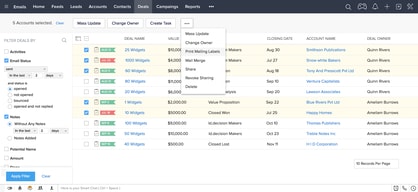
- Mobile version with access to visual reports
- Data security, integrity, and regulatory compliance built-in
- Not the best tutorials for beginners
- Integrations can be a little clunky





Compare Zoho CRM with other popular tools in the same category.
Simplicity of the Product ; The ways if functions for a msaller organization with Sacalable features and Best part is that ismaller version is available Free of Charge
INdiain industry version is not available ; I wish that templacte for mail communication was made available . Also Integration with Dropbox and Googel Drive is expected
Sales Process Spreamlined

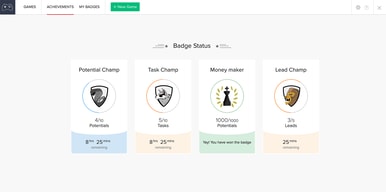
I like Zoho best for the dashboards and score cards they have for the leads. Like the fact we can see the leader boards inside of dashboards
Slow not and the look of Zoho besides that I like everything else that Zoho has to offer
We are able to monitor leads in a time period can access records and have team dashboards to improve dales etc
The time management feature works well. You can create a project and assign it to a specific user or to a group of users to collaborate on. It's easy to track the time they are spending on the project and what the status is at any point in their progress.
Sometimes I feel like I am recreating the wheel when adding a a new project. Seems like there should be a way to replicate a previous one. Bugs pop up frequently. They are always patched, but customer support response time can lag more than wanted.
Mostly collaboration and project management. We do not use the sales forecasting portion of the CRM for this particular client.
the method of collecting customer information and how it is displayed in the administration panel, has good centralization of Sales, Marketing, Services, Support and Management processes.
to have access to other functionalities you have to install other packages
Sales, Marketing
I really like that the software is hosted in the cloud and you do not need to install it in your computer. This is one of the main reasons I opted to use the software because I can access it anywhere I need to. It meets most of my requirements and has made my business run more smoothly because of its ease of use. It made sending quotes to customers a lot easier for all the employees and everyone thinks it is a great software.
It's expensive. I like to software, however, I think that the price can be reduced and would also help in getting others to purchase the software. The help documentation is not very clear. It should be a bit more clear on the how it can help, it does is not very straight forward and I feel that it could be. The lack of support can definitely be improved on because it is almost not there and could easily be there. This is almost very important for new users.
Using it to manage customer communication, including, sending quotes, following up with customers and setting up meetings. We were able to close more customers.
We have a very unique Sales process that is difficult to support via out of the box CRM setups. Zoho allowed us to create custom modules that spoke directly to our users and helped create automation around a process that was already in use at our company.
Certainly there are a lot of kinks for this product. As an admin, my biggest issue is with the lack of visibility and control of users through an admin login. You cannot ghost users to setup their dashboards/email sync and to offboard employees properly, you have to go only through their login to create an IMAP sync via a unique mobile number. Another issue we have pretty consistently is with Zoho's API, there are common failures related to Zoho making changes that they do not communicate.
We have been able to house our claims, pricing, sales, face-to-face meetings, and account review processes in Zoho. We initially started with only sales, but saw a lot of value in connected Zoho with as much as we could across our business to increase visibility and automation.
Easy to start with a CRM and almost free for small business
It's hard to growth with this solution if you have a big company
Following sales
The best thing i like in Zoho is sending and tracing all the emails i sent daily. I like it because it is cheap
No sequence emails, No gmail syncing, No linkedin syncing
Saving and managing the contact details and relations of our customers
How easy it was to learn and operate. Quite impressed with ease of operation
Cost was a little more than what I think is fair.
CRM CUSTOMER MANAGEMENT
Note section correlation with each contact
Could be more consise and user friendly from business and not engineer standpoint
Reporting,tracking of clients and #of contacts along with why
I like being able to interact with my customers on my website. Being able to see what products customer are looking at.
The glitches. But it would seem that all software has some glitches.
The more you are able to talk to your customers, the more you can help them with decisions and buying.
With Zoho I was able to track and schedule sales calls in the platform. I was also able to interfrate my sales quotes.
I think the platform could have used a smoother transition into different accounts. Text or email reminders when I needed to. E on a call would be great too.
Sometimes I misplace a quote. I love that I am able to load the quote right under the customer account. I also like that I can share my accounts with my coworkers.
Very end user friendly and malliable to user interface.
Limitations to how personalized the software can become for non-traditional sales teams.
Duplicate prospects/leads
Zoho has many modules which help make the sale flow helpful, including the ability to make and send quotes, sales orders, and invoices. It is an easy all in one system for tracking all of these different items for reference and followup.
The interface is better but still not as slick as other solutions. Overall Zoho has more features than other options but does not have the polish or is intuitive to use like others such as Pipeline. I think I would use the application more if it were more enjoyable to use.
Ability to track contacts, quotes, and sales orders long term. We find it fills more gaps than other CRMs because of its many features.
good for marketing, sales and operation. Can create reports and dashboards. Good benefits for the cost. a lot of options to customize pretty much anything. can communicate with
Dashboards are sometimes limited. Since there are a lot of options, there should be more tutorials and examples
Managing our leads and customers - instead of using emails, follow ups etc'. Anyone can see the status of any lead, opportunity, and customer from anywhere, anytime.
I can easily add my custom fields in ZohoCRM and that helps me have better control over more aspects of my customer service, especially when having to answer to complex questions from my current and prospective customers. There are many options readily available, from the start. I like the fact I can have separate interactions with my contacts and the companies they're part of, given I enter both their information sets.
The overall speed of ZohoCRM could be better but I understand the pages are built dynamically so most of the content I request can't be cached, hence the slower speed but even then, it's totally workable. I would like to see more visually rich tutorials to use the features to their fullest since they're all quite attractive and sometimes, it can take time to get around to understanding all this online CRM can accomplish.
My customer service is easy to tend to both by me and my team. We can be at the office or anywhere else and we still have access to the fully updated datasets.
Track all of my customers, sales and potential sales all in one spot. Love the custom reports that I can create.
A bit slow at times but that is a small price to pay for the flexibility for all of the features.
Tracking customers and sales. Able to compare sales people and track things from year to year.
Ease of use, I like the colors as well. Integrating the database of clients in to Zoho serves incredible purpose and saves a lot of time in the long run. Quick statistics on aggregate and each customer really helps when you need overall picture or have to pull up information on a client in real time, sometime the customer is on the phone, and I can see the info right away.
Short lags in between window switching. Sales Signal function seems little hard to implement and understand
Assisting in finding appropriate target group in food and beverage industry through email and social media. Team performance business analytics via various communication channels
The ease of use and features available to consumers
Could do more for the consumers that are medium to large scale
keeping customers in the pipeline, remembering the sales cycle.
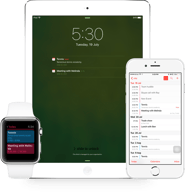
I like the mobile app a lot, its very easy to add notes, tasks etc and stay organized. It also prompts you to log a call after you have made it by clicking on the number so it helps me stay on top of logging activities.
Its very difficult to get emails into the system, there is no easy to way to BCC a code or something to log it and its very time consuming to add it individually. There is no easy way to organize them as I add emails
Its been great when covering for co workers if they are out. IF someone has an unexpected absence, you can look at tasks they have set up to follow and make sure critical deadlines aren't missed
I like the price point of Zoho. I especially like their integration with all their other solutions.
I dislike the activity manager and how to set follow up tasks vs salesforce.
Lead management. Account management. Project management
I like Zoho's visuals a lot. Everything is simple and easy to navigate. I also like the range of information that I can store on Zoho.
I don't have anything that I dislike about Zoho, actually! For my organization, it fulfills its purpose very well.
I work in a college-prep after-school program, and we use Zoho to keep track of past and present students. We keep track of their gpa, their hours in the program, stuff like that. The benefits include being able to easily keep track of students' progress, and having a place where all the program's students have their information stored.
Reports, being in sales we have to be able to show the fruits of our labors and no better way than to use live reports. Create the matrix and criteria you are looking to report on and presto just a moment you'll have all you need right at your fingertips.
Lack of servicing when it comes to set up. You are pretty much on your own.
Staying up to date with my customers all in one place. Schedule tasks and follow-ups with ease and report on conversations in real time.
Performance. Cross Platform. Cost.
It seems a bit cluttered. Making it simpler should have made it more lovable among the sales guys.. It surely comes with a lot of features but people can find better alternatives because they figure out what exactly they want out of a CRM and if they don;t that depth in Zoho then they hunt for the other solutions
Contacts management was the key purpose... But this part could have been much simpler like few solutions out in the market.
We have been using zoho suite for 2 years now, Contact management , ticket management feature is what we liked the most.
Still need to work on open-source 3rd party integration, we do not want to spent spent extra for integration.
Case/Ticket Management Ticket Audit trails Customer preferences Alert and Notification
Free to start utilizing the software for up to a certain amount of users. Customization is pretty simple once you know what you want the platform to look like.
Software support was lacking. Also, project tracking did not fit very well with what we did as a business.
Just keeping track of customers and companies without cluttering my Outlook contacts
I like that the software is user-friendly and it's relatively easy to custom-tailor things to meet your preferences.
The user-interface is a little clunky and seems a little outdated, however, that doesn't really impact its usability.
Keeping track of numerous pieces of data pertaining to prospective sales leads, existing business, as well as marketing campaigns. I also use it regularly for keeping my calendar up-to-date.
I would say that for ease of use Zoho would get a 9 in my book,. I was able to get up and running as a new employee in Zoho very quickly without any help from our IT team which is a lot better than some of the other solutions out there. Zoho keeps it simple and I enjoy that. The solution has a lot of integrations that can be connected very easily to make life easier and while I am not an admin for the solution it seemed as though a lot of the add-ons and integrations were free to add or at least didn't require our company to spend a small fortune to enable.
Definitely some quirks with the solution such as the calendar for tasks. It seems as though the window that pops up for picking a date on a calendar for a task is constantly changing format. Ex. At one point you could simply select "today" like a lot of pop-up style calendars do but selection disappeared one day... About a month later it reappears only to disappear again the next day. Not a huge deal but when you get used to clicking a selection 100+ times a day (b/c I make 100+ dials a day) it becomes an annoyance when that selection is no longer available.
It makes keeping up with contacts in an organized fashion easier for sure. Also allows you to set up you day to optimize the most important tasks through selections for task importance, reminders and the ability to automated call flows/emails to stay on top of followups.
Fast and easy to move around. Was easy to use with simple links at top.
I had to scroll and move around to much to have all the information I needed.
I have thousands of customers and clients all over the world. Toughest time keeping track of when to call and keep in touch.
It's pretty easy to use; self explanatory; reports are useful; easy to customize to your needs; easy onboarding simple and straightforward, learned the ins and out within hours of starting to use it.
Can be a bit overfeatured....too many options. Lots of menus, reports, etc. that it can be confusing and hard to find what you exactly want easily. Reports require significant editing...not as readable at first as you would want. UI is not as polished as I would expect or want but still very modern
Better understanding of new business pipeline and new business wins/loses; track leads throughout sales cycle; better see progress of new business deals understand financial elements of each; maintain database of contacts, leads, etc.