

( 276 )
Unclaimed: Are you working at Zoom Events and Webinars?






Zoom Events and Webinars Reviews: 4.4/5 — Solid Choice
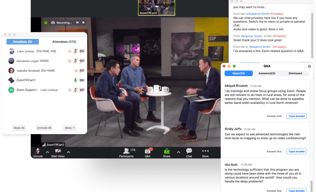
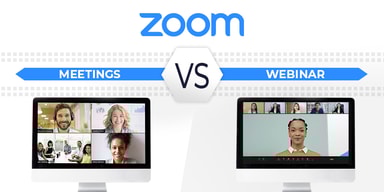
Zoom may be software that you're already familiar with but their Video Webinar is definitely a more robust and comprehensive communications tool that most have yet to explore. With Video Webinar, users get access to features such as presentation engagement tools, dual screen support, live broadcasting to YouTube, polling, and other features that are essential for webinar streaming and virtual events.





| Capabilities |
API
|
|---|---|
| Segment |
Small Business
Mid Market
Enterprise
|
| Deployment | Cloud / SaaS / Web-Based, Desktop Mac, Desktop Windows, Mobile Android, Mobile iPad, Mobile iPhone |
| Support | 24/7 (Live rep), Chat, Email/Help Desk, FAQs/Forum, Knowledge Base, Phone Support |
| Training | Documentation |
| Languages | English |
Zoom Events and Webinars Pros and Cons
- 'Access video meetings on mobile devices
- Remote keyboard and mouse control
- Live streams to your social media channels
- Supports large participant groups (up to 1000)
- Poor customer support
- No cloud storage on the freemium plan

Compare Zoom Events and Webinars with other popular tools in the same category.
Easy to setup. Easy to bulk add multiple people and has great video quality.
Sometimes it takes time to login and start
Most users do not face a challenge in joining the call, We have multiple features, allowing access for people to join is easy
Congregates so many people together No issues of switching on and off of videocameras Easy to interact
The host cant see the participants video Feels like talking to a screen
Conducting webinars for counts of people at once - helping in spreading knowledge of current industry trends.
Zoom has a lot of very convenient features for the people attending the seminars, like raising hands and writing questions to the presenter. All the staff trainings that happen over the weekends are conducted over Zoom, and they are extremely helpful and easy to use via this software. No training is needed to upskill as the UI is very straightforward for any user.
Sometimes, calls and meetings log you off abruptly, even though the meetings are still in progress. So, we have to log back in again. This probably could be because of network congestion, but I think that this needs to be improved.
Zoom has made virtual seminars very easy to attend, as all of us can attend from anywhere we are comfortable. This became a boon during COVID times, as physical face-to-face trainings and seminars could not be held. As most of the organized webinars are during weekends when the school is non-operational, it becomes very convenient for hundreds of staff members to attend them virtually.

The best thing that I like about Zoom Events and Webinars is it's highest maximum participants capacity and it's user friendly interface. We can add as much people as we want.
It's lack of comment control and HD video is not standard and this thing is very sad to have in this. Also you need to download an app to use this, there should be a website link for the meeting too.
Zoom Events and Webinars allows us to host webinars with upto 10000 participants and it offers support for questions and answers,chat with audience members abd live streaming to various platforms. These are problems it is solving.
Zoom has so many other apps that work well with the software - we use captioning services from a third party and the integration makes it easy for staff to set up. Additionally, most people are comfortable with Zoom and large agencies often have firewalls that make using other programs difficult.
The events platform was difficult for my small staff to grasp, we do not have an IT department so new programs require a "champion" on the team to want to learn and share. We use large meetings and webinars more often than events.
Post pandemic, people still have some preference to do online training events. The recording aspect also allows us to save content and share with those who could not attend the live session. The registration reports are very helpful and we are able to upload information into our other systems with that information.
Easy to use, the same usability as the Zoom meeting
Only one admin can view the back-end - the collaboration functionalities is not as good as others
Easy to set up B2B webinars
It is more reliable and ease to use. Completely Well versed platform to have a professional meets.Excellent tools and better optimization. Best online platform for virtual meet.
Less time meetings in basic plan. Getting lag sometimes. While some important times it gets delayed to get open. Some server errors need to be optimized. If more than 300 participants means it getting lag
Perfectly a virtual meets can be easily handled by using the Zoom. Very convenient and user friendly.Able to schedule the meetings whenever needed with high ease of usage.

It has a creative and straightforward interface that makes it so friendly for hosting webinars or online events. It can be integrated to host the event on social media; Participants can join quickly from mobile phones.
Customer service response should be faster in responding to inquiries. I did not notice any other things that I disliked during the experience.
It was an excellent solution for the company to use Zoom Events and Webinars to generate and host events and webinars easily without the complexity and keep track of our participants all over the globe through any occasion. Audio and Video Quality for the events and webinars was excellent, which made Zoom the best solution for us.
One of the great things about Zoom events and webinars is that they are incredibly convenient
Technical issues like poor internet connectivity or audio problems can sometimes interfere with the experience.
Geographic barriers: Traditional in-person events are often limited by geography, which can make it difficult for people who live in remote areas or who cannot travel to attend. Zoom events and webinars eliminate this barrier by allowing people from all over the world to participate.
I like the controllable options for attendees and host, the options of having a meeting or webinar are perfect, sending a reminder for the attendees is very helpful.
One of the things I dislike is Lifestream, it can't be on more than one platform because of the camera, I used to do Lifestream on youtube but I couldn't do it on Facebook at the same time.
Interactive lectures, which can be recorded and published on youtube, with no limit of attendees for Fundraising events, we do in-person events and we stream them on zoon at the same time for capacity place purpose.

