

Unclaimed: Are you working at ClickUp?
ClickUp Reviews: 4.7/5 — Highly Rated
More than just a task management tool, ClickUp is a 360-degree productivity suite that offers functionalities that expand and scale together with a business’ evolving needs. With more than 15 views and over 35 apps, it allows teams of all sizes from across different disciplines to set strategic project goals, manage workflows, collaborate, iterate and optimize, and track progress. There are unique features for every team such as bug tracking and reporting (engineering), sales automation (sales and marketing), and employee onboarding (HR) just to name a few. ClickUp comes pre-loaded with templates that can be utilized out of the box while offering rich customization options.

| Capabilities |
API
|
|---|---|
| Segment |
Small Business
Mid Market
Enterprise
|
| Deployment | Cloud / SaaS / Web-Based, Desktop Mac, Desktop Windows, Mobile Android, Mobile iPad, Mobile iPhone |
| Support | 24/7 (Live rep), Chat, Email/Help Desk, FAQs/Forum, Knowledge Base, Phone Support |
| Training | Documentation |
| Languages | English |
ClickUp Pros and Cons
- Customizable dashboards
- Features and functions best suited for solopreneurs and small teams
- Comprehensive freemium plan
- Built-in chat feature for both private and public communication
- Offers extensive features with the option to customize under the free plan.
- Onboarding process can be complicated
- No built-in video conferencing feature
- Additional customizable features will require an annual fee
- Platform can easily overwhelm new users


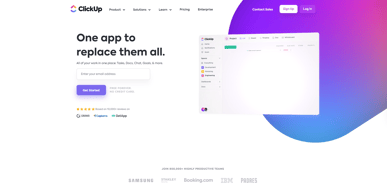
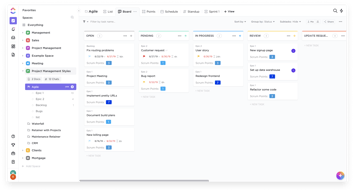
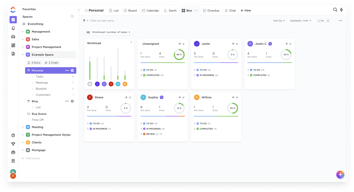
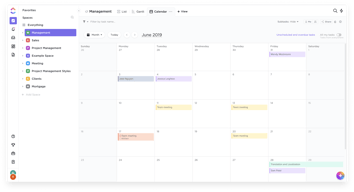
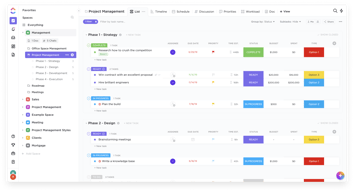






In the realm of project management tools, ClickUp has emerged as a comprehensive solution that caters to a wide range of users. From freelancers managing their own tasks to large corporations coordinating complex projects, ClickUp aims to simplify and streamline the process. But does it deliver on its promise? In this review, we’ll take a close look at ClickUp, dissecting its features, user interface, support, and pricing structure. Our goal is to provide an unbiased and thorough examination of this software, helping you decide if it’s the right fit for your needs. So, without further ado, let’s delve into the world of ClickUp.
What is ClickUp?
ClickUp is a cloud-based productivity platform that aims to centralize all your work and tasks in one place. It’s a comprehensive project management tool designed to help individuals and teams plan, organize, and collaborate on projects.
The software offers a wide range of features including task management, time tracking, goal setting, document sharing, and more. It also provides multiple views for project tracking such as list view, board view, and Gantt chart view, allowing users to customize their workspace according to their preference.
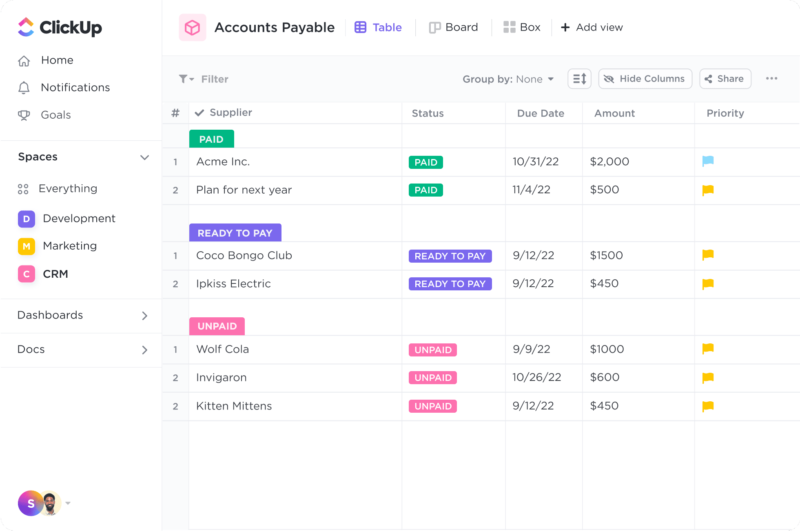
ClickUp Dashboard
ClickUp’s target users range from freelancers and small businesses to large corporations. It’s designed to be flexible and adaptable, catering to different industries and project types. Whether you’re managing a marketing campaign, developing software, or planning an event, ClickUp aims to provide the tools you need to keep your project on track.
In essence, ClickUp is more than just a project management tool. It’s a productivity platform that seeks to eliminate the need for using multiple, disjointed tools by providing a unified, all-in-one solution.
ClickUp Core Features
ClickUp is packed with a variety of features designed to enhance productivity and streamline project management. Here are some of its core features:
- Task Management : ClickUp allows users to create, assign, prioritize, and schedule tasks. You can also set dependencies between tasks, making it easier to manage complex projects.
- Multiple Views : ClickUp offers several views for managing your projects, including list view, board view, box view, Gantt chart view, and calendar view. This allows you to visualize your tasks and projects in a way that suits your working style.
- Time Management : ClickUp includes time tracking features, allowing you to monitor how much time is spent on each task. It also includes scheduling and capacity management features, helping you to plan your time effectively.
- Collaboration Tools : ClickUp facilitates team collaboration with features like real-time chat, comment assignment, document sharing, and in-app video recording. These features make it easier for teams to communicate and collaborate on tasks and projects.
- Customizable Workflows : ClickUp allows you to create custom workflows that match your team’s processes. You can set up statuses for tasks and move them through different stages as they progress.
- Integrations : ClickUp integrates with a wide range of other tools, including Google Drive, Slack, GitHub, and more. This allows you to bring all your work into one place, reducing the need to switch between different apps.
ClickUp Pricing Plans
ClickUp offers a variety of pricing plans to cater to different user needs. Here’s a breakdown of their tiered pricing structure:
ClickUp offers Free, Unlimited, Business, and Enterprise plans — see ClickUp pricing for current rates.
The Free plan is a great starting point for small teams or individuals who want to try out ClickUp’s basic features. The Unlimited plan offers more flexibility and customization options, making it a good choice for growing teams. The Business and Enterprise plans offer advanced features and increased automation, making them suitable for larger teams or businesses with complex project management needs.
ClickUp has since launched ClickUp Brain, an AI assistant integrated across the platform for writing, summarization, and project insights.
Remember, it’s important to choose a plan that aligns with your team’s size, budget, and requirements. You can always start with a lower-tier plan and upgrade as your needs evolve.
ClickUp Competitor & Alternatives
ClickUp competes with tools like monday.com, Trello, and Asana. Each tool has its own strengths and weaknesses. ClickUp stands out for its wide range of task display views, real-time chat, and in-app video recording features. However, other tools like monday.com and Asana also offer robust features, although they lack real-time chat and in-app video recording. Trello, on the other hand, is a more budget-friendly option, but it lacks time tracking and budgeting tools.
ClickUp FAQs
Is ClickUp’s free plan really free?
Absolutely! ClickUp’s free plan is indeed free, with no hidden costs or strings attached. This plan offers a robust set of features including unlimited tasks, unlimited members, and up to 100MB of storage. It’s a great option for individuals or small teams who are just getting started with project management software.
While the free plan does have some limitations compared to the paid plans (such as storage limits and access to premium features), it still provides a comprehensive toolset for managing tasks and projects. So, you can definitely start using ClickUp for free and then decide if you want to upgrade to a paid plan as your needs grow.
What does project management software do?
Project management software is a digital tool that helps teams plan, organize, and manage tasks. It facilitates collaboration, scheduling, resource allocation, and progress tracking, making project execution more efficient and streamlined.
Bottom Line – ClickUp
ClickUp is a robust and versatile project management tool that can significantly benefit businesses of all sizes. Its comprehensive features for task management, collaboration, and project tracking make it an excellent choice for teams aiming to streamline their workflows and enhance productivity. While it has a rich feature set, it’s designed with user-friendliness in mind, making it accessible even to those new to project management software.

Compare ClickUp with other popular tools in the same category.
With the new version this becomes to be a awesome app
I don't have any concerns, this app complimented everything
Does my job so easy, maintain everything organized and keep all in track
I LOVE that ClickUp is integration friendly but yet it can be an all in one solution in of itself. It can do documents really great as well as tasks cohesively.
I wish there was a bit more hierarchy, and/or customization for the the main sidebar and menu UI. ClickUp 3.0 has been a big improvement for the information architetcure, but I'd like to see more hierachy to provide more clarity for navigation. I know there's alot of integrations but I'd love some of these integrations to feel more cohesive with the ClickUp UI instead of just a pop up model. Even a very generic drawer that is basically an iframe but still inside the ClickUp UI would reduce the mental fatigue for the user.
ClickUp streamlines alot of our teams processes into one place that we can all manage seamlessly. It helps us document project info as well as manage tasks and milestones all super cohesively.
The thing I like best about ClickUp is the versatility of systems we are able to utilize in order to stay organized. We have a smaller team but ClickUp makes communication easy! Being able to share links, attachments, create checklists, change statuses and view settings allow us to implement multiple products from beginning to completion. It's all encompasing!
Something I dislike about ClickUp is the tendency to get glitchy. Every few months we'll run into technical issues where it feels like the system is just down and won't allow us the ability to access it's full potential.
ClickUp is giving us a virtually all around platform for team communication and task organization.
The best part about ClickUp is the ability to have everything in one place! We used to ask for updates on tasks and projects in Slack and then have to go find those conversations later. Now we comment and have those conversations right on the applicable task! We also run our meetings through ClickUp, so all that information is in the same place, too. And, we live by our SOPs, so having Docs in the same software as our daily tasks is crucial. Another factor would be the fact that we can connect ClickUp to other platforms that we use. Integrations and automations have saved our team a lot of time and headaches. And any time I've needed help, the support team at ClickUp has been super helpful and pretty quick to reply.
My team has struggled to get comfortable with ClickUp. I've heard multiple times that the learning curve for ClickUp is steeper than other platforms. But when you can do more with a platform....there's going to be more to learn!
The biggest change for us was to get all our teams into one project management system. This streamlines projects that involve multiple teams and makes sure everyone has the access to the information they need to get the job done.
As a freelancer, the forever free plan is invaluable. I use it for my own internal work but also use it to help new clients get their teams organized and more efficient. It's truly an amazing tool all around!
I don't love their notification settings, I wish there was more customization around how you receive daily tasks and workload, etf.
I am able to get my projects and workloads dialed in with very few steps. The multiple views make my life much easier!
It helps me in my daily work. I can organize my clients and task to do.
At this moment I am very happy with it. No problems yet.
It helps me to organize my work and permits me to control time used.
I have honestly tried every possibly project management software out there, and none of them stack up with ClickUp. It is so incredibly versatile - I can use it in any way and for anything - so much more than I ever intended the software to be for and I use it every day without fail. The templates available are brilliant. I've always managed to find one for what I need it for and it's so easy to then adapt them to exactly how my business needs. I wouldn't be without it now. Not now not ever. The university is amazing so training up my staff is so easy, and the support is very quick to respond and have always helped when I need them.
There is one tiny thing I would love to be able to do, and that's to be able to use ClickUp to schedule social media posts.
It's allowing me to save a fortune on loads of different softwares by allowing me to use one solution for so many different purposes.
ClickUp is by far one of my favorite tools for organization. The ability to create multiple lists, templates, and specialized subtasks has been especially helpful in taking my organization to the next level. It has been a key tool in keeping our projects streamlined, our to-dos aligned with proper deadlines, and allowing structure to permeate our ventures with ease.
Despite ClickUp's countless and wonderful features that make work so much easier, there is always room for improvement. One aspect that ClickUp could see much more benefit is to work on a more cohesive chat feature that is more similar to Slack. The Chat function is not user-intuitive, difficult to locate at times, and doesn't follow the same organizational value that the rest of the tool encompasses. This left our team to stay in Slack for a lot of communication, as the comments on tasks and the awkward chat feature in ClickUp were lacking for our company's development.
ClickUp allows our company to stay organized across several departments and projects. ClickUp not only handles client projects that require several intricate tasks, but also satisfies our internal company operations, and future project planning. It has been amazing at breaking down our business development processes into handy templates that we are able to repeat and use on our other brands and concepts. This saves our organization a significant amount of time across multiple areas of business and has given us a path to allow our stronger partners to manage other team members that weren't possible in our previous structure. ClickUp solves operational duties with its streamlined delivery and multiple list structures that make growth significantly easier.
It is easy to use. Like - share business related messages to the dedicated people. Makes workflow easier.
ClickUp AI isn't really helpful with my day to day work
Attaching business files, creating contextual threads, messages, recurring tasks creation.
the ability to turn my work from different platforms into tasks that I can later prioritize and add to projects
i still have trouble navigating in a comprehensive way still learning the clickup way which is entirely different from my project management ways I really dislike the checklists inability to truly connect with detail and the fact that they are my only source of sub-sub task
not sure if i am solving any problems just yet but I am definitely enjoying the benefit of having all of my details in one place even if I have to manually manipulate it to meet my needs
It's a great tool to use if you have a team (and if you like it and want to use it as an individual, you certainly can, though all of the features may be overkill). As I've gotten to use it more and more and my team is familiar with how we assign projects, it's now a great way to share info with my team and clients from onboarding to project management. The templates and automations make it easy to get clients set up + also use it as a business hub for my team.
New users can get overwhelmed easily, because there is so much functionality. And with so many features that could be cool to use, it can be easy to go down a rabbit hole that may not actually add much to running your business. So you've got to find the sweet spot of using enough features to help things run smoothly while not getting stuck in "I could do this and this and this too!!" land.
All of our clients and tasks are in ClickUp, and my team and I can see everything that is going on + who owns what. That makes it way easier to stay on top of client work (and get reminders if stuff is late or there are questions)
Everything in one place, it's trello on steroids
AI is terrible and asking me annoying questions in the survey
Making me more productive
I really like the very simple yet powerful project management features that allow individuals to effectively organize the tons of work that needs to get done. The collaboration features are a plus, so I'm glad there's options to upgrade whenever I'm ready for that stage. At work, there's Jira for organizing everything, but that one is so heavy-handed that it's always a relief to organize my true workload on ClickUp. Oh, and how could I forget – the time tracking feature is really good!
Hmm, compared to similar tools like Notion, one thing I felt that ClickUp was missing was the ability to easily hyperlink to specific documents.
As a consultant, it's mostly the project management features and time tracking elements.
From gantt charts to allocating timelines and deadline across the team's calendars, clickup helps in allocating tasks, collaborate with team members to finish projects on time. The tool is easy to integrate with google docs and help to track overall process
It takes a while to convince people to adopt to the tool.
The tool helps in project management in a lean manner
Slack intergrations and easy task management
the amount of features could be overwhelming at first
ClickUp helps keep track of the larger amount of tasks I recieve as a personal assistant. It helps me manage my time more effectively
I like how I can automate tasks and assign it to someone at a certain due date so I don't have to manually add a task.
They can add integration on ClickUp on slack, gmail
It helps lessen the back and forth since all tasks that we need to prioritize is in the board already
Time tracking reports, workspaces, list and calendar view
sometimes the tool is a bit slow..not sure if it's because I have so many workspaces. Shouldn't matter though!?
Keeping track of all tasks and subtasks, deadlines, taking notes, time tracking
I love how flexible and user friendly it is, and how many features you have available even on the cheaper plans. When we first got started I had read that Clickup had a more flexible layout and combined with all it's features could be overwhelming to start. I've found the opposite to be true, it's been easy to learn, easy to adapt to our needs and the support/help articles we've used when we need it has great. We rely on clickup every day to know what to do and move our projects forward. The best part for me is how much mental space it frees up.
We're really happy so don't have much in terms of complaints. We would love to see a sophisticated GoHighLevel integration and have access to more workload management on the Unlimited plan.
By having all my work/tasks in Clickup my mental space is freed up when I'm not working. I know I'll know what to do when I sign in and look at what's on my plate. It's also helping my team with the same. It also helps us follow up on each other/tasks so they don't fall through the cracks, and see when we need to adjust priorities/project tasks based on workload.
App integration, and multiple pasting tools.
Little confusing workspaces and project integrations.
Time and task tracking. Good to keep tasks on list and see them from time to time. Also get notification of updated tasks.
The option to manage all my marketing projects in one-app, no need to leave the platform or invest in anything more. Additionally, the use of Template Center - if I am not sure how to start a project, I can just follow the good-to-go template :)
No translation to PL language. The inability to turn off some unnecessary options - I don't need to see "Add checklist", "Add subtasks", "Add attachments" all the time. I would like to make my space "cleaner".
Managing all my marketing operations in one place.
It's easy to learn, fast and powerful. Recommended.
we need order alphabetically spaces. 128c.
Order my projects
Clickup allows more very creative build-outs to run any kind of system, company, or workflow. It is very flexible and I run both business and personal systems through Clickup now.
Lots of little things such as formatting and UX are simple things that often get reviewed during product updates. The pros outweigh the cons in this case, as nothing can directly compare to Clickup's functionality.
ClickUp is able to combine multiple system types in one, including task manager, project manager, document hub, proof editor, reminders, and all kinds of data list types.
How easily I can organize the things in my English school.
There are some specific functions from NOTION that I'd love have here too!
Lack of organization, before having ClickUp I didn't have all the data I have organized right now!

Clickup is a useful platform to plan yearly and quarterly plans for our teams and have a documentations of the progress of the same.
The mobile interface can be better in terms of overall usability
It helps to collaboratively work instead of working in silos
The platform has a very friendly interface to allocate our tasks and work internally on multiple projects that run strictly on deadlines
None So far, the experience is actually good!
We are seeing visibility over team members project status
Easy to set up. Has templates for all job functions right from Marketing, Sales to a fantastic project management tool. The new AI is promising, but expecting more functionality based on existing tasks
AI needs more functionality to generate reports based on existing tasks. Also there needs to be integration between Marketing & CRM & Project Management tasks.
Works like a consolidated tool for various job functions
The design and custom fields that are very user friendly
The fact that the goal seem very poorly designed, like it doesn't make it appealing
I think that ClickUp it is doing great, just need for ClickUp 3.0 to see what's, because so far, no bad experiences.
Flexibility, templating, customization. ClickUp got it all. We are very happy customers in our company.
It could have better performance, but seems like that has been the focus of the new major version coming out soon. So, if performance is actually improved, it would be nearly impossible finding places for improvement.
Everything from product development to inventory management to customer support. Almost everything besides incident management and CRM, as we have some other tools in those categories that we already had integrated, and has not had a reason to migrate it yet.

Daily reminders in my email make it easy to keep track of my to-do list. Also, the calendar view is helpful to see what is coming up soon.
Having to click on completed on every task that shows up on my email is a little time-consuming.
Keeping on top of my many projects. It is keeping me organized and giving me peace of mind.
I like best about ClickUp its ability to create automations so I don't have to manually do everything.
I find the least helpful feature the homepage because of its odd structure and not being able to fit zooming into pages or different window sizes like other parts of the app/webpage
ClickUp is helping me complete assignments and tasks and it benefits me because it helps me be able to know what I am working on and keep track of time.