

Unclaimed: Are are working at ClickUp ?
ClickUp Reviews: 4.7/5 — Highly Rated
More than just a task management tool, ClickUp is a 360-degree productivity suite that offers functionalities that expand and scale together with a business’ evolving needs. With more than 15 views and over 35 apps, it allows teams of all sizes from across different disciplines to set strategic project goals, manage workflows, collaborate, iterate and optimize, and track progress. There are unique features for every team such as bug tracking and reporting (engineering), sales automation (sales and marketing), and employee onboarding (HR) just to name a few. ClickUp comes pre-loaded with templates that can be utilized out of the box while offering rich customization options.

| Capabilities |
API
|
|---|---|
| Segment |
Small Business
Mid Market
Enterprise
|
| Deployment | Cloud / SaaS / Web-Based, Desktop Mac, Desktop Windows, Mobile Android, Mobile iPad, Mobile iPhone |
| Support | 24/7 (Live rep), Chat, Email/Help Desk, FAQs/Forum, Knowledge Base, Phone Support |
| Training | Documentation |
| Languages | English |
ClickUp Pros and Cons
- Customizable dashboards
- Features and functions best suited for solopreneurs and small teams
- Comprehensive freemium plan
- Built-in chat feature for both private and public communication
- Offers extensive features with the option to customize under the free plan.
- Onboarding process can be complicated
- No built-in video conferencing feature
- Additional customizable features will require an annual fee
- Platform can easily overwhelm new users


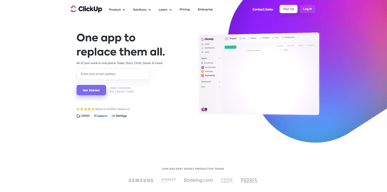
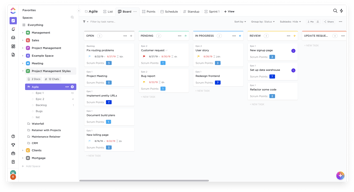
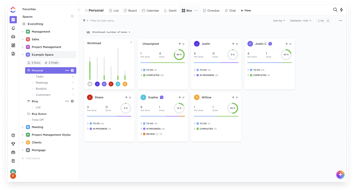
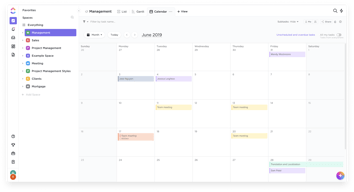






In the realm of project management tools, ClickUp has emerged as a comprehensive solution that caters to a wide range of users. From freelancers managing their own tasks to large corporations coordinating complex projects, ClickUp aims to simplify and streamline the process. But does it deliver on its promise? In this review, we’ll take a close look at ClickUp, dissecting its features, user interface, support, and pricing structure. Our goal is to provide an unbiased and thorough examination of this software, helping you decide if it’s the right fit for your needs. So, without further ado, let’s delve into the world of ClickUp.
What is ClickUp?
ClickUp is a cloud-based productivity platform that aims to centralize all your work and tasks in one place. It’s a comprehensive project management tool designed to help individuals and teams plan, organize, and collaborate on projects.
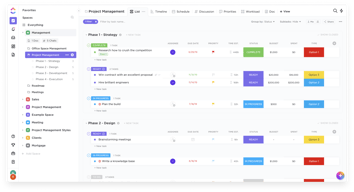
The software offers a wide range of features including task management, time tracking, goal setting, document sharing, and more. It also provides multiple views for project tracking such as list view, board view, and Gantt chart view, allowing users to customize their workspace according to their preference.
 _ClickUp Dashboard_
ClickUp’s target users range from freelancers and small businesses to large corporations. It’s designed to be flexible and adaptable, catering to different industries and project types. Whether you’re managing a marketing campaign, developing software, or planning an event, ClickUp aims to provide the tools you need to keep your project on track.
In essence, ClickUp is more than just a project management tool. It’s a productivity platform that seeks to eliminate the need for using multiple, disjointed tools by providing a unified, all-in-one solution.
ClickUp Core Features
ClickUp is packed with a variety of features designed to enhance productivity and streamline project management. Here are some of its core features:
- Task Management : ClickUp allows users to create, assign, prioritize, and schedule tasks. You can also set dependencies between tasks, making it easier to manage complex projects.
- Multiple Views : ClickUp offers several views for managing your projects, including list view, board view, box view, Gantt chart view, and calendar view. This allows you to visualize your tasks and projects in a way that suits your working style.
- Time Management : ClickUp includes time tracking features, allowing you to monitor how much time is spent on each task. It also includes scheduling and capacity management features, helping you to plan your time effectively.
- Collaboration Tools : ClickUp facilitates team collaboration with features like real-time chat, comment assignment, document sharing, and in-app video recording. These features make it easier for teams to communicate and collaborate on tasks and projects.
- Customizable Workflows : ClickUp allows you to create custom workflows that match your team’s processes. You can set up statuses for tasks and move them through different stages as they progress.
- Integrations : ClickUp integrates with a wide range of other tools, including Google Drive, Slack, GitHub, and more. This allows you to bring all your work into one place, reducing the need to switch between different apps.
ClickUp Pricing Plans
ClickUp offers a variety of pricing plans to cater to different user needs. Here’s a breakdown of their tiered pricing structure:
ClickUp offers Free, Unlimited, Business, and Enterprise plans — see ClickUp pricing for current rates.
The Free plan is a great starting point for small teams or individuals who want to try out ClickUp’s basic features. The Unlimited plan offers more flexibility and customization options, making it a good choice for growing teams. The Business and Enterprise plans offer advanced features and increased automation, making them suitable for larger teams or businesses with complex project management needs.
ClickUp has since launched ClickUp Brain, an AI assistant integrated across the platform for writing, summarization, and project insights.
Remember, it’s important to choose a plan that aligns with your team’s size, budget, and requirements. You can always start with a lower-tier plan and upgrade as your needs evolve.
ClickUp Competitor & Alternatives
ClickUp competes with tools like monday.com, Trello, and Asana. Each tool has its own strengths and weaknesses. ClickUp stands out for its wide range of task display views, real-time chat, and in-app video recording features. However, other tools like monday.com and Asana also offer robust features, although they lack real-time chat and in-app video recording. Trello, on the other hand, is a more budget-friendly option, but it lacks time tracking and budgeting tools.
ClickUp FAQs
Is ClickUp’s free plan really free?
Absolutely! ClickUp’s free plan is indeed free, with no hidden costs or strings attached. This plan offers a robust set of features including unlimited tasks, unlimited members, and up to 100MB of storage. It’s a great option for individuals or small teams who are just getting started with project management software.
While the free plan does have some limitations compared to the paid plans (such as storage limits and access to premium features), it still provides a comprehensive toolset for managing tasks and projects. So, you can definitely start using ClickUp for free and then decide if you want to upgrade to a paid plan as your needs grow.
What does project management software do?
Project management software is a digital tool that helps teams plan, organize, and manage tasks. It facilitates collaboration, scheduling, resource allocation, and progress tracking, making project execution more efficient and streamlined.
Bottom Line – ClickUp
ClickUp is a robust and versatile project management tool that can significantly benefit businesses of all sizes. Its comprehensive features for task management, collaboration, and project tracking make it an excellent choice for teams aiming to streamline their workflows and enhance productivity. While it has a rich feature set, it’s designed with user-friendliness in mind, making it accessible even to those new to project management software.

Compare ClickUp with other popular tools in the same category.
ClickUp is known for its high level of customization, allowing users to adapt the platform to their specific needs and workflows. Whether you're managing projects, tasks, or documents, ClickUp provides a flexible environment.
Some users find that ClickUp has a steeper learning curve, especially for new users. The platform's extensive feature set may take time to master, and a more streamlined onboarding process could be beneficial.
Clickup helps to centralize all our projects in one location. We needed an easy way to stay on track with projects and our team can easily be assigned different tasks within each project.
ClickUp m'apporte une gestion facile de mon organisation perso et pro avec les différents espaces. Et c'est très complet pour mes projets pro où j'ai beaucoup de tâches à effectuer, documents à conserver... Et leur support : une gentilesse et une disponibilité incomparable !
C'est un bel outil mais aussi un gros outil. Il faudra consulter un tuto ou deux pour utiliser toutes les fonctionnalités.
J'ai tout sur un seul et même endroit : mes tâches perso/pro, mes documents, calendrier, tableau blanc, objectifs, tracker de temps, emails...

The ease in how you can document the work step by step by adding images, links, programming code, is versatile.
the part of adding description when it is already added and is larger than what can be seen and does not have a vertical scroll to quickly see its content
clearly translate my work, which saves me time having to explain all the processes involved that are recorded through documentation
I personally use the software on a daily basis. The hierarchy of it's project management. Goals -> Tasks -> Todo's with proper space to document each step. I integrate with Google calendar and email to get my work done. The product was intuitive enough I didn't actually need to use the customer support. The product support was more than enough. Love the ease of implimentation with the current processes.
I wish there was an option to customize the UI.
1. Makes it easier to share progress with clients. 2. Easy to keep track of the project progress with my small team. 3. Calendar integration and the fact that I can schedule subtasks makes it extremely easy to work and remember. 4. Documents help me DUMP my ideas
I like how clickup creates great features and listens to its customers. It is generally a joy to use clickup because of its design and features such as lists, spaces and docs, found in one app!
I think calendar and other views aside from lists load just a little slowly, and calendar sync is not easy too, other than that there is minor downsides to it. And generally it is improving with every update.
ClickUp is a great productivity app that provides all sorts of different views of your tasks and other features. All the features are really working for me, I especially like the agenda!
Easy to use and very flexible. The level of support provided is also superior to most services out there even at the free level. Oh and the fact most of the features are free (and hopefully will remain so) makes this unbeatable.
I wish the fact that you can only use some features 100 times in the free version was clearer from the start as I ended up investing time creating customizations that I could not keep without upgrading. I wish my company would pay for this!
Centralized task management with visibility of tasks within multiple projects allowed in a number of different ways so it is easier to not lose track of small details
ClickUp has every single feature that you might need, and most of them can be turned on/off as needed. That's a great way to customize each project to be as simple or complex as needed. I've also delt with support a handfull of times and they're among the best in the industry.
I get a lot of feedback that non PM's are intimidated by the user interface. V3 is an improvement, but I'm not sure that will be enough to get all business users (accounting, sales, etc) to buy in.
ClickUp combines the benefits of a nocode database application (a la Airtable) and a full-featured PM software, like Wrike. If you really learn what the platform is capable of, you can run virtually any business using ClickUp alone.
The color and we can record in the task and not as confusing as other competitors! We are truly happy! I have experience using Asana, Trello and Notion! But this one has been the easiest to use and automate! The support was also amazing as per my boss. We use it everyday. We also intergrated loom with is which something we need as we work remotely! This makes any project works easily almost without any issue with the implementation.
I would say my experience where it becomes slower as time goes by
We become aware how many times our tasks takes to complete, we also become more aware of our pending tasks.
Everything because we've all in same place
Nothing! I've everything in same time, in same place
Comunication with my customers
Ticket life cycle monitoring, and tracking every segment in bussiness process
Some additional functions are missing, like asset management
Monitoring of business tasks of all team members

