

Unclaimed: Are are working at ClickUp ?
ClickUp Reviews: 4.7/5 — Highly Rated
More than just a task management tool, ClickUp is a 360-degree productivity suite that offers functionalities that expand and scale together with a business’ evolving needs. With more than 15 views and over 35 apps, it allows teams of all sizes from across different disciplines to set strategic project goals, manage workflows, collaborate, iterate and optimize, and track progress. There are unique features for every team such as bug tracking and reporting (engineering), sales automation (sales and marketing), and employee onboarding (HR) just to name a few. ClickUp comes pre-loaded with templates that can be utilized out of the box while offering rich customization options.

| Capabilities |
API
|
|---|---|
| Segment |
Small Business
Mid Market
Enterprise
|
| Deployment | Cloud / SaaS / Web-Based, Desktop Mac, Desktop Windows, Mobile Android, Mobile iPad, Mobile iPhone |
| Support | 24/7 (Live rep), Chat, Email/Help Desk, FAQs/Forum, Knowledge Base, Phone Support |
| Training | Documentation |
| Languages | English |
ClickUp Pros and Cons
- Customizable dashboards
- Features and functions best suited for solopreneurs and small teams
- Comprehensive freemium plan
- Built-in chat feature for both private and public communication
- Offers extensive features with the option to customize under the free plan.
- Onboarding process can be complicated
- No built-in video conferencing feature
- Additional customizable features will require an annual fee
- Platform can easily overwhelm new users


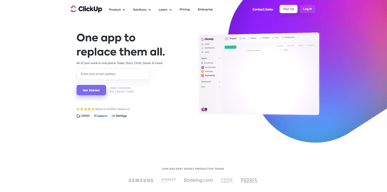
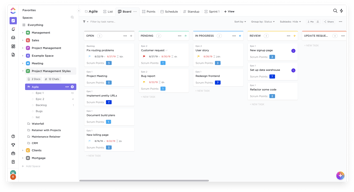
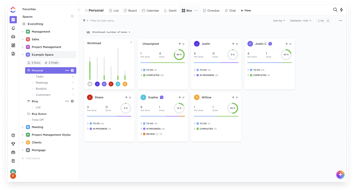
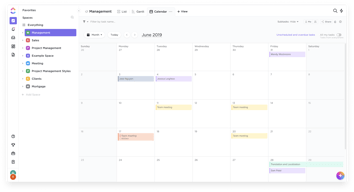
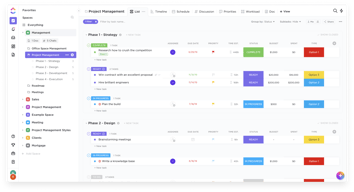






In the realm of project management tools, ClickUp has emerged as a comprehensive solution that caters to a wide range of users. From freelancers managing their own tasks to large corporations coordinating complex projects, ClickUp aims to simplify and streamline the process. But does it deliver on its promise? In this review, we’ll take a close look at ClickUp, dissecting its features, user interface, support, and pricing structure. Our goal is to provide an unbiased and thorough examination of this software, helping you decide if it’s the right fit for your needs. So, without further ado, let’s delve into the world of ClickUp.
What is ClickUp?
ClickUp is a cloud-based productivity platform that aims to centralize all your work and tasks in one place. It’s a comprehensive project management tool designed to help individuals and teams plan, organize, and collaborate on projects.
The software offers a wide range of features including task management, time tracking, goal setting, document sharing, and more. It also provides multiple views for project tracking such as list view, board view, and Gantt chart view, allowing users to customize their workspace according to their preference.
 _ClickUp Dashboard_
ClickUp’s target users range from freelancers and small businesses to large corporations. It’s designed to be flexible and adaptable, catering to different industries and project types. Whether you’re managing a marketing campaign, developing software, or planning an event, ClickUp aims to provide the tools you need to keep your project on track.
In essence, ClickUp is more than just a project management tool. It’s a productivity platform that seeks to eliminate the need for using multiple, disjointed tools by providing a unified, all-in-one solution.
ClickUp Core Features
ClickUp is packed with a variety of features designed to enhance productivity and streamline project management. Here are some of its core features:
- Task Management : ClickUp allows users to create, assign, prioritize, and schedule tasks. You can also set dependencies between tasks, making it easier to manage complex projects.
- Multiple Views : ClickUp offers several views for managing your projects, including list view, board view, box view, Gantt chart view, and calendar view. This allows you to visualize your tasks and projects in a way that suits your working style.
- Time Management : ClickUp includes time tracking features, allowing you to monitor how much time is spent on each task. It also includes scheduling and capacity management features, helping you to plan your time effectively.
- Collaboration Tools : ClickUp facilitates team collaboration with features like real-time chat, comment assignment, document sharing, and in-app video recording. These features make it easier for teams to communicate and collaborate on tasks and projects.
- Customizable Workflows : ClickUp allows you to create custom workflows that match your team’s processes. You can set up statuses for tasks and move them through different stages as they progress.
- Integrations : ClickUp integrates with a wide range of other tools, including Google Drive, Slack, GitHub, and more. This allows you to bring all your work into one place, reducing the need to switch between different apps.
ClickUp Pricing Plans
ClickUp offers a variety of pricing plans to cater to different user needs. Here’s a breakdown of their tiered pricing structure:
ClickUp offers Free, Unlimited, Business, and Enterprise plans — see ClickUp pricing for current rates.
The Free plan is a great starting point for small teams or individuals who want to try out ClickUp’s basic features. The Unlimited plan offers more flexibility and customization options, making it a good choice for growing teams. The Business and Enterprise plans offer advanced features and increased automation, making them suitable for larger teams or businesses with complex project management needs.
ClickUp has since launched ClickUp Brain, an AI assistant integrated across the platform for writing, summarization, and project insights.
Remember, it’s important to choose a plan that aligns with your team’s size, budget, and requirements. You can always start with a lower-tier plan and upgrade as your needs evolve.
ClickUp Competitor & Alternatives
ClickUp competes with tools like monday.com, Trello, and Asana. Each tool has its own strengths and weaknesses. ClickUp stands out for its wide range of task display views, real-time chat, and in-app video recording features. However, other tools like monday.com and Asana also offer robust features, although they lack real-time chat and in-app video recording. Trello, on the other hand, is a more budget-friendly option, but it lacks time tracking and budgeting tools.
ClickUp FAQs
Is ClickUp’s free plan really free?
Absolutely! ClickUp’s free plan is indeed free, with no hidden costs or strings attached. This plan offers a robust set of features including unlimited tasks, unlimited members, and up to 100MB of storage. It’s a great option for individuals or small teams who are just getting started with project management software.
While the free plan does have some limitations compared to the paid plans (such as storage limits and access to premium features), it still provides a comprehensive toolset for managing tasks and projects. So, you can definitely start using ClickUp for free and then decide if you want to upgrade to a paid plan as your needs grow.
What does project management software do?
Project management software is a digital tool that helps teams plan, organize, and manage tasks. It facilitates collaboration, scheduling, resource allocation, and progress tracking, making project execution more efficient and streamlined.
Bottom Line – ClickUp
ClickUp is a robust and versatile project management tool that can significantly benefit businesses of all sizes. Its comprehensive features for task management, collaboration, and project tracking make it an excellent choice for teams aiming to streamline their workflows and enhance productivity. While it has a rich feature set, it’s designed with user-friendliness in mind, making it accessible even to those new to project management software.

Compare ClickUp with other popular tools in the same category.
As the Head of Client Services, ClickUp has become an indispensable tool. Its user-friendly interface and customization options streamline our workflow, enhancing collaboration and transparency. The platform's robust task hierarchy, real-time updates, and automation features have significantly improved our team's efficiency in executing our initiatives for our clients.
Speed and Performance: In certain instances, we see some occasional delays or lags in the platform's speed and performance, particularly when dealing with larger projects or extensive data.
Visibilty and length of time spent on tasks to measure efficiency and improve productivity
Quick Notifications for Mobile and Time Tracking,
It is bit slow, needs to optimze for speed and page loading
Clickup is trying to optimize loading speed, which may help a lot.
It's easy to use and user friendly. You can make the implementation as simple or as complicated if you like. Has great integration with other applications and easy automation out of the box. Use for personal and business related tasks.
Bulk updating is a little tricky, but I have managed to make it work for me.
It help me have a central hub for my work and personal life so I don't forget any of my projects and tasks.
It is a really REALLY well organized tool, so helpful por building projects plans, micro managing, keeping track of everything and to ease the status of a project between many workers of a common project
Somethings take too much time to load The desktop version is annoy since you only have one tab and cannot open more the time tracking (manual) sometimes doesnt update when you add time
It is really benefiting my team and myself to be more organized with all projects, keep trackings and be aware of all the status of all projects
There are so many customizable options that you can ensure that ClickUp works how your team works.
This is a tough question! There are some minor features I would like to see added, but ClickUp has a feature forum that you can use to let them know and they provide status updates.
ClickUp makes sure that everyone has the proper visibility into the work that is being done and when.
User experience and widgets layout, I really like the way every area of the app is designed.
Nothing, I really appreciate this app and use it every day for work and personal tasks.
ClickUp fullfilled all my needs in task management.
It really helps me to be well organized so I can be effective.
One thing that I don't like is that every time I open it I have to change the view to Calendar which is my favorite. I would really like it to save my favorite view
I've got a lot of things to do in the same period of time. It helps me to organize my priorities very well

The best thing about Clickup is its feature improvements have come quickly and dramatic improvements in usability have become pretty commonplace throughout the software. I can quickly create a list within an organized folder for each client in the firm, and assign out tasks from that space showing the client what they have and what they can expect moving forward, and of course, this is always updated in real-time.
The biggest painpoint for us when it comes to clickup is that we need to have our client's email associated with each task. Instead of offering a quick and easy way to do this, I have to create the same automation on each list, creating a repetitive process, which is something Clickup itself uses as a brag, saying it eliminates these from your workflow. I also wish I could privatize the list views for my client that "owns" the list, as we have one per client, but that would cost money so instead I have to send a public link to them. This typically isn't a problem as our information isn't in any way sensitive, but bear that in mind if yours is!
Clickup solves multiple problems: We can easily create email templates which saves tons of typing to clients We can easily pull tasks and duplicate them to other lists which is great for getting multiple clients on the same show We can automate simple tasks like adding certain assignees to different list depending on who is taking ownership of the list and adding customer email accounts as well as their assistant's email account into the list Reporting is easy to compile and run and links to publicity work-to-date can easily be seen by the client
I use ClickUp for all my Tasks. ClickUp is great because it's so easy to create a task and add it to a Space. I can add priority flags that then enables me to order the Tasks by priority. Tags also are useful to quickly see the status of the Task, or to search for related Tasks. Sub tasks are also very useful to sub-divide larger tasks. Files can also be attached to a Task, which is really handy. I only use ClickUp as a small business, so presently I don't need to share Tasks with others, but should my business grow, I may need to use this function. It's great when a Task has been done, as a mere click renders the task set to completed. ClickUp is an important part of my business. I've used other Job management software, but never stuck with them, but I'm still with ClickUp after a long period. As the software is easy to understand, I've not needed to use the support system.
There is nothing in my case that is negative about ClickUp. And I can't think that there is anything else it could do that I need as my needs are relatively simple.
It helps me keep on top of all my jobs, particulary client jobs. I can also use it to keep track of marketing activities. I also use it to keep track of jobs that have been invoiced and whether they have been paid or not. I even use it to track jobs at home.
The best thing about ClickUp is being able to have everything in one place. We can easily assign tasks to members of the team, and then have a full commentary on the tasks that allow us to track the journey a task has taken, from start to finish. It's so easy to link other team members, other tasks and other lists. I love the integration with SharePoint, that allows us to add links to sites hosted on our company SharePoint, instead of ending up with multiple different versions of the same file. What sets ClickUp apart from other project management tools is the customisability of tools, features, fields, and the look.
It can be a little slow to load, and the page needs to be refreshed now and then to get the data to update on the screen. I would like more options with regards to resource allocation and management.
The Forms feature allows our users to easily submit ideas & suggestions, report bugs, put in internal requests & more. It's so easy to use, and then so easy to manage the tasks on the receiving end. The automations are powerful, allowing us to create tasks using templates based on the data entered into a form.

