

Unclaimed: Are you working at ClickUp?
ClickUp Reviews: 4.7/5 — Highly Rated
More than just a task management tool, ClickUp is a 360-degree productivity suite that offers functionalities that expand and scale together with a business’ evolving needs. With more than 15 views and over 35 apps, it allows teams of all sizes from across different disciplines to set strategic project goals, manage workflows, collaborate, iterate and optimize, and track progress. There are unique features for every team such as bug tracking and reporting (engineering), sales automation (sales and marketing), and employee onboarding (HR) just to name a few. ClickUp comes pre-loaded with templates that can be utilized out of the box while offering rich customization options.

| Capabilities |
API
|
|---|---|
| Segment |
Small Business
Mid Market
Enterprise
|
| Deployment | Cloud / SaaS / Web-Based, Desktop Mac, Desktop Windows, Mobile Android, Mobile iPad, Mobile iPhone |
| Support | 24/7 (Live rep), Chat, Email/Help Desk, FAQs/Forum, Knowledge Base, Phone Support |
| Training | Documentation |
| Languages | English |
ClickUp Pros and Cons
- Customizable dashboards
- Features and functions best suited for solopreneurs and small teams
- Comprehensive freemium plan
- Built-in chat feature for both private and public communication
- Offers extensive features with the option to customize under the free plan.
- Onboarding process can be complicated
- No built-in video conferencing feature
- Additional customizable features will require an annual fee
- Platform can easily overwhelm new users


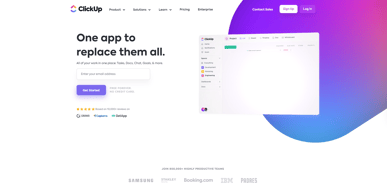
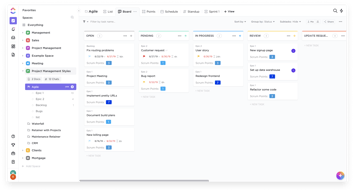
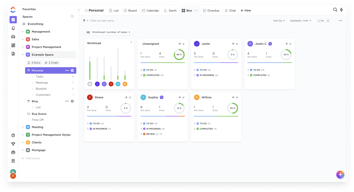
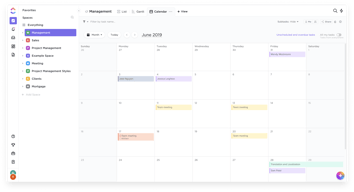
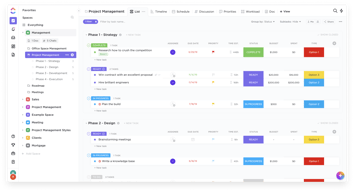






In the realm of project management tools, ClickUp has emerged as a comprehensive solution that caters to a wide range of users. From freelancers managing their own tasks to large corporations coordinating complex projects, ClickUp aims to simplify and streamline the process. But does it deliver on its promise? In this review, we’ll take a close look at ClickUp, dissecting its features, user interface, support, and pricing structure. Our goal is to provide an unbiased and thorough examination of this software, helping you decide if it’s the right fit for your needs. So, without further ado, let’s delve into the world of ClickUp.
What is ClickUp?
ClickUp is a cloud-based productivity platform that aims to centralize all your work and tasks in one place. It’s a comprehensive project management tool designed to help individuals and teams plan, organize, and collaborate on projects.
The software offers a wide range of features including task management, time tracking, goal setting, document sharing, and more. It also provides multiple views for project tracking such as list view, board view, and Gantt chart view, allowing users to customize their workspace according to their preference.
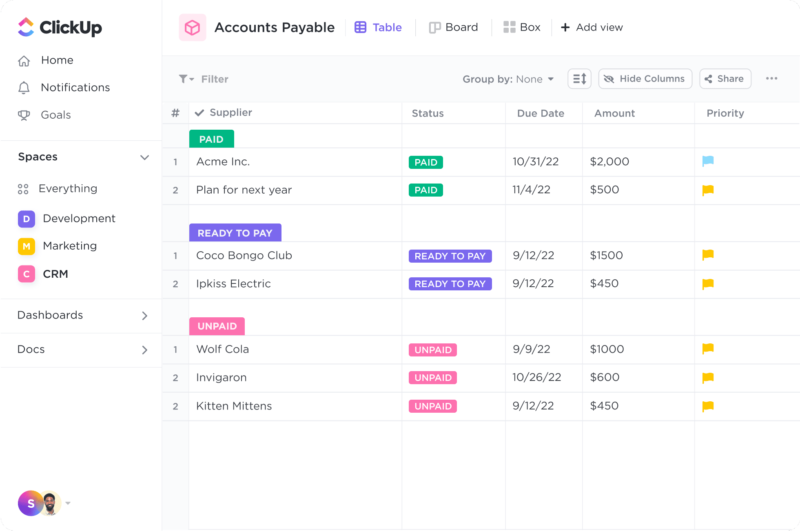
ClickUp Dashboard
ClickUp’s target users range from freelancers and small businesses to large corporations. It’s designed to be flexible and adaptable, catering to different industries and project types. Whether you’re managing a marketing campaign, developing software, or planning an event, ClickUp aims to provide the tools you need to keep your project on track.
In essence, ClickUp is more than just a project management tool. It’s a productivity platform that seeks to eliminate the need for using multiple, disjointed tools by providing a unified, all-in-one solution.
ClickUp Core Features
ClickUp is packed with a variety of features designed to enhance productivity and streamline project management. Here are some of its core features:
- Task Management : ClickUp allows users to create, assign, prioritize, and schedule tasks. You can also set dependencies between tasks, making it easier to manage complex projects.
- Multiple Views : ClickUp offers several views for managing your projects, including list view, board view, box view, Gantt chart view, and calendar view. This allows you to visualize your tasks and projects in a way that suits your working style.
- Time Management : ClickUp includes time tracking features, allowing you to monitor how much time is spent on each task. It also includes scheduling and capacity management features, helping you to plan your time effectively.
- Collaboration Tools : ClickUp facilitates team collaboration with features like real-time chat, comment assignment, document sharing, and in-app video recording. These features make it easier for teams to communicate and collaborate on tasks and projects.
- Customizable Workflows : ClickUp allows you to create custom workflows that match your team’s processes. You can set up statuses for tasks and move them through different stages as they progress.
- Integrations : ClickUp integrates with a wide range of other tools, including Google Drive, Slack, GitHub, and more. This allows you to bring all your work into one place, reducing the need to switch between different apps.
ClickUp Pricing Plans
ClickUp offers a variety of pricing plans to cater to different user needs. Here’s a breakdown of their tiered pricing structure:
ClickUp offers Free, Unlimited, Business, and Enterprise plans — see ClickUp pricing for current rates.
The Free plan is a great starting point for small teams or individuals who want to try out ClickUp’s basic features. The Unlimited plan offers more flexibility and customization options, making it a good choice for growing teams. The Business and Enterprise plans offer advanced features and increased automation, making them suitable for larger teams or businesses with complex project management needs.
ClickUp has since launched ClickUp Brain, an AI assistant integrated across the platform for writing, summarization, and project insights.
Remember, it’s important to choose a plan that aligns with your team’s size, budget, and requirements. You can always start with a lower-tier plan and upgrade as your needs evolve.
ClickUp Competitor & Alternatives
ClickUp competes with tools like monday.com, Trello, and Asana. Each tool has its own strengths and weaknesses. ClickUp stands out for its wide range of task display views, real-time chat, and in-app video recording features. However, other tools like monday.com and Asana also offer robust features, although they lack real-time chat and in-app video recording. Trello, on the other hand, is a more budget-friendly option, but it lacks time tracking and budgeting tools.
ClickUp FAQs
Is ClickUp’s free plan really free?
Absolutely! ClickUp’s free plan is indeed free, with no hidden costs or strings attached. This plan offers a robust set of features including unlimited tasks, unlimited members, and up to 100MB of storage. It’s a great option for individuals or small teams who are just getting started with project management software.
While the free plan does have some limitations compared to the paid plans (such as storage limits and access to premium features), it still provides a comprehensive toolset for managing tasks and projects. So, you can definitely start using ClickUp for free and then decide if you want to upgrade to a paid plan as your needs grow.
What does project management software do?
Project management software is a digital tool that helps teams plan, organize, and manage tasks. It facilitates collaboration, scheduling, resource allocation, and progress tracking, making project execution more efficient and streamlined.
Bottom Line – ClickUp
ClickUp is a robust and versatile project management tool that can significantly benefit businesses of all sizes. Its comprehensive features for task management, collaboration, and project tracking make it an excellent choice for teams aiming to streamline their workflows and enhance productivity. While it has a rich feature set, it’s designed with user-friendliness in mind, making it accessible even to those new to project management software.

Compare ClickUp with other popular tools in the same category.
As an operations manager, I oversee multiple remote teams. I like that I've been able to create various workflows that match each team's needs. It's been more customizable and supportive for tasks that vary pretty widely than the average productivity platform.
*Update - we've had a bug now for about 6 months that the team continues to fail to address where changing a task's status from ASSIGNED to SUBMITTED fails to stick (so multiple team members are having to reset the status of the task to try to get it to save). We've had multiple team members submit bug reports and have had NO success in getting tech support to respond with anything other than "we've elevated this to the development team." A basic feature of a task management platform is to track it through a workflow...so it's been a little mind boggling that this feature has such a huge bug and no support.
Support for multiple remote teams with vastly different workflows, payment tracking for independent contractors, task management through multiple teams, planning and oversight, and team training have all improved since we began using ClickUp.
It's great that they have a free plan so you don't have to buy it to realize how underwhelming it is.
They label themselves as a Loom alternative but when you login, it seems more like a Trello-type product. Seems like a big cluster-mess of tools.
ClickUp is not solving any problems.
It functions as a task management and project management platform, offering some whiteboard features. Additionally, it incorporates generative AI features, although it lacks specific features aimed at enhancing time and cost efficiency for design teams which was disappointing to discover since we migrated from a platform that was definitely superior.
The platform exhibits certain characteristics that some users may find less than ideal. One notable aspect is the absence of web proofing capabilities, which are generally considered important for UX/User Journey Testing. Additionally, it does not offer integration with Adobe Creative Cloud, potentially posing challenges for design ops teams. Our decision to transition from Wrike to ClickUp resulted in some features that were previously automated now requiring manual intervention. This shift has, in some cases, led to increased complexity in our design processes, causing some disarray within the design team. Consequently, ClickUp may not fully meet the needs of Design Ops. Furthermore, the platform lacks asset/file version control, which can be a significant headache for agile design and development teams. How do you track the various versions of assets?. For those in the market for a platform tailored to design and creative work, it's worth noting that Wrike may be a better option in this regard. We also observed that the platform's claim of being 'One platform for all' may not entirely align with our experience since we've had to purchase additional plugins and platforms to make up for the limitations of ClickUp. Therefore, we recommend thoroughly testing the platform before committing to an annual contract to ensure it aligns with your specific requirements. It's also worth noting that the platform does not integrate with Microsoft 365, which is a fundamental tool for many users in the workplace.
Currently, the use of ClickUp has presented challenges for the design team processes rather than offering solutions, resulting in a need to revert to manual methods.
There are a lot of features and integrations
Can easily get very disorganized, users can override required steps, lack of customization with integration features
ClickUp is a nice project management tool, but it isn't any better than its cheaper competitors

i think everything view in the clickup and calender view in the clickup
as i was a user of clickup for more then 2 year they have a buggy interface and i have 12 gb ram i5 processor 100 mbps of internet connection windows 11 laptop i have all the necessary requirement what a software need but still they many problems and bugs a lot of them eg recurring task bug which when i have created task from 1pm to 2pm it show the task in calender view from 12:00am to 2pm . to open clickup it takes around 30 secs to 1 mins every time to open clickup and in the customer support blocked me because i was using abuse words on the product of clickup i was trying to express myself that i am facing problem in clickup they don't understand my problem they said send this and that and the software is really buggy and slow.
manageing things in my life
Theoretical Flexibility but in reality it is very limited.
It's slow, buggy and problematic. I also don't like their business practices. They increased our workspace price without noticing us and they announced ClickUp 3.0 more than 9 months ago and we still have this frustrating experience.
Aligning Task Management and Collaboration within our team.

It's similar to other scrum-style storyboard services.
It is incredibly slow, buggy, and has a horrendous UX design. Numerous layout shifts cause misclicks.
It does the job of storyboard management.
- While my review of ClickUp is overall negative, I believe that the underlying ideas of ClickUp are interesting. Unfortunately it does not quite live up to its potential but there are many different ways to organize tasks, agendas, and projects.
- So many things to dislike about ClickUp. From the excessive amount of bugs to the very slow loading speeds. Perhaps the most egregious example is that URLs for projects are NOT static. Which messes with bookmarks, data synching, and causes so much confusion.
- In a perfect world, ClickUp would be solving our project management and CRM problems. However, because of the aforementioned bugs, it does not truly solve these problems. And in fact just creates new and different problems that we now need to urgently solve.
They have a lot of options, but one of the most important ones for project management doesn't work.
Unfortunately, some of these options don't work as intended. This company is costly, and the customer service is garbage. You can pay $89 a month and still get no live support. I've had a bug reported for almost a month and a half, and it's still not fixed.
They're not solving anything at the moment, they're like any other project management system
The product has potential. It is growing and developing new features fast
• Customer support is a nightmare. If you have an issue beyond the support playbook, good luck solving it! • The platform is full of bugs and issues. Document and tasks are disappearing; sometimes, the system is so slow that the team can't work; reports are too simple.
Project management for several customers at the same time.

-built Integromat and Zapier connectors (that has since changed.) Ability to make a List View public (for client reporting needs) The ability to create and embed data in a ClickUp Doc that allows you to have pages. This is nice because you can create your own little reporting center that's organized by pages that is viewable from a simple link. (this is still the case, but embedding outside sources doesn't work so now we're out of luck.)
I'm not even looking for awesome new features, I just want ClickUp to break what fixes and give enterprise-level customers (like me), some degree of added benefit. Their white-label feature is useless because it still uses the ClickUp loading icon. Using the software with any degree of automation whether with their own tools or through Zapier/Integromat is totally unreliable. Their support is pointless unless you have an issue that is extremely easy to fix.
I loved ClickUp when I started using it 6-12 months ago. We use it for task management for our client campaigns. Almost all of these campaigns require the tasks to be created outside of the system but then placed into the system using Integromat or Zapier. These connectors worked great until they didn't. Now we're reliant on ClickUp and they won't fix the problems. This is the biggest issue I have, but I have another list as long as my leg with smaller issues. Go to their ClickUppers Facebook Group and you'll see how people have shifted on this company. If I sound mad, it's because I am. We trusted ClickUp to be the "app to replace them all", to be reliable, and to be something we can create company processes around. What happens when your company does all that (like we did), and ClickUp decides to focus more on new features and growth (to appease investors), rather than fix what breaks? You built a company on the backs of your customers, ClickUp, at least do right by them by fixing what breaks.
the genral idea of connecting all channels is great. The delivery however failed.
CUSTOMER SERVICE. OMG. they should really invest in that part and hire people who actually can think. 6 weeks and basic problem still is unsolved, every 2 days someone new "jumping in" into conversation with some copy-paste "solutions" that doesn't match your problem. also - they will delete your account, but they won't delete your workspace: so they will keep charging you even when you stopped working with them. SCAM.
probably there were some, however now everything is not important due to incredible low quality of client service.
Highly flexible structure and multiple view options.
Terrible mobile experience. Half-baked time-tracking that does not work on mobile. ClickUp has become scattered as it tries to "do everything" instead of focusing on project management.
Managing multiple projects, tracking bugs, working with contractors, and managing leads.
I can't say that I like literally anything in this service - it barely performs the things I need and there are tons of software options that do it way better.
Oh, this list is pretty long but to name a few things: you can't manage notifications effectively - if you leave a comment you're getting into "watchers" and you should manually remove yourself every time to not get spammed (there's an open bug report with dozens of comments but nobody cares); interface is confusing; the UI is glitching - e.g. when you move pointer over the text it shrinks in size bc of added margin; it sends comment on ctrl+enter instead of adding a blank line which is damn confusing for slack/skype/fb/telegram/etc users
We use it as a bug tracker and I constantly miss a fast open source solution we had before
The product seemed good, as an all in one solution, so we decided to give it a try.
Slow, very slow, and way too many useless options. Besides, it is impossible to erase your account. You have to respect a "template" to ask ClickUp to erase your account and all your business data, but their staff is sending a number of 5 (five) e-mails, asking are you sure you want to erase ? Yes. Reconsider again. Yes, sure. Really sure ? Sure sure. No, think again. Very very shady, and a clear GDPR violation. Their investors must be happy with the number of "active accounts". Sure, because impossible to erase your account !
Project management, but ClickUp failed all colours.
The features around workflow management, integrations with 3rd party services, and available automations are all top-notch. We were looking for one app to centralize everything, and ClickUp got us very close.
We were very excited to migrate our team to ClickUp from Monday. The features were all better, there were many more integrations and automations, and it provided more diverse ways for us to manage our work. We were a little concerned about how slow it was after we migrated, but it was bearable and seemed worth the feature improvement. While it did get a bit faster over the 6 months we used it, we became less and less able to trust ClickUp as a work management tool. We had to deal with a lot of chaos created by bugs. In particular: Automations would completely fail every few weeks, and ClickUp did not do anything to ensure automations that should have happened in that window did happen,nor to alert us that this had happened so we would know to go figure out what was lost. The result was a lot of work falling through cracks because of automations that should have happened, but never did. We were never able to sort tasks in Kanban view. Well, we *could* do it, but it wouldn't stick. So then our employees would spend a bunch of time prioritizing tasks only to find upon next refresh that it was all lost. We discovered that our employees had started to manage their work outside of ClickUp to compensate! We were not able to trust that any data we entered would actually stick. We'd often find after populating a card with a ton of thought work that it just... didn't save. And if we changed two things on a card in quick succession (e.g. a time estimate and a status) that only one would save -- but since we weren't looking for this we ended up with confusing consequences and lost work. Again, we found that our employees had started using external editors to write the content they wanted to put into ClickUp tasks. Finally, there were a handful of significant outages that made ClickUp completely unusable for hours at a time. ~3 weeks ago we lost another round of work, discovered that *all* of our employees had been inventing their own additional systems to keep track of work because they didn't trust ClickUp, and it finally pushed us over the edge. We treated it as an emergency, suspended all operations, and migrated to a different service over ~3 days. Long story short: ClickUp prioritizes breadth of features over quality and has completely insufficient testing and deployment management. We were unable to trust it for essential business operations, and there is nothing you need to trust more when running a business than your work management tools. Note: This instability is a widely-felt experience (see the currently-top bug in their tracker, which has been at the top for months: https://clickup.canny.io/bugs/p/please-slow-down-a-little-bit-and-take-it-more-serious).
We found that it created more ways to organize our work than some competitors, allowing us to re-think how certain things were planned, managed, and handed off. We ended up with better work management as a consequence.

Good User Experience and Interface, Design.
Don't let shiny syndrome and lies distract you. People and attitude is all what matters. Always test behavior and ignore words on the surface. I have been using a tool called ClickUp since 2018 long before it became a hype. A lot of businesses move there from other tools due to good UX and because it offers so much for free. Sounds too good to be true. I have been recommending this tool also to anyone else. But no more. I stopped recommending ClickUp to clients because the team was just ghosting me and their "Chief Creative Officer" blocked me. Their newly hired Executive Assistant after securing a job during COVID instantly changed and went from being caring, while without a job and struggling, to "All the best" as soon as she got a job. And most importantly their CEO doesn't even care. Tough times reveal real character, true friends and partners. They delete any negative feedback and try to show that they care about their customers, but only in words. Action speaks louder. Always remember that nothing is free and wonder what else they might hide, and, like social media, know not just everything about you, but everything about your business, your tasks, your plans. What are YOU looking for in partners?
Product Management, Consulting, Project Management, Planning
The illusion that this could have been an incredible piece of software to use.
I have spent two weeks trying to get it to work. I prepaid for a year, yet can't get any tech support. They do not have a phone number - everything is through email and can take anywhere from 4 hours to days to receive a response. Despite countless emails, my account is still unable to create folders from my template (to be specific, it worked for the first 5 days, then stopped for a day, then was sporadic with about a 30% success rate today). I have logged out, tried multiple browsers, restarted my computer, yet it still won't work. I cannot in good conscience recommend this to anyone unless they like to be frustrated and lose days of work.
I don't think Ive been able to solve any problems - but I have definitely suffered problems with Clickup...especially after recommending them to my company and then being embarrassed when it doesn't work.
- How employers can look at all employees' tasks - We can add sub tasks - We can prioritize tasks
The app is really bad. If it was a bit better I would be using ClickUp more often
Staying on top of my tasks

The plethora of features makes it a universal app just like it claims to be.
The UI is too complicated for organization-wide adoption. Why should anyone still seat through multiple tutorials to get started with software in 2020?
We only tested it for a few weeks but were able to get better mileage with multiple easy to use tools instead of one big difficult to use tool.