

Unclaimed: Are you working at ClickUp?
ClickUp Reviews: 4.7/5 — Highly Rated
More than just a task management tool, ClickUp is a 360-degree productivity suite that offers functionalities that expand and scale together with a business’ evolving needs. With more than 15 views and over 35 apps, it allows teams of all sizes from across different disciplines to set strategic project goals, manage workflows, collaborate, iterate and optimize, and track progress. There are unique features for every team such as bug tracking and reporting (engineering), sales automation (sales and marketing), and employee onboarding (HR) just to name a few. ClickUp comes pre-loaded with templates that can be utilized out of the box while offering rich customization options.

| Capabilities |
API
|
|---|---|
| Segment |
Small Business
Mid Market
Enterprise
|
| Deployment | Cloud / SaaS / Web-Based, Desktop Mac, Desktop Windows, Mobile Android, Mobile iPad, Mobile iPhone |
| Support | 24/7 (Live rep), Chat, Email/Help Desk, FAQs/Forum, Knowledge Base, Phone Support |
| Training | Documentation |
| Languages | English |
ClickUp Pros and Cons
- Customizable dashboards
- Features and functions best suited for solopreneurs and small teams
- Comprehensive freemium plan
- Built-in chat feature for both private and public communication
- Offers extensive features with the option to customize under the free plan.
- Onboarding process can be complicated
- No built-in video conferencing feature
- Additional customizable features will require an annual fee
- Platform can easily overwhelm new users


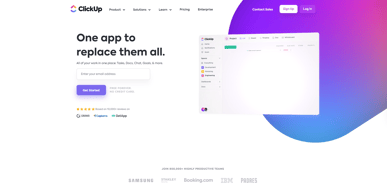






In the realm of project management tools, ClickUp has emerged as a comprehensive solution that caters to a wide range of users. From freelancers managing their own tasks to large corporations coordinating complex projects, ClickUp aims to simplify and streamline the process. But does it deliver on its promise? In this review, we’ll take a close look at ClickUp, dissecting its features, user interface, support, and pricing structure. Our goal is to provide an unbiased and thorough examination of this software, helping you decide if it’s the right fit for your needs. So, without further ado, let’s delve into the world of ClickUp.
What is ClickUp?
ClickUp is a cloud-based productivity platform that aims to centralize all your work and tasks in one place. It’s a comprehensive project management tool designed to help individuals and teams plan, organize, and collaborate on projects.
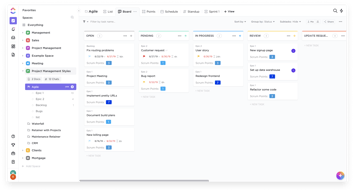
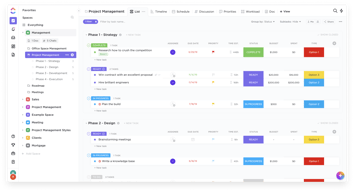
The software offers a wide range of features including task management, time tracking, goal setting, document sharing, and more. It also provides multiple views for project tracking such as list view, board view, and Gantt chart view, allowing users to customize their workspace according to their preference.
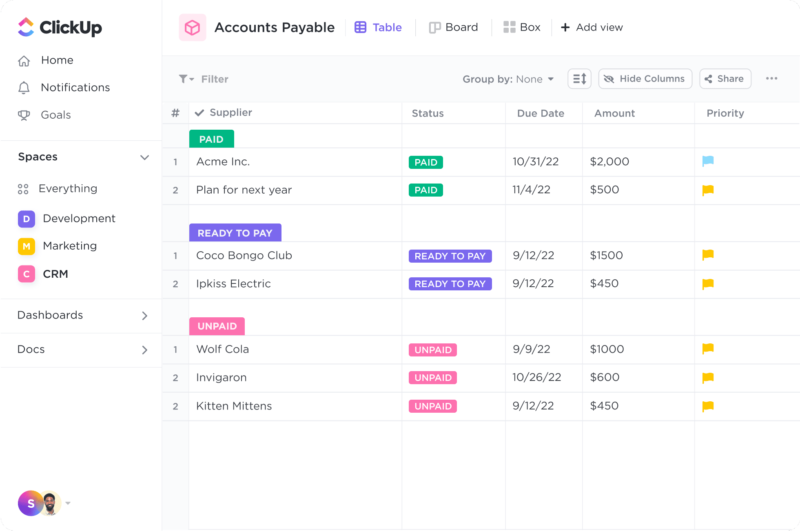
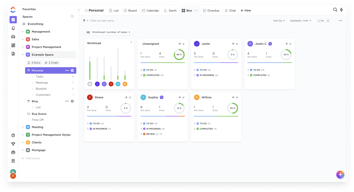
ClickUp Dashboard
ClickUp’s target users range from freelancers and small businesses to large corporations. It’s designed to be flexible and adaptable, catering to different industries and project types. Whether you’re managing a marketing campaign, developing software, or planning an event, ClickUp aims to provide the tools you need to keep your project on track.
In essence, ClickUp is more than just a project management tool. It’s a productivity platform that seeks to eliminate the need for using multiple, disjointed tools by providing a unified, all-in-one solution.
ClickUp Core Features
ClickUp is packed with a variety of features designed to enhance productivity and streamline project management. Here are some of its core features:
- Task Management : ClickUp allows users to create, assign, prioritize, and schedule tasks. You can also set dependencies between tasks, making it easier to manage complex projects.
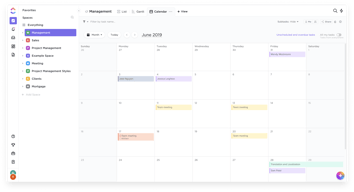
- Multiple Views : ClickUp offers several views for managing your projects, including list view, board view, box view, Gantt chart view, and calendar view. This allows you to visualize your tasks and projects in a way that suits your working style.
- Time Management : ClickUp includes time tracking features, allowing you to monitor how much time is spent on each task. It also includes scheduling and capacity management features, helping you to plan your time effectively.
- Collaboration Tools : ClickUp facilitates team collaboration with features like real-time chat, comment assignment, document sharing, and in-app video recording. These features make it easier for teams to communicate and collaborate on tasks and projects.
- Customizable Workflows : ClickUp allows you to create custom workflows that match your team’s processes. You can set up statuses for tasks and move them through different stages as they progress.
- Integrations : ClickUp integrates with a wide range of other tools, including Google Drive, Slack, GitHub, and more. This allows you to bring all your work into one place, reducing the need to switch between different apps.
ClickUp Pricing Plans
ClickUp offers a variety of pricing plans to cater to different user needs. Here’s a breakdown of their tiered pricing structure:
ClickUp offers Free, Unlimited, Business, and Enterprise plans — see ClickUp pricing for current rates.
The Free plan is a great starting point for small teams or individuals who want to try out ClickUp’s basic features. The Unlimited plan offers more flexibility and customization options, making it a good choice for growing teams. The Business and Enterprise plans offer advanced features and increased automation, making them suitable for larger teams or businesses with complex project management needs.
ClickUp has since launched ClickUp Brain, an AI assistant integrated across the platform for writing, summarization, and project insights.
Remember, it’s important to choose a plan that aligns with your team’s size, budget, and requirements. You can always start with a lower-tier plan and upgrade as your needs evolve.
ClickUp Competitor & Alternatives
ClickUp competes with tools like monday.com, Trello, and Asana. Each tool has its own strengths and weaknesses. ClickUp stands out for its wide range of task display views, real-time chat, and in-app video recording features. However, other tools like monday.com and Asana also offer robust features, although they lack real-time chat and in-app video recording. Trello, on the other hand, is a more budget-friendly option, but it lacks time tracking and budgeting tools.
ClickUp FAQs
Is ClickUp’s free plan really free?
Absolutely! ClickUp’s free plan is indeed free, with no hidden costs or strings attached. This plan offers a robust set of features including unlimited tasks, unlimited members, and up to 100MB of storage. It’s a great option for individuals or small teams who are just getting started with project management software.
While the free plan does have some limitations compared to the paid plans (such as storage limits and access to premium features), it still provides a comprehensive toolset for managing tasks and projects. So, you can definitely start using ClickUp for free and then decide if you want to upgrade to a paid plan as your needs grow.
What does project management software do?
Project management software is a digital tool that helps teams plan, organize, and manage tasks. It facilitates collaboration, scheduling, resource allocation, and progress tracking, making project execution more efficient and streamlined.
Bottom Line – ClickUp
ClickUp is a robust and versatile project management tool that can significantly benefit businesses of all sizes. Its comprehensive features for task management, collaboration, and project tracking make it an excellent choice for teams aiming to streamline their workflows and enhance productivity. While it has a rich feature set, it’s designed with user-friendliness in mind, making it accessible even to those new to project management software.

Compare ClickUp with other popular tools in the same category.
Having so many of my tasks in one place, the automations to reduce the time, having all my clients in ClickUp, and having the dashboard to help me see an overview of my work.
Honestly nothing so far! I've worked in other PM Tool that just didn't fit my business so using ClickUp for nearly a year and being a paid user for the last 8 months I don't have any dislikes!
Firstly it helps me keep track of my client's tasks, updates, and communication on specific tasks. I love the whiteboard function and also the form builder, which I use all the time now.
Different views for collaborative work. You can look on the same project with different eyes and finally reach the same goal.
Nothing yet. Reactivity is impressive. When I need help, the ClickUp Team always show me the best way to use ClickUp for my goals.
I have a small company with several pruposes. ClickUp helps me to optimize the organization of human ressources, to connect people who works on the same project and always have a global an detailed view of customer experience.
How accessible it is for others to quickly onboard during projects and understand. The learning curve is super easy, I don't need to spend countless hours training & explaining.
The whiteboard feature could be enhanced if they really want to compete with other tools in this space.
ClickUp helps to communicate to stakeholders in a clear way through very intuitive and understandable features Click supercharges me personal workload and time management through their different features
Over the past few years, I´ve deployed Clickup as my primary organizational tool. It has given me: data analysis to save money and make better decisions, integrate my teams and have accountability, run the company with less and more efficient and happy people, and finally grow smarter and think outside of the box to solve many issues that would take so much time and money!
I'm a big forms user for my workflows and gathering data, so having more AI and auto-populating fields.
Data input, data analysis, workflow and streamline my business, accountability and budgeting
The best thing about ClickUp is that I can coordinate tasks across multiple departments. There can be a single point of truth to reference. I can also customize my content to meet my specific needs.
The only thing I've noticed is that changes aren't always saved the first try on the browser version of the app. Other than that, everything in the app works as intended.
The biggest problem it solves is easy visibility. You can see what tasks are being worked on, which tasks may need help, and which tasks are behind. Because there is a view for everything, you can tailor the app to suit what you want to see.
Everything is linked to one another. It's so user friendly and easy to navigate that it makes finding things so easy and natural, and it seems to have some power behind the scenes too.
Having a weekly, monthly calendar view on the home screen would be good, just for reference. But that's a minor thing that's more a personal preference than a necessity. Being able to integrate with a Microsoft ToDo and Outlook 365 calendars would be amazing, but not possible yet.
Bringing our new hybrid marketing team together and getting quicker decisions being made. It's also helped narrow down the amount of software we use for collaborating, as we can do it all in ClickUp now.
Clickup has the full feature set we need to manage our dev, design and marketing projects.
Sometimes others comments and texts do not sync instantaneously if you have the task opened.
Having all our projects on one place for the whole team to use.
I've used Wrike, Trello, Asana, Monday, FunctionPoint, and Scoro - and nothing beats the value and customization inherent to ClickUp. Most users could likely stick with the free plan - which is incredible. It does everything you could ever need.
Using ClickUp to manage your sales cycle is a little more advanced, and it took me some time to set mine up in a way that worked for me. There isn't a preset way to build a quote, so you'd have to do some manual entry and custom fields to get that functionality.
ClickUp helps me stay on track and organize my team's projects the way that works best for us. It's even color coded and has great user interface so each person can set up their app the way they want it to look.
Customization, workflow, automations, different ways to view tasks.
It is difficult to pick up at first, especially if you've never used a project management platform before.
ClickUp solves the problems posed by asynchronous or hybrid/remote work when working as a collaborative team is still necessary.
I'm able to easily create tasks and lists to organize and know at any point in time what I'm supposed to be doing in regards to which project. Other team members can also create tasks and assign me - which is great because sometimes they would ask me over Slack and it may get lost in the flow of the day.
There are quite a lot of features that I don't feel like I'm using to their full potential, and I am not sure where to go to chase this up.
Project Management for sure. Before I was manually tracking my daily tasks in a notebook, but that made it hard to plan out long term as well. Now in clickup home I can see my daily tasks, anything overdue, as well as what's coming up next.
Clickup has been helping us setup processes. We have started using clickup to streamline are communication and create accountability. We're a performance agency, Catalys.co and have been growing pretty quickly. Clickup has come as savior for us and our clients.
It's a little expensive, but the value it adds is phenomenal
Accountability and process creation. Everyone is on the same page with the tasks being done.
I love the due date and recurring feature for tasks. There are tons of daily/weekly/monthly tasks I have to take care of in my business and before ClickUp, it was overwhelming to remember and crowded my personal calendar.
The one thing I have found that can be challenging is that some comments may get lost, but a simple solution is to receive email notifications whenever I am mentioned in a comment so I can keep track of where they are.
ClickUp houses all of my tasks in one centralized location and allows me to focus on other important business needs rather than trying to remember what it is I'm supposed to be doing on any given day. I can set it and forget it until ClickUp reminds me it's time to work on it!
ClickUps' versatility has really given our team the tools we need to structure our project management system to suit our unique processes. It has boosted our productivity exponentially and helped our team get clarity on their next moves without needing to ask.
The Slack integration is a bit limited in how the messages get sent through, and I would like a bit more customization options in the home area, but these are minor.
ClickUp is helping our business unit increase productivity and take on more projects. It is also helping us boost our customer relations as we are better able to organise and retrieve information or assign work to be done with speed.
I can streamline work across all the various departments. I'm also able to give my clients their own views which gives them peace of mind about what's going within their accounts.
Not much of a dislike but rather of, there's so much stuff I don't know what to do with it. I wish there was an onboarding call option for even the smallest level, and maybe if would be like a 15 min call where 5 min is going over general items and the other 10 is setting up one view based off my needs.
I'm able to streamline everything into one platform. So the things that I need from video to graphic design to website development all within one big task is super helpful. I can also adjust timelines all at once and make dependencies. There's so much to this platform that I know I haven't touched but overall the main benefit for my agency is cross work in various departments on one initiative.
I switched from Asana to ClickUp when I changed jobs last year. The difference I have noticed between the two platforms has been considerable. ClickUp is much more flexible, allowing you to create and manage projects in whatever framework you are comfortable with. Coming from Asana, I was accustomed to using workarounds to support a SCRUM framework. But with ClickUp, there is native support for sprints with lots of customization and automation, making sprint management easier. Reporting is also significantly better, with more options for visualization and the capability to embed external resources and documents. There is even a chat function that can be included to communicate about the dashboard. The suite reporting features allow us to create customized, live dashboards for our clients to keep them updated on progress and communicate easily. Finally, the AI tools that ClickUp introduced into the platform have been impressive. We were already using ClickUp docs to draft content and document processes. But, adding AI tools has enhanced that content, increased the speed of authoring, and made it effortless to create actionable items from large blocks of text.
There have been occasional performance issues with ClickUp. However, they are an inconvenience at worst and have occurred less often. The only restriction we are currently experiencing is reporting on time tracking. Time tracked can only be visualized as a table or a single calculated value. It would be helpful to also visualize as at least a pie chart. We track time on the service line, client, and delivery role and want to see how time tracked breaks down the values of each dimension. Currently, the workaround is to use the time estimate field. But, by doing that, we cannot use the time estimate to compare the estimate to the time tracked for process optimization.
We initially implemented ClickUp to track our agency processes and time spent on client work. The ClickUp docs feature has allowed us to create a robust knowledge base that supports knowledge share and employee onboarding. And the time tracking capabilities have helped us understand our agency profitability on a per-client basis and adjust effort and scope to align it to our desired agency rate.
Our tasks are always organized and the teams are aware of the whole. We work all the projects in one place and it relieves us of the demands. We've already tried using other tools and ended up being hostages of needing to use more than one at the same time, with the clickup it's not necessary.
My only caveat is through the created documents. As we work in teams, sometimes we use the same document on several machines to create processes and demands, but the platform still doesn't give us real-time updates and we need to update the page in question so that it can keep up with what the other has written. Other than that, all the functionalities suit us.
We no longer have the need to exchange emails or messages to manage the progress of projects and tasks, as in a few clicks we can follow the work of the entire team.
I've been a user of ClickUp for about 3 years. During that time I've learned a lot about project management and no matter my needs, ClickUp has me covered. The thing that first drew me to the company was the rate of development - they don't just rest on their laurels, they're always pushing the boundaries.
Just the wait for ClickUp 3.0 - I'm sure it'll be worth it though!
It's a great all-round tool that allows me to reclaim precious hours throughout my week.
As a long-term user of ClickUp, I can confidently say that it has been an integral part of my productivity toolkit for the past two years. ClickUp has positioned itself as a single platform for all work-related tasks and has lived up to that promise. It
nothing, the team got all necessary tools in one app
1) Streamlined Project Management: ClickUp's task management feature has solved the problem of keeping track of numerous projects and tasks within our marketing team. It allows us to break down any project into manageable tasks, assign responsibilities, and monitor progress. This has significantly improved project execution and reduced the risk of missing deadlines. 2) Collaboration and Communication: With remote work becoming the norm, effective communication and collaboration have become more important than ever. ClickUp's chat and docs feature have fostered real-time collaboration among team members, keeping everyone in sync and making sure that no information falls through the cracks. 3) Integration and Automation: ClickUp's ability to integrate with other tools has been a game-changer. It has solved the problem of data silos, enabling us to pull data from different sources into a single platform. Furthermore, the automation feature has helped reduce repetitive tasks, allowing the team to focus on more strategic and creative tasks.
I love having everything in one place! I help manage a mechanic shop that has both local customers and shipped orders. We use ClickUp to manage our employees workload, show customer appointments, and communicate when an order is ready for the next department to take over.
It does have glitches, which can lead to needing to refresh the page to get new information to display and automations not always working. We have enough checks and balances in place, but quicker resolution of those issues would be great to see.
Before using ClickUp, we had tasks falling through the cracks constantly. We still aren't perfect, but ClickUp helps us keep track of everything so that customer needs are being met.
Being able to track your progress; have the records of every change made on tasks or documents; works as several different softwares in just one app, I cannot see myself working without it anymore!
The platform is very complex and its functions are also complex to understand, and I believe that it could somehow be a bit simpler than it is, I love the app but do not know how to use 1/4 of it.
ClickUp makes it so much easier to manage our time, which leads to an easier way of managing the tasks we have to do. We can give these tasks timelines and different levels of urgency, helping to decide what should be done first.
I love the way to manage my tasks and projects, the possibility to create templates, to have a time tracker, the very useful options of task and project views, the flexibilities to manage them, to have automatizations and many possibilities to share all this things with ours clientes, colleagues and family.
The fact that we can't paste contents into the table view yet.
Manage my all activities (job, study, family) in one place. I have more serenity and focus on what I'm doing. I've absolutely saved time and I'm more organized now than I was before.
It's been a blessing when it comes to working with team members across the world. From creating tasks to tracking progress and staying on top of my to-dos - ClickUp is perfection. Started with the free version and upgraded almost immediately as the pro version is too cool to miss out on! Thank you for creating such a software!
I'd like more flexibility on the automations so that the subtasks are also easy to set up.
As an e commerce that's selling across various countries it helps me stay on top of all my to do's and helps me collaborate with my team members
The first scheduling & task management tool I've found to be properly useful; it's incredibly easy to use once you're past the introductory learning curve, and it's got a good balance of features you want without bloat.
The learning curve was a little steep at first - I highly, HIGHLY recommend onboarding with an experienced mentor, as opposed to picking it up from square one.
This is the best version of a to-do list I've ever seen

One of the standout features of ClickUp is its versatility. It offers a wide range of tools and features that can adapt to various project management needs. Whether you're managing a small personal project or coordinating a complex team collaboration, ClickUp provides the flexibility to customize workflows, tasks, and views to suit your specific requirements.
The occasional performance issues (glitches) I experience, especially with automations. Also, there are occasional lags or slow loading times, particularly when working with large projects or extensive task lists.
It helps our company to streamline our workflows and document SOPs. This obviously helps with productivity and efficiency. We've seen an increase in performance.
Even on free plan, ClickUp provides all the tools necessary to manage projects and teams.
Though seldom, front-end gets buggy and you have to refresh the page. But it's a very rare occasion
Clickup works as a tasks aggregator and calendar, knowledge base, bug resolution tracker and more for us.
ClickUp is an agile software that allows a lot of customization. It's easy to use and easy to integrate! We organize events and could not find a better task management software that connects with the Google Suite and other apps.
The only negative thing I have to say about ClickUp is the whiteboard option, don't get me wrong, it's awesome, but it's also a little bit laggy at the moment. But considering all the features of the app, it's insane that it's the only comment I have to make
ClickUp makes the exchange of information and communication way easier. We have solved a lot of problems and simplified our flow.
I love the interface, the customization options, the integrations, the desktop and mobile apps, and how well it functions. It keeps me organized and on top of my projects. As a self-employed business owner with no employees, I wear a lot of hats. ClickUp helps me manage every aspect of my business. I used to use the free version of Asana and found that their paid version was too expensive. I looked for an alternative and discovered ClickUp. Importing everything from Asana was a breeze and I was up and running in no time. I have never looked back. I'm in my second year using ClickUp and plan to use it for life. Thank you for an awesome product!
The desktop app doesn't automatically update changes sometimes and you have to refresh to view your changes. This is not a deal-breaker, just something that can be a bit annoying and that the developers are hopefully aware of and working to correct. Other than that - I have no real complaints!
It keeps me organized and on top of every aspect of my business. I love the user interface and the ability to tailor it to my specific needs. Customization is an important feature to me when working with an application and ClickUp delivers.
The best of ClickUp is just how powerful it is when it comes to features.
There are not many things to dislike, the only thing that can be a little bit better is the interface, but they are already fixing that with the new update.
One of our main goals in business was to streamline our systems and processes, and ClickUp tremendously helped us achieve that goal.
Best tool for managing many projects from multiple clients. I use the Kanban view mostly but has other views, and also has timekeeping for keeping track of staff times for later billing.
Docs functionality is a bit clunky and guests cant create docs which is a bit disappointing.
Managing the development of multiple projects, easily switch between projects, reduced time commenting on issues and communication between developers and cleints.
I've tried almost every project management platform for client and company management in the past seven years. ClickUp is by far my favorite. They make it so simple to delegate a heavy load of team members and tasks, manage client delivery with seamless automation, and track progress on high-level company goals.
I absolutely love the ability to create forms and track data with automation for future tasks based on responses. I would love to see the form functionality and design upleveled. It's a bit clunky and less visually appealing than other stand-alone form products.
Clickup saves me a ton of time with custom dashboards that help me track multiple team members across different divisions and companies. This has allowed me to spend more time on the larger projects without anything slipping through the cracks.