

Unclaimed: Are are working at ClickUp ?
ClickUp Reviews: 4.7/5 — Highly Rated
More than just a task management tool, ClickUp is a 360-degree productivity suite that offers functionalities that expand and scale together with a business’ evolving needs. With more than 15 views and over 35 apps, it allows teams of all sizes from across different disciplines to set strategic project goals, manage workflows, collaborate, iterate and optimize, and track progress. There are unique features for every team such as bug tracking and reporting (engineering), sales automation (sales and marketing), and employee onboarding (HR) just to name a few. ClickUp comes pre-loaded with templates that can be utilized out of the box while offering rich customization options.

| Capabilities |
API
|
|---|---|
| Segment |
Small Business
Mid Market
Enterprise
|
| Deployment | Cloud / SaaS / Web-Based, Desktop Mac, Desktop Windows, Mobile Android, Mobile iPad, Mobile iPhone |
| Support | 24/7 (Live rep), Chat, Email/Help Desk, FAQs/Forum, Knowledge Base, Phone Support |
| Training | Documentation |
| Languages | English |
ClickUp Pros and Cons
- Customizable dashboards
- Features and functions best suited for solopreneurs and small teams
- Comprehensive freemium plan
- Built-in chat feature for both private and public communication
- Offers extensive features with the option to customize under the free plan.
- Onboarding process can be complicated
- No built-in video conferencing feature
- Additional customizable features will require an annual fee
- Platform can easily overwhelm new users


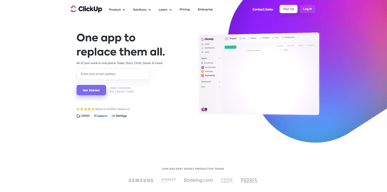
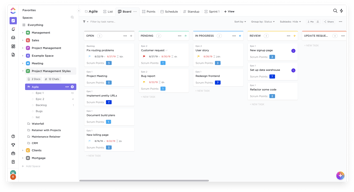
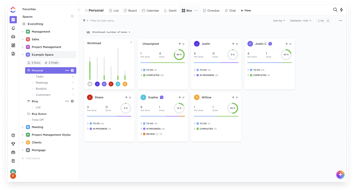
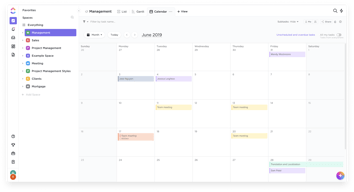
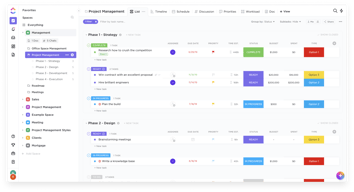






In the realm of project management tools, ClickUp has emerged as a comprehensive solution that caters to a wide range of users. From freelancers managing their own tasks to large corporations coordinating complex projects, ClickUp aims to simplify and streamline the process. But does it deliver on its promise? In this review, we’ll take a close look at ClickUp, dissecting its features, user interface, support, and pricing structure. Our goal is to provide an unbiased and thorough examination of this software, helping you decide if it’s the right fit for your needs. So, without further ado, let’s delve into the world of ClickUp.
What is ClickUp?
ClickUp is a cloud-based productivity platform that aims to centralize all your work and tasks in one place. It’s a comprehensive project management tool designed to help individuals and teams plan, organize, and collaborate on projects.
The software offers a wide range of features including task management, time tracking, goal setting, document sharing, and more. It also provides multiple views for project tracking such as list view, board view, and Gantt chart view, allowing users to customize their workspace according to their preference.
 _ClickUp Dashboard_
ClickUp’s target users range from freelancers and small businesses to large corporations. It’s designed to be flexible and adaptable, catering to different industries and project types. Whether you’re managing a marketing campaign, developing software, or planning an event, ClickUp aims to provide the tools you need to keep your project on track.
In essence, ClickUp is more than just a project management tool. It’s a productivity platform that seeks to eliminate the need for using multiple, disjointed tools by providing a unified, all-in-one solution.
ClickUp Core Features
ClickUp is packed with a variety of features designed to enhance productivity and streamline project management. Here are some of its core features:
- Task Management : ClickUp allows users to create, assign, prioritize, and schedule tasks. You can also set dependencies between tasks, making it easier to manage complex projects.
- Multiple Views : ClickUp offers several views for managing your projects, including list view, board view, box view, Gantt chart view, and calendar view. This allows you to visualize your tasks and projects in a way that suits your working style.
- Time Management : ClickUp includes time tracking features, allowing you to monitor how much time is spent on each task. It also includes scheduling and capacity management features, helping you to plan your time effectively.
- Collaboration Tools : ClickUp facilitates team collaboration with features like real-time chat, comment assignment, document sharing, and in-app video recording. These features make it easier for teams to communicate and collaborate on tasks and projects.
- Customizable Workflows : ClickUp allows you to create custom workflows that match your team’s processes. You can set up statuses for tasks and move them through different stages as they progress.
- Integrations : ClickUp integrates with a wide range of other tools, including Google Drive, Slack, GitHub, and more. This allows you to bring all your work into one place, reducing the need to switch between different apps.
ClickUp Pricing Plans
ClickUp offers a variety of pricing plans to cater to different user needs. Here’s a breakdown of their tiered pricing structure:
ClickUp offers Free, Unlimited, Business, and Enterprise plans — see ClickUp pricing for current rates.
The Free plan is a great starting point for small teams or individuals who want to try out ClickUp’s basic features. The Unlimited plan offers more flexibility and customization options, making it a good choice for growing teams. The Business and Enterprise plans offer advanced features and increased automation, making them suitable for larger teams or businesses with complex project management needs.
ClickUp has since launched ClickUp Brain, an AI assistant integrated across the platform for writing, summarization, and project insights.
Remember, it’s important to choose a plan that aligns with your team’s size, budget, and requirements. You can always start with a lower-tier plan and upgrade as your needs evolve.
ClickUp Competitor & Alternatives
ClickUp competes with tools like monday.com, Trello, and Asana. Each tool has its own strengths and weaknesses. ClickUp stands out for its wide range of task display views, real-time chat, and in-app video recording features. However, other tools like monday.com and Asana also offer robust features, although they lack real-time chat and in-app video recording. Trello, on the other hand, is a more budget-friendly option, but it lacks time tracking and budgeting tools.
ClickUp FAQs
Is ClickUp’s free plan really free?
Absolutely! ClickUp’s free plan is indeed free, with no hidden costs or strings attached. This plan offers a robust set of features including unlimited tasks, unlimited members, and up to 100MB of storage. It’s a great option for individuals or small teams who are just getting started with project management software.
While the free plan does have some limitations compared to the paid plans (such as storage limits and access to premium features), it still provides a comprehensive toolset for managing tasks and projects. So, you can definitely start using ClickUp for free and then decide if you want to upgrade to a paid plan as your needs grow.
What does project management software do?
Project management software is a digital tool that helps teams plan, organize, and manage tasks. It facilitates collaboration, scheduling, resource allocation, and progress tracking, making project execution more efficient and streamlined.
Bottom Line – ClickUp
ClickUp is a robust and versatile project management tool that can significantly benefit businesses of all sizes. Its comprehensive features for task management, collaboration, and project tracking make it an excellent choice for teams aiming to streamline their workflows and enhance productivity. While it has a rich feature set, it’s designed with user-friendliness in mind, making it accessible even to those new to project management software.

Compare ClickUp with other popular tools in the same category.

I love how Clickup allows me to see all projects I'm working on at a quick glance. The collaborating options make working with others a breeze. One of my favorite features is the time tracking.
The only issue I had was the massive amount of emails I received letting me know about project updates. Thankfully there was a setting to reduce notifications.
Keeping track of projects and deadlines.
It is super user-friendly, it is constantly updating, and creating new ways to do things, and allows me to simplify workflows and be more efficient.
I wish the dashboards were more accurate when presenting how long it takes to complete a task, and overall how long it is taking the team to complete tasks. In terms of KPI's we normally have to export the data because we don't feel Click up dashboards are good enough.
It help us automate and simplify workflows, communicate requests and answers between departments
I have currently preferred using ClickUp over other platforms due to the simplicity of how tasks can be accomplished in the software. The system is extremely intuitive, making moments of uncertainty about functionality rare. And even though it is easy to use, it remains an extremely powerful tool. It is possible to generate various insights through dashboards, in addition to having good process automation features. I use ClickUp almost every business day, and it has been a great tool. I've also taken full advantage of the integrations with Bitbucket, which help track open pull requests (PRs).
A slight downside is that I feel there is a lack of shortcuts in the application. Many tasks require the use of the mouse, which diminishes productivity for those accustomed to predominantly using the keyboard.
ClickUp solves the pain of having to maintain each stage of the software development lifecycle in separate places. On the platform, it's possible to do almost everything needed to track the software lifecycle: documentation, bug tracking, kanban, product roadmap, etc. Everything is in one place, making it easy to reference, and it doesn't compromise organization.
Clickup, especially with the recent updates, has been the best project management software that our company has used so far.
Clickup is easy to get up and running on because the set up feels decently self-explanitory, but if you don't take the time to learn the proper ways to go about things, you can set things up in a way that can cause issues later down the line.
Click up lets us get a high-level view that can drill down to a detailed view and have all that info linked together so you only have to update things in one place.
Incredibly flexible to allow you to configure it for your workflow. Also, integrates with slack so you can share tasks with your team mates, but also has its own comments and discussions, which I think is better. You can assign those comments to someone to resolve! Awesome.
The alerts for iOS and iwatch are fiddly to configure. It's flexible but takes a while. But just a one of so not the end of the world.
It helps to solve the issues of team collaboration around software product development. We benefit from having a single place to track work items relating to features and have the whole team collaborate and leave updates and comments.
I use ClickUp everyday to help me organize my day to day, week to week, month to month tasks. The features available meet every need that I may have in managing my tasks. One feature that I plan to utilize soon is time tracking. This will assist me in mapping operations and learn where to reduce time constraints. The help tools such as university, videos, help center, help so much in accomplishing anything that I may need to better utilize ClickUp.
Not much on this topic. Always room for innovation!
It's solving workflow operations and tasks management issues. ClickUp helps keep up with the large amount of tasks that I have on a daily basis.
Ease of use and it's chrome extension is such a time saver.
Nothing really as does what I need it too.
It's chrome extension save me time when reviewing sites and for project management it's simple to use
We've tried almost every project management tool and ended up with click up, it does everything better. Super easy to set up and get integrated, clear clutter free views of your tasks and the ability to heavily customise your dashboards/lists and spaces is what makes clickup the better choice.
Genuinely haven't found an issues, it has been a perfect tool for my team.
As an agency it's hard to find a good software that can easily have seperate spaces for each client/project, clickup does this simply and better than all the competition that I have tried. It has become our only task management tool and works best for agency use.
Keeping workflow moving seemlessly through all departments, it's user friendly and intuitive, and highly customisable, means we always know exactly where we stand with every task or project.
ClickUp 3 has changed some user interfaces that we are still getting used to and that we have sent feedback about.
Anything that needs to be actioned within our business is on ClickUp. At a glance, we can see exactly where we stand with any task or project , where the hold ups might be, and plan for live dates or leave cover. Work flow in seamless through ClickUp
The possibilite to create many lists with colors
The recorrent tasks are allowed only in The paid version
I can see all my tasks togheter

