

Unclaimed: Are you working at Zoho CRM?
Zoho CRM Reviews: 4.1/5 — Solid Choice
Zoho CRM is a leading customer relationship management platform that businesses of all sizes can rely to manage sales, track marketing campaigns, and gain customer insight within a centralized, collaborative environment. Using Zoho CRM, users can set up and customize that platform according to their personal preferences and incorporate all necessary data and workflow to maximize its features. Zoho CRM is also available on a free plan and scales gradually depending on features needed.
| Company | Zoho Corporation |
|---|---|
| Year founded | 2000 |
| Company size | 10,001+ employees |
| Headquarters | Chennai, Tamil Nadu |
| Social Media |

| Capabilities |
AI
API
|
|---|---|
| Segment |
Small Business
Mid Market
Enterprise
|
| Deployment | Cloud / SaaS / Web-Based, Mobile Android, Mobile iPad, Mobile iPhone |
| Support | 24/7 (Live rep), Chat, Email/Help Desk, FAQs/Forum, Knowledge Base, Phone Support |
| Training | Documentation |
| Languages | English |
Zoho CRM Pros and Cons
- Extensive omnichannel customer support via live chat, phone and email
- High-level automation options for various sales tasks
- Tons of integrations with third-party tools like Outlook and LinkedIn
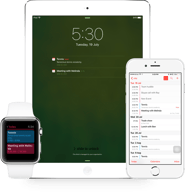
- Mobile version with access to visual reports
- Data security, integrity, and regulatory compliance built-in
- Not the best tutorials for beginners
- Integrations can be a little clunky






Compare Zoho CRM with other popular tools in the same category.
I like that it integrates well with all the other ZOHO offerings - this allows us to learn one language without having to learn how the different tools talk to each other.
No concerns at this time - for my business(recruiting), I'd love to see the CRM part of same package as RECRUIT but it's OK - no other provider does this well.
Segmenting of data, customers in campaigns, easy to navigate.
I like that it lets you share tasks between the members of an office.
I know that my supervisor finds it a little difficult to use because she’s not as tech friendly and there’s a lot of drop down tabs on a page.
Delegation of tasks have improved since using Zoho
Zoho is very easy to use and it's got a ton of different options to use for keeping leads updated. Also a very easy way to stay on top of scheduled calls & events.
There isn't much that I dislike about Zoho. The only problem I have ever had with it was a few times some scheduled events randomly disappeared. Other than that - it's great.
Keeping leads organized and staying on top of prioritizing them. It's been a great way to stay on top of clients and helping us to make sure no events are missed.
I like that it has many features that helps you keep on track of your data.
Reminders aren’t as agressive as they should be.
Collecting data
Cost, ease of use for the initial set up, great for small businesses
Customer support needs work, when a new interface happens, the guidelines are not updated quickly and too many separate systems that require its own CRM
We use it for everything sales and marketing, including email campaigns, workflows, tracking calls, management of contacts, entering proposals.

The Integration with all the apps of Zoho
Data exporting from CRM costs high in Zoho CRM
Previously we used to store our data in Excel Sheets. We all know how challenging it will be for an organisation to collaborate if we use Excel. So we initially started using Zoho Creator to custom build Applications, but we thought of scaling up, But creator alone cannot do that. Then we thought of using CRM. Initially, we are terrified to use CRM because all the terminologies were new to us. We went and attended Zoholics to understand CRM much better. With the understanding we got, we started migrating data from Creator to CRM & it's was as smooth as butter. If you are in Zoho ecosystem the additional advantage for you is, you can create related links from creator so that you don't need to import every report. Other features like Mailing templates, Zia and so on are the productive tools to grow. The Different set of reports that CRM generates by itself gives the customer another perspective to look into the problem so that managers can take concrete decisions & right approach to solve the existing problem. The heart of the CRM would typically be Workflows & Blueprints. We can create Workflows(i.e., Defining Processes) so that every employee in the organisation is on the same page.
It is a very easy crm to use. I love the fact that you can find things in the search and once you start typing all of the clients that you have already added to zoho start poppin up.
The fact that if you have not been able to manually watch someone by screen sharing it can be a little tricky at times to learn the software. I felt a little lost when i first started using it but the more i worked with it the better I got.
On the daily I get people signed up for credit repair using ZOHO so that they can purchase a home. We are easily able to keep track of the clients that we are working with and be able to keep track of all the leads that we load into the system in one simple place.

Wow! Talk about easy to set up. I have previously reviewed and used a similar CRM. With the other one you needed a lot of time to figure out how to use it, not the case at all with Zoho. Very very easy. They really thought about the customer first and designing an awesome UX!
More custom functionality, ie: building custome pages. I am sure there is a way but not sure how, yet.
We are using it to track our sales, Human Resources, recurring subscription billing and more!
We use this for customer filtering business purposes and the the ability to quickly ID and assist clients using Zoho's great features helps us be more effective day to day.
Not a whole lot. If I had to say something it would be that customer service and support could be better.
Client acquisition and maintenance problems are solved through our use of Zoho The biggest benefits are ease of use, short learning curve when training new employees, efficiency through timesaving, and great filtering aspects.
It is easy to set up and get all of your information imported.
When I first got it I noticed several down days for maintenance mid day.
Organizing all of my clients info.
Flexibility, integration points, connection to other tools in the suite. API makes the data accessible from custom integration. Ability to customize with additional data fields. Logical hierarchical database design.
Some quirky aspects of the way data is organized. Although the screen layout is flexible, there is no good way to design truly custom screens without writing my own applications and interfacing through the API. Can be time consuming to find the best way to use features.
CRM in general keeps me organized to ensure I follow up with sales leads and stay connected with my referral sources. Use it to plan my sales staff activities.
The ease of the system. Especially the support helpline which helped me a few times
IF you want to make tweaks or personalise anything to your business you have to call them up and they charge you a lot of money for it ie importing data which is a 30seconds process but they quoted me £1000
Keeping everything streamlined has made us more efficient
Blueprinting and automation capabilities of Zoho CRM
Saturday and Sunday their support does not work
Sales process and service delivery
The home screen was organized and each area was labeled effectively.
It was all effective for me and helpful.
Working as a team from different areas of the State.

The best part of this software is if you don't like something it is most likely customizable to be able to meet your requirement. Granted some things I have run across have not been able to customized, but we have adapted and made it work for us.
Tech support can be challenging to get your point across, English is definitely a second or third language for their support team.
We needed a system to track our quotes and to be able to see where they are in our process.
The way every lead is organized. The possibility to send the emails right from Zoho.
The preset drop down descriptions. Quite often the descriptions do not mert my needs.
I manage my leads and keep contact with them.
Ease of use. Being the head of inside sales, I have a team of inside sales people who interact with leads on a daily basis and updating of information, passing it on to sales and then sales conversion to a Potential is done seamlessly.
There are some limitations on the layout, fields, conditional layouts which can be worked on. If we go on to a higher version then there are some of it which can be overcome, but the conditional layouts feature to be reworked on.
I am saving a lot of times by using Zoho CRM.
I love the ease of using Zoho, I can access Zoho CRM from any smartphone or computer allowing me to work and notate contacting clientele while traveling. Zoho's 2017 edition is a superb improvement, again being extremely user friendly for Zoho clients.
I need to be able to revert Client accounts back to Leads. Is there anyway to do this without my having to manually change accounts to leads? & I created a Template. I sent the allowed emails one day & went back the next day to send more, I could not find the template in the template folder.
The benefits I've realized again are the ease of the CRM. The mass email contact functions are extremely helpful as well. Zoho is a great all around CRM that is extremely well organized and allows me to keep track of my clients.
There is a lot of customization options!
not user friendly. Has a long learning curve.
Keeping track of opportunities and contactacts.

Ease of use, connectivity to outside apps (Google Apps for business, Ring Central) and the search function
White the new version has some great new features (seeing when a client opens an email), it is also harder to find the customization modules and I hate that Events I create automatically are marked as closed when the date arrives. Sometimes events do not actually occur, or I have to get to them the next day - I use events to do important tasks. I want to be able to mark it closed. I want to be able to mark any activity closed in a very fast, easy way... just a check, done. Also, with the activities would show in the calendar, not just events. Wish I could see what my team member sees on her calendar, especially when we share an event.
I run a small business and I evaluated many, if not all of the CRM's available to small companies. By far, Zoho offered the greatest functionality, ease of customization and overall value in price. Zoho offers the ability to create mail merge templates - one of my criteria when choosing a CRM - few others if any offer this. Also, I love that I can see when a client or prospect has opened or read an email, right from the application. Reporting features are fantastic too! I was even able to add a Zoho code to my website so now all new leads come directly into Zoho and receive an email immediately from me. Overall, I can now contact my prospects faster and close sales faster. I can manage my clients better with great detail right on their records and my one team member and I can better communicate through the CRM and even assign each other tasks. Although I highly recommend it, I do wish Zoho had live Chat Help. Takes a bit to get a response when you need help. That said, overall, best CRM, best value for small businesses that want to see and understand where their business is related to sales, sales pipeline, and customer management.Functionality: Mail merges, email templates, customization, reporting
Zoho CRM is easy to use and the Marketplace off Add-Ons is endless. It works for a small business to a large scale multinational corporation. The mobile app is great as well.
Doesn't tie into ZOHO Creator all that easy.
Our small enterprise needed a place to manage prospects, clients and projects to Zoho was the best solution for our needs. The price is right and its flexible.

Having real time information on all of my sales teams actions.
I have not found anything to dislike yet.
This is a vast improvement over Salesforce as our CRM for a small brewery.

Zoho is clean and very easy to use. Greta features and also has an app for Android and Iphone
They could use more features especially for calling and lead generation
Prospecting and lead generation, database management and other CRM issues

I love this product. I have an excellent relationship with my customers and prospects because Zoho CRM allows me to keep tight control of every step of the customer lifecycle. It is easy to use and has constant reminders to stay on track
It can be a little hard to navigate until you are familiar with the product
I manage all of my clients and prospects during their lifecycle

Zoho CRM has a fairly intuitive interface and great integration with other Zoho applications.
There are tons of features, which can be a little overwhelming when you're just getting started, especially if you haven't had experience with tracking leads, needing to set up events, or if you're working solo in an operation.
Zoho CRM has been great for tracking my clients - contact information, dates that we've spoken, prices that have been negotiated, as well as extra-curricular plans and activites. Integration with social media and websites makes lead generation and tracking easy, and has let me keep better track and better touch with my clients.
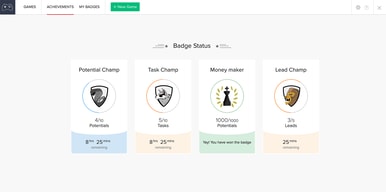
Zoho Motivator captures the data from your CRM account to give you realtime insights of your sales activities. These insights give you an idea of which behaviors you need to improve ..
Haven't had any trouble with the software, enough to addressed as a dislike issue .
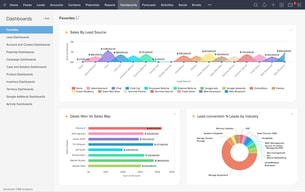
Boost Revenue using: Insights and Dashboards KPIs to indicate performance Pipeline Velocity to give insights into lead conversions.
Zoho CRM is "so" easy to use! If Big'ol Salesforce is the #1 CRM out there...I'd have to say Zoho CRM is giving them a Run For Their Money! But sometimes bigger is "not" better...being easy to use and fully customization is Key when using a CRM!
The "cost" for any of these types of service is usually the #1 factor of "dislikes". If you have a good sized company, and can keep under $1,000 annually for a Cloud Based CRM...Zoho CRM Professional is the Big Winner! I can't really say anything bad about all the features and power of this service, because its all Really Great! It's very easy to use, and totally worth at least trying out the "Free Trial", which never ends...its just limited to the "amount" of data you can store. And we used it for 1yr before we ran out!
The problem of keeping track of current and potential clients has always been a challenge. Zoho CRM has really turned our perception of this challenge around. We Love It!
They have very detailed contact management and a lot of space to add things.i like that I can make my page a color.
The app is not he best for adding contacts and lists.
Contact records
Use this every day and the service is so easy anyone could do it. Keeps clients updated and takes a lot of thinking away from me.
If I had to pick something it would be to have the system automatically tell you if you've duplicated a customer. Sometimes I put it in one way and another employee has already added the customer only slightly different and now we have multiple things for the same client.
Keeps everything in one place very easily. Helps keep payroll right and helps us when we renew clients annually.
I really take advantage of the intregation of other apps and how easy the process is.
I tend to run into being locked out of and error messages.
I take advantage of collaborating with other team members in the field making sales.