

Unclaimed: Are you working at Asana?
Asana Reviews: 4.3/5 — Solid Choice
Considered one of the pioneering cloud-based project management tools, Asana offers four views for its users – List View, Timeline, Calendar, and Boards – all of which help teams get both a macro and micro view of all the moving parts of projects and tasks. It provides a comprehensive roadmap of ongoing projects from start to finish, clearly outlining dependencies, project milestones, and feedback and approval processes. For project managers, strong reporting capabilities that show completion rates, individual workloads, and potential delays just to name a few create opportunities for real-time project optimization, collaboration, stronger forecasting, and better planning for future similar projects.





| Capabilities |
API
|
|---|---|
| Segment |
Small Business
Mid Market
Enterprise
|
| Deployment | Cloud / SaaS / Web-Based, Mobile Android, Mobile iPad, Mobile iPhone |
| Support | 24/7 (Live rep), Chat, Email/Help Desk, FAQs/Forum, Knowledge Base, Phone Support |
| Training | Documentation |
| Languages | English |
Asana Pros and Cons
- Tons of great integrations
- Easy to use and clean environment
- Lots of timeline tracking tools
- Automation features built-in
- Various customization options
- No budgeting or invoicing features
- The volume of features can be overwhelming
- No time tracking feature
- The volume of features can be overwhelming
- No time tracking feature








Asana cut its free plan from 15 users to 2, and a great deal of published information has not caught up. Accounts created on or after 12 November 2025 get two seats on the Personal plan. Older accounts keep a legacy allowance of up to ten, but lose it permanently if they downgrade and re-upgrade. If you are choosing Asana because you heard the free tier supports a small team, that is no longer true.
- What it is: A project management platform for tracking work across tasks, projects, portfolios, and goals.
- Best for: Mid-size and larger teams coordinating structured work across departments, where portfolios and goals matter.
- Pricing: Personal free for 2 users. Starter €10.99, Advanced €24.99 per user per month billed annually. Enterprise is custom. Verified in July 2026.
- The honest catch: Beyond the free-plan change, AI Studio credits are allocated per billing account rather than per user, so a large team shares one pool.
What Is Asana?
Asana is one of the two or three products that defined modern work management. Its model is a hierarchy: tasks belong to projects, projects roll into portfolios, portfolios connect to goals. That structure is why larger organizations choose it. When an executive asks how a quarterly objective is progressing, Asana can answer from work people are actually doing rather than from a status document.
That focus also explains where it is weaker. Asana is less flexible than monday.com, less spreadsheet-like than Smartsheet, and less simple than Trello. It rewards organizations that want a consistent structure imposed across teams, and frustrates ones that want each team to work its own way.
The independent evidence base is very large, with more than 11,000 reviews on G2 alone, and satisfaction scores remain strong despite the free-plan controversy.
How Asana Works
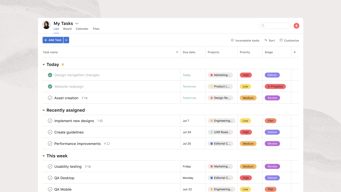
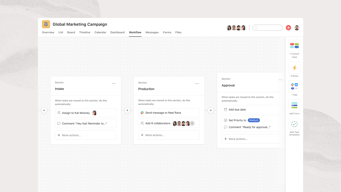
- Tasks, projects, portfolios, goals. The hierarchy is the product, and portfolios and goals are what separate Advanced from Starter.
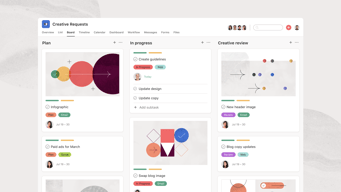
- Multiple views. List, board, and calendar on every plan, with timeline and Gantt from Starter.
- Automation. Unlimited automations from Starter, which is more generous than competitors that meter them.
- Workload and capacity. Resource management on Advanced, plus universal workload and capacity planning on Enterprise.
- AI Studio. Credit-based AI, at 50,000 on Starter, 75,000 on Advanced, and 200,000 on Enterprise, allocated per billing account per month.
- Integrations. Salesforce, Tableau, and Power BI connectivity from Advanced.
Asana Pricing
Four tiers, with the free plan now materially smaller than its reputation. Figures verified on Asana’s pricing page in July 2026, billed yearly. Asana localizes currency, and the euro figures correspond numerically to its dollar pricing.
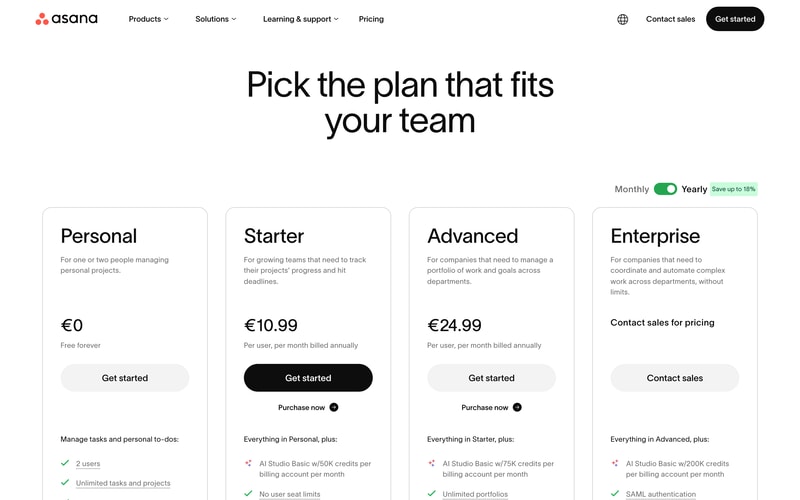
| Plan | Per user/mo (yearly) | Users | AI Studio credits | Key additions |
|---|---|---|---|---|
| Personal | €0 | 2 | — | Unlimited tasks and projects, list, board and calendar views |
| Starter | €10.99 | No seat limit | 50,000/account | Timeline and Gantt, dashboards, unlimited automations, forms, custom fields |
| Advanced | €24.99 | No seat limit | 75,000/account | Portfolios, goals, workload, approvals and proofing, time tracking, Salesforce and BI integrations |
| Enterprise | Custom | Unlimited | 200,000/account | SAML, SCIM provisioning, capacity planning, admin controls |
The details that matter most:
- The free plan is two users. Reduced from fifteen for any account created on or after 12 November 2025. This is the single most important change in Asana’s pricing in years, and much published comparison content, including some review aggregator pricing pages, still describes the old limits.
- Legacy accounts have a trap. Accounts predating the change keep up to ten users on a Legacy Personal Plan, but cannot recover that allowance if they downgrade and re-upgrade. If you are on a legacy free plan, do not experiment with plan changes.
- AI credits are per account, not per user. 50,000 credits on Starter is shared across your whole billing account, so a fifty-person team gets the same pool as a five-person one. This is unusual and worth modelling if AI features matter.
- Portfolios and goals require Advanced. At €24.99 per user, more than double Starter. Since portfolio-level visibility is the main reason larger organizations choose Asana, Advanced is the realistic tier for that use case.
- Yearly billing saves up to 18%.
- No seat minimums on paid plans, which is a genuine advantage over monday.com’s three-seat floor.
Who Should Use Asana
- Mid-size organizations coordinating across teams. The clearest case, and where the portfolio and goal hierarchy earns its price.
- Teams that outgrew a simpler tool. Asana is the common destination for teams hitting Trello’s dependency limits, and it handles dependencies properly.
- Companies that run on OKRs or similar. Goals connected to actual work is genuinely useful rather than decorative.
- Teams wanting structure. If consistency across departments matters more than per-team flexibility, Asana suits better than monday.com.
It fits poorly for individuals and pairs on the free plan, which is now extremely limited, for very small teams on a budget, since €10.99 per user adds up quickly, and for teams wanting to shape the tool around an unusual process, where monday.com’s flexibility is better.
Honest Pros and Cons
Strengths
- Excellent structural model. Tasks to projects to portfolios to goals is coherent and genuinely useful at scale.
- Proper dependency handling. Unlike Trello, Asana models work that waits on other work.
- Unlimited automations from Starter. More generous than competitors that meter automation runs.
- No seat minimums. You can buy exactly the seats you need.
- A very large evidence base. More than 11,000 G2 reviews with consistently strong satisfaction.
- Mature integrations. Salesforce, Tableau, and Power BI on Advanced for organizations that need reporting elsewhere.
Limitations
- The free plan is now two users. Cut from fifteen, and the change is poorly reflected in third-party documentation.
- The legacy grandfathering is fragile. Downgrade and re-upgrade and you lose the higher allowance permanently.
- AI credits are pooled per account. A large team shares the same allocation as a small one.
- Portfolios and goals need Advanced. More than double the Starter price for the capability larger buyers actually want.
- Less flexible than monday.com. Asana imposes structure, which some teams experience as rigidity.
- Cost at scale. €24.99 per user across a large organization is a serious line item.
Asana Alternatives and How It Compares
- monday.com is more flexible and more visual, with a three-seat minimum and less rigorous portfolio structure.
- ClickUp offers more features per dollar and a genuinely usable free tier, at the cost of a busier interface.
- Trello is simpler and cheaper, and lacks dependencies entirely, which is the usual reason teams move to Asana.
- Smartsheet suits organizations whose work already lives in spreadsheets.
- Teamwork is better for agencies that need billable time and project profitability.
For a broader survey see our guide to the best project management software.
The Verdict
Asana remains one of the strongest work management platforms for organizations that want structure rather than flexibility. The hierarchy from tasks through portfolios to goals is coherent, dependencies work properly, and unlimited automations from the entry paid tier is more generous than most competitors. For a mid-size company coordinating work across departments, it is a sound default.
The free plan is no longer part of the argument. Cutting it from fifteen users to two for accounts created after 12 November 2025 changes what Asana is for small teams, and the change is badly reflected in third-party sources, including some review-site pricing pages that still quote the old figures. If you are evaluating Asana for a small team on the strength of its free tier, check the current limit rather than the guide you are reading.
Two specifics worth acting on. If you hold a legacy free account with up to ten users, do not downgrade and re-upgrade, because the allowance does not come back. And if AI features factor into your decision, note that AI Studio credits are pooled per billing account rather than per user, which makes them meaningfully less generous for large teams than the headline numbers suggest. Price Asana at Advanced if portfolios and goals are why you want it, because that is where they live.
FAQ
How many users does Asana’s free plan support?
Two, for any account created on or after 12 November 2025. It was previously fifteen. Accounts created before that date are grandfathered onto a Legacy Personal Plan supporting up to ten users. Much published comparison content, including some review aggregator pricing pages, still describes the older, larger limits.
I have an older Asana free account. Should I change plans?
Be careful. Legacy accounts keep up to ten users, but Asana does not restore that allowance if you downgrade and subsequently re-upgrade. If you are on a legacy free plan and value the extra seats, avoid experimenting with plan changes, since the higher limit cannot be recovered once lost.
How much does Asana cost in 2026?
Billed yearly, Starter is €10.99 per user per month and Advanced €24.99, with Enterprise custom priced and Personal free for two users. Yearly billing saves up to 18%. There are no seat minimums on paid plans, and Asana localizes currency so its dollar pricing corresponds numerically.
Are Asana’s AI credits per user or per team?
Per billing account, which is the less generous interpretation. Starter includes 50,000 AI Studio credits per month for the whole account, Advanced 75,000, and Enterprise 200,000, regardless of how many users you have. A fifty-person team receives the same allocation as a five-person team, so model your expected usage before assuming the allowance is sufficient.
Is Asana better than monday.com?
They optimize differently. Asana imposes a consistent structure across teams and handles portfolios and goals more rigorously, which suits larger organizations. monday.com is more flexible and visual, letting each team shape the tool around its own process, and has a three-seat minimum. Choose Asana for structure and monday.com for adaptability.

Compare Asana with other popular tools in the same category.
The Asana board which makes it easier for me to navigate on my daily tasks and deliverables
None. More on optimizing the asana app as it works slowly than the website
The hassle of organizing task and things to do is the problem that anyone face daily. In my case, as I work a lot i was able to do more task with the use of asana

Submitting tickets on Asana is literally a piece of cake and the resolution timeline is minimum - the prioritization can be set though.
Nothing about it that I do not like. Pretty impressive!
Session scheduling, change in data requirements, assigning shifts, swapping shifts amongst team members etc.

The task management style is very good and can be tracked across teams
I think there can be more integrations to platforms like whatsapp checkout.com mamopay and paytabs or ziwo too
Task management, weekly reports, task delegation, I am able to track project progress of my team

The dashboard is the most interesting part of this tool. Everything is easily accessible in front of you at one glance.
One thing that annoys me most is if you forgot to stop the tracker in other apps like Clickup. It is not stopping automatically and logs time day and night.
Working with several companies and managing all the tasks and projects on one platform.
Organised, clarity in work distribution and work load of each team member. Well structured and no messy email.
Exepensive, if there is option for a young startup to get more feature on free version that'd be great.
Work distribution, work load and communication.

User friendly and easy to assigned task to other members
I like all thee asana easier to us so all like
Organized my tasks Easy for colllaboration

Easy to use. User-friendly. Great task management tool.
There are not a lot of visuals or graphics.
None so far.
I like the possibility to determine who does what until when and this in a projected environment.
Subtasks must be assigned to a project each time, although the parent task is already assigned to a project and thus only appears on a portfolio.
With Asaan, as a lead, I can see what my team is doing. With proper reporting use, I can get information at the level of detail that is interesting to me.

Efficient loading of tasks no matter how large the volume of tasks there is.
Maybe add more automations on like assigning certain stuffs to certain people.
Organizing our company tasks could be a problem since there are many. Thanks to Asana we were able to keep track of them all.

Other departments can also see what you are working on. Plus you can check the history of completed tasks as well.
i don't dislike anything in this tool. Anasa is good tool to use.
very easy to use. very user friendly software
Very easy to use and user-friendly. I managed many projects with asana and clients are also loving it.
according to other services, I didn't find any mistake
the tasks which are on high priority are populating on top which is good benefit
What I find most helpful is the ability to be able to assign tasks to clients and have them comment, make notes, and approve projects that are being collaborated on.
There are times when comments nested inside sub-tasks are difficult to refer to. Similarly, one-on-one communication that gets started either by the client or our team is hard to find in order to keep the conversation going.
Project and product management is the biggest thing that Asana is solving for us. This helps ensure that our entire team has eyes on the different aspects of projects. Our engineering team also loves Asana to run their sprints.
How easy it is to get your head around, very easy to onboard people. I've onboarded several developers with a simple 5 minute video and rarely run into issues where they need additional clarification on functionality.
Could be better for single users. I find that it works extremely well for teams, but some of the features require you to be a premium user. When you are a single user you have to pay for things for multiple people.
When you have a lot of long-term projects it can sometimes get a bit hard to distinguish. I find the projects you can set up are good, but when you have large teams it can sometimes get cluttered.
Ability to create different projects and task and track the progress made by the team. Simple and effective to use.
Not really but when so many tasks are created its difficult to search a particular one.
Team collaboration. Project handelling.
People can work simultaneously on a task.
Using it so far, there is nothing I do not like.
It helps me monitor and update the statuses of all the projects I handle. I can also leave important notes to remind me where I left off.
I really enjoy Asanas calendar feature for visualization, that's important to me. As well the subtasks help with larger complicated projects and it's nice the project manager can organize things out for me in there. Also like the CSV upload feature for projects we do layouts of first, although I'd make some changes to the upload's mapping abilities to add more features.
Honestly the inbox for online doesn't work very well. Most people at my company use Asana in browser for some reason(I know it's not designed this way sorry) and so it's sometimes easy to miss important comments on projects. I think pop up notif's in the bottom corner that the user has to manually close might be useful to prevent that(as a feature that could be turned on or off). I've also run into an issue where project managers will assign me something in a board but it somehow never shows up on my personal boars which is irritating. Lastly for CSV upload I think an expansion of features would be useful, like Asana being able to update tasks via csv upload and categories and multiple project boards being able to be included for tasks so you don't have to back-edit tasks after large uploads.
Asana is primarily used by my team as a planning and communication tool, I think the primary problems we're solving would be organizing tasks and projects as well as showing kpi and performance through task tracking.
I have been using Asana since couple of years and found that it is really helpful in team management, project management. Its rules feature is amazing which automates the work loads
The free version of Asana has limited functionaties which should be increase however, it is best for small team and their collaboration. The fields shoulf be more than 5 so it will be good
Project management is very difficult for me but use of Asana is extremely beneficial, cooordination with other teams is also easy, I am using this tool for visibility

Asana helps me so much in managing my projects, tracking and doing tasks. It saves so much time and more productively for me and my team.
For starting a business it is not advisable since it is only giving a free trial for 30 days and after that, you need to pay for the subscription.
It identifies if a team member is overloaded. It helps you balance to assign in a team member
Asana really is an "if you can dream it you can do it" platform. There's so many ways you can customize your views and projects to make it work for business collaborations, professional development, or even personal use.
When I share a task to two different projects, I wish that I could change the naming conventions based on the project but still have it linked.
I have better clarity into what needs to get done, what hasn't been done, and help keep everyone accountable to their deadlines.
I like that your task view is customizable and can become very detailed. The task sharing really allows our teams to stay aligned. It's a lot easier to create processes that automatically put a task on your to-do list with Asana. I love that you can integrate Asana with Slack so that your tasks don't get lost in the chat. You can make sure that someone's work request to you is thought out and checks all of the details that you need. I appreciate the auto-saving feature and the intuitive UI. At the end of the year when I have to report to my boss all of the projects that I've completed, Asana helps me write those performance reviews and self-evaluations. I can get very detailed in my reports because I have a history of my project management details.
One of the most difficult things about Asana is keeping it updated. I wish I could set a date where things would automatically check themselves off. Sometimes it gets a bit manual to go in and clean up your board if you forget about it for a while. Everyone has different styles and levels of detail in the way they maintain Asana so sometimes giving others access to your board can really throw off your groove. I dislike how daunting it can feel to keep up with all the moving pieces of your boards. I also wish that I could pull up multiple boards at the same time on the app.
I use Asana to request tasks from other teams, keep track of my projects for self-evaluations, manage projects from inception to completion, assign collaborators for tasks that are dependent on outside teams, give my manager visibility into my work, and keep my to-do list straight.
I love the tagging and task following capabilities.
I really wish you didn't have a pay just as much as Asana it's self for the time tracking. I think that is a core feature that should come with basic membership. It would be so nice to allocate a time amount to a task so that the team can see workload in that way. Too much to do is our biggest issue right now and we need a way to prove that.
Organization and simple project management where huge issues as our team grew. This has helped all of us work together, keep on track, and helps nothing to fall threw the cracks.
well designed task and project management
no daily project summary to project owner
Tasks management, Bug Tracking, and project handling in technical, support, finance department.

First of all, the graphic user interface is straightforward, fantastic, and easy to understand. It follows the "5 second rules" for me, as it took me just 5 seconds to understand what this app for
Well, the integration with my note-taking application is missing. I love my Evernote app, which should be integrated with this application.
No doubt getting the team onboard is USP for the slack and it proves out to be true. For me , as dealing with multiple organization I can keep track of whats going on and where the problem start. I don't have to ask someone
The organization of multiple programs and detail within it.
Hard to collaborate with multiple people
Managing multiple programs with multiple stakeholders that have many responsibilities and varying program ownership
I use asana for project management. Using "My Tasks" I can see how to prioritize tasks based on deadlines. This makes it easy to get things done within the time limit and that helps my team organize for project progress reporting.
Managing sub-tasks is somewhat difficult in Asana.
Using Asana, we are managing our project workflow by assigning tasks to a developer team and after that, it is assigned to the QA team for testing. We realized that checking project or task progress or stage is easy using Asana.

Asana allows you to visualise at a glance the project as a whole as well as create and delegate objectives between fellow teams and colleagues. You can set dates to complete by, prioritise and create sub tasks within them. I found the learning curve to very extremely easy, and it meant I could focus on inputting tasks with ease and get on with them, without having to figure out how to do so to begin with.
Initially I found the mobile app a bit restricting in terms of having certain information available at a glance (e.g. columns on a list view for priority, deadlines etc.) but other than that it offers a great deal.
The greatest problem that was solved was saving time in communication by listing new objectives or issues and when to resolve them by. This saved possible meeting time which could then be used to focus on dealing with the goals and provide updates to any updates and issues. Attaching files to certain tasks to provide evidence that could be followed up with comments etc. is also extremely useful.
I love being able to customize the look and layout of my project management tasks. There are plenty of options to suit the needs of each project & each participant's personal mental-processing style.
I can't think of anything at all that I dislike!
Asana has made it a lot easier to keep track of multiple clients, each with concurrent projects, helping to keep everything straight about who needs what and by when.

Asana makes it easy to collaborate and be updated with the tasks of our agency. I love the idea of having everything organized in one place and within easy access.
The only downside I see is the limitation regarding the use of gifs as a comment, for example. Or at least expanding the list of the celebration animations, which we use a lot.
We keep all the tasks of both clients and the company in Asana. It helps us focus on the business and the next project to be delivered. As we can also break each project down into small pieces, Asana also helps us to be more productive.
The user interface is super easy to navigate. It's easy for new team members to get up and running with very little training, making onboarding a sinch, especially compared to other project management tools I've used in the past.
Needs more integrations and personalization options. There are only a few themes to choose from and I don't believe there is an integration with Github. Also, tags can get a bit out of hand if not managed properly.
Used for managing web development projects. I really enjoyed how easy it is to set up new projects and create new labels, so we can easily see how we are utilizing our time.
The fact that you can assign different members of your team to separate projects.
Nothing. Everything is great. I wouldn't change a thing.
Team members were logging into the wrong project to leave notes. The benefit of assigning members to different projects