

Unclaimed: Are you working at Asana?
Asana Reviews: 4.3/5 — Solid Choice
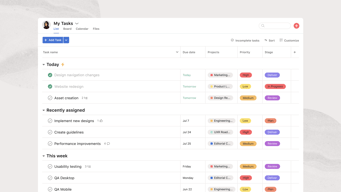
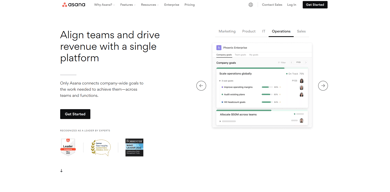
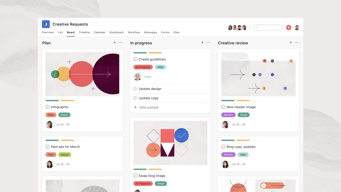
Considered one of the pioneering cloud-based project management tools, Asana offers four views for its users – List View, Timeline, Calendar, and Boards – all of which help teams get both a macro and micro view of all the moving parts of projects and tasks. It provides a comprehensive roadmap of ongoing projects from start to finish, clearly outlining dependencies, project milestones, and feedback and approval processes. For project managers, strong reporting capabilities that show completion rates, individual workloads, and potential delays just to name a few create opportunities for real-time project optimization, collaboration, stronger forecasting, and better planning for future similar projects.





| Capabilities |
API
|
|---|---|
| Segment |
Small Business
Mid Market
Enterprise
|
| Deployment | Cloud / SaaS / Web-Based, Mobile Android, Mobile iPad, Mobile iPhone |
| Support | 24/7 (Live rep), Chat, Email/Help Desk, FAQs/Forum, Knowledge Base, Phone Support |
| Training | Documentation |
| Languages | English |
Asana Pros and Cons
- Tons of great integrations
- Easy to use and clean environment
- Lots of timeline tracking tools
- Automation features built-in
- Various customization options
- No budgeting or invoicing features
- The volume of features can be overwhelming
- No time tracking feature
- The volume of features can be overwhelming
- No time tracking feature









Asana cut its free plan from 15 users to 2, and a great deal of published information has not caught up. Accounts created on or after 12 November 2025 get two seats on the Personal plan. Older accounts keep a legacy allowance of up to ten, but lose it permanently if they downgrade and re-upgrade. If you are choosing Asana because you heard the free tier supports a small team, that is no longer true.
- What it is: A project management platform for tracking work across tasks, projects, portfolios, and goals.
- Best for: Mid-size and larger teams coordinating structured work across departments, where portfolios and goals matter.
- Pricing: Personal free for 2 users. Starter €10.99, Advanced €24.99 per user per month billed annually. Enterprise is custom. Verified in July 2026.
- The honest catch: Beyond the free-plan change, AI Studio credits are allocated per billing account rather than per user, so a large team shares one pool.
What Is Asana?
Asana is one of the two or three products that defined modern work management. Its model is a hierarchy: tasks belong to projects, projects roll into portfolios, portfolios connect to goals. That structure is why larger organizations choose it. When an executive asks how a quarterly objective is progressing, Asana can answer from work people are actually doing rather than from a status document.
That focus also explains where it is weaker. Asana is less flexible than monday.com, less spreadsheet-like than Smartsheet, and less simple than Trello. It rewards organizations that want a consistent structure imposed across teams, and frustrates ones that want each team to work its own way.
The independent evidence base is very large, with more than 11,000 reviews on G2 alone, and satisfaction scores remain strong despite the free-plan controversy.
How Asana Works
- Tasks, projects, portfolios, goals. The hierarchy is the product, and portfolios and goals are what separate Advanced from Starter.
- Multiple views. List, board, and calendar on every plan, with timeline and Gantt from Starter.
- Automation. Unlimited automations from Starter, which is more generous than competitors that meter them.
- Workload and capacity. Resource management on Advanced, plus universal workload and capacity planning on Enterprise.
- AI Studio. Credit-based AI, at 50,000 on Starter, 75,000 on Advanced, and 200,000 on Enterprise, allocated per billing account per month.
- Integrations. Salesforce, Tableau, and Power BI connectivity from Advanced.
Asana Pricing
Four tiers, with the free plan now materially smaller than its reputation. Figures verified on Asana’s pricing page in July 2026, billed yearly. Asana localizes currency, and the euro figures correspond numerically to its dollar pricing.
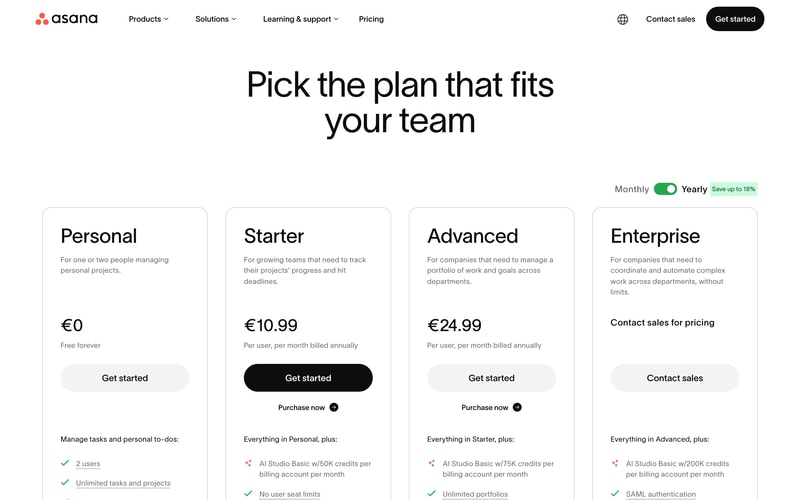
| Plan | Per user/mo (yearly) | Users | AI Studio credits | Key additions |
|---|---|---|---|---|
| Personal | €0 | 2 | — | Unlimited tasks and projects, list, board and calendar views |
| Starter | €10.99 | No seat limit | 50,000/account | Timeline and Gantt, dashboards, unlimited automations, forms, custom fields |
| Advanced | €24.99 | No seat limit | 75,000/account | Portfolios, goals, workload, approvals and proofing, time tracking, Salesforce and BI integrations |
| Enterprise | Custom | Unlimited | 200,000/account | SAML, SCIM provisioning, capacity planning, admin controls |
The details that matter most:
- The free plan is two users. Reduced from fifteen for any account created on or after 12 November 2025. This is the single most important change in Asana’s pricing in years, and much published comparison content, including some review aggregator pricing pages, still describes the old limits.
- Legacy accounts have a trap. Accounts predating the change keep up to ten users on a Legacy Personal Plan, but cannot recover that allowance if they downgrade and re-upgrade. If you are on a legacy free plan, do not experiment with plan changes.
- AI credits are per account, not per user. 50,000 credits on Starter is shared across your whole billing account, so a fifty-person team gets the same pool as a five-person one. This is unusual and worth modelling if AI features matter.
- Portfolios and goals require Advanced. At €24.99 per user, more than double Starter. Since portfolio-level visibility is the main reason larger organizations choose Asana, Advanced is the realistic tier for that use case.
- Yearly billing saves up to 18%.
- No seat minimums on paid plans, which is a genuine advantage over monday.com’s three-seat floor.
Who Should Use Asana
- Mid-size organizations coordinating across teams. The clearest case, and where the portfolio and goal hierarchy earns its price.
- Teams that outgrew a simpler tool. Asana is the common destination for teams hitting Trello’s dependency limits, and it handles dependencies properly.
- Companies that run on OKRs or similar. Goals connected to actual work is genuinely useful rather than decorative.
- Teams wanting structure. If consistency across departments matters more than per-team flexibility, Asana suits better than monday.com.
It fits poorly for individuals and pairs on the free plan, which is now extremely limited, for very small teams on a budget, since €10.99 per user adds up quickly, and for teams wanting to shape the tool around an unusual process, where monday.com’s flexibility is better.
Honest Pros and Cons
Strengths
- Excellent structural model. Tasks to projects to portfolios to goals is coherent and genuinely useful at scale.
- Proper dependency handling. Unlike Trello, Asana models work that waits on other work.
- Unlimited automations from Starter. More generous than competitors that meter automation runs.
- No seat minimums. You can buy exactly the seats you need.
- A very large evidence base. More than 11,000 G2 reviews with consistently strong satisfaction.
- Mature integrations. Salesforce, Tableau, and Power BI on Advanced for organizations that need reporting elsewhere.
Limitations
- The free plan is now two users. Cut from fifteen, and the change is poorly reflected in third-party documentation.
- The legacy grandfathering is fragile. Downgrade and re-upgrade and you lose the higher allowance permanently.
- AI credits are pooled per account. A large team shares the same allocation as a small one.
- Portfolios and goals need Advanced. More than double the Starter price for the capability larger buyers actually want.
- Less flexible than monday.com. Asana imposes structure, which some teams experience as rigidity.
- Cost at scale. €24.99 per user across a large organization is a serious line item.
Asana Alternatives and How It Compares
- monday.com is more flexible and more visual, with a three-seat minimum and less rigorous portfolio structure.
- ClickUp offers more features per dollar and a genuinely usable free tier, at the cost of a busier interface.
- Trello is simpler and cheaper, and lacks dependencies entirely, which is the usual reason teams move to Asana.
- Smartsheet suits organizations whose work already lives in spreadsheets.
- Teamwork is better for agencies that need billable time and project profitability.
For a broader survey see our guide to the best project management software.
The Verdict
Asana remains one of the strongest work management platforms for organizations that want structure rather than flexibility. The hierarchy from tasks through portfolios to goals is coherent, dependencies work properly, and unlimited automations from the entry paid tier is more generous than most competitors. For a mid-size company coordinating work across departments, it is a sound default.
The free plan is no longer part of the argument. Cutting it from fifteen users to two for accounts created after 12 November 2025 changes what Asana is for small teams, and the change is badly reflected in third-party sources, including some review-site pricing pages that still quote the old figures. If you are evaluating Asana for a small team on the strength of its free tier, check the current limit rather than the guide you are reading.
Two specifics worth acting on. If you hold a legacy free account with up to ten users, do not downgrade and re-upgrade, because the allowance does not come back. And if AI features factor into your decision, note that AI Studio credits are pooled per billing account rather than per user, which makes them meaningfully less generous for large teams than the headline numbers suggest. Price Asana at Advanced if portfolios and goals are why you want it, because that is where they live.
FAQ
How many users does Asana’s free plan support?
Two, for any account created on or after 12 November 2025. It was previously fifteen. Accounts created before that date are grandfathered onto a Legacy Personal Plan supporting up to ten users. Much published comparison content, including some review aggregator pricing pages, still describes the older, larger limits.
I have an older Asana free account. Should I change plans?
Be careful. Legacy accounts keep up to ten users, but Asana does not restore that allowance if you downgrade and subsequently re-upgrade. If you are on a legacy free plan and value the extra seats, avoid experimenting with plan changes, since the higher limit cannot be recovered once lost.
How much does Asana cost in 2026?
Billed yearly, Starter is €10.99 per user per month and Advanced €24.99, with Enterprise custom priced and Personal free for two users. Yearly billing saves up to 18%. There are no seat minimums on paid plans, and Asana localizes currency so its dollar pricing corresponds numerically.
Are Asana’s AI credits per user or per team?
Per billing account, which is the less generous interpretation. Starter includes 50,000 AI Studio credits per month for the whole account, Advanced 75,000, and Enterprise 200,000, regardless of how many users you have. A fifty-person team receives the same allocation as a five-person team, so model your expected usage before assuming the allowance is sufficient.
Is Asana better than monday.com?
They optimize differently. Asana imposes a consistent structure across teams and handles portfolios and goals more rigorously, which suits larger organizations. monday.com is more flexible and visual, letting each team shape the tool around its own process, and has a three-seat minimum. Choose Asana for structure and monday.com for adaptability.

Compare Asana with other popular tools in the same category.
My favorite parts of utilizing Asana are the community, the ease of use, and their knowledge base. The community is quite active and can often problem solve or explain alternative methods for the vast majority of issues. Asana is a simple task management platform, that lacks the customizability of some of its more sophisticated counter-parts, but is easy to deploy and train on.
Asana is missing some common sense functionality that would enable power users to get more out of the platform. Specifically, things like conditional logic for rules or the ability to more actively integrate the platform with outside software (the Asana API seems to struggle when dealing with massive workspace [1+ million tasks, 10,000+ projects]) and so that's another option that would be good for improvement.
Asana has reduced the amount of meetings that we need to have and it has simplified my ability to produce project updates, meeting summaries, and weekly reviews. My favorite feature here is posting portfolio updates to make concise text around what is being done for specific groups of projets.
Asana supports well for both Small scale and Large scale Industries. Here free plan supports projects, unlimited teams, messaging, multiple Task views etc. I am using this in my present company for managing the tasks weekly and monthly
Asana tends to work better in full computer screen but on mobile app we dont have so much ease to operate. Here we cannot assign tasks to multiple users that is only for single person who is responsible can be assigned thats it.
Task time tracking tools are available even for free plan which is a asset for ASANA. ASANA makes it easy to automate the processes involved including due dates, assigning a task, checking a task, alerting the team member. It is the only app helpful in sharing the different type of files like PDF, JPG, Google Doc etc.
We have been using the free version of Asana for a good five years at the university I am at, and I have always enjoyed it. As someone who makes checklists for everything, this website can keep yourself and your team on top of your work. Building out tasks, adding in subtasks, due dates, uploading files, writing comments, and assigning tasks to coworkers are just a few activities you can do in Asana. It keeps me organized! Ideally, if a university could get multiple departments on a platform like Asana, I belive that could really help workflows out tremendously. Every once in awhile someone in one office may be out, a request would get stuck waiting for a reply in someone's email. By adding multiple collaborators to a task, writing comments, giving updates, etc. that could allow each side to know where everyone is on the project.
I have not found much that I dislike about Asana. The more you use it, the more you enjoy it. Sometimes you may have to nudge your coworkers to use it a bit more so you can all be on the same page. I do know that my one coworker has worked on adding an automatic feed from her email to Asana. I may to dig more into that compared to just manually adding in each task, subtask, attachment, etc.
Being able to upload project requests all into one platform so everyone on the team can view and work on them is the best attribute. We have so many emails and requests each day, Asana allows us to break the request down into pieces, add due dates and keep everyone who needs to be involved in the loop and not have to rely on email chains. Before having Asana, we used another platform but it was not as smooth running. It was more of just lists and didn't allow for comments, reactions, or uploads. Asana allowing a team to add comments, upload documents, and not have to rely on email as your only communication for projects is ideal and I would never go back to just doing the latter.
Has the capacity to hold real-time communication. Flexibility. Prioritization. Has diversity of integration. Allows people to invite coworkers, guest and clients to a collaborative workspace.
No contempt whatsoever.The application is very customizable. I adore the kanban format. One feels so relieved after ticking off a completed task. A very dependable tool.
Allocation and tracking tasks. Organizing our daily activities. Collaborating with teams. Tracking time and goals. Assigning tasks to others within the platform.
I like its ease of use, the ability to get an overview of teams and the process. It helps us to manage projects correctly in a modern way
Some of the support, training and community are a bit all over the show. Different names, different systems, and areas to look at things. It needs to be similified.
Proper project management and tracking. Before, we were using connect wise manage but that solution is extremely dated and does not have a modern methodology behind it; it is slow, busy, time consuming and not collaborative

Easy to set up and use. Very effective mobile version. Tremendous in task allocation and tracking. Has a beautiful design. The best way to ease communication between teams.
No disgust . I love how intuitive the application is. It is very easy to create projects with timelines. Has seamless integration with other leading applications.
Tracking goals. Tracing progress. Project analysis. Coordination. Sorting tasks by date or by priority. Organizing information. Facilitating communication between teams.

Keeping track of tasks and projects. Effective communication on tasks and due dates. Customization. Kanban. Seamless integrations with other applications. Timeline Building.
No ridicule.i love the beautiful and fascinating design. Capacity to assign tasks to various people. Capability to assign a date on a task. Allows for project and task analysis.
Virtual meeting management. Ability to manage workflow without being overwhelmed. Sharing files with team members. Assigning tasks and follow-ups. Progress meetings.
I love Asana automation and workflows. Also the ability to break the project down into more minute details.We use this for multiple projects with hundreds of customers.
Really nothing. Sometimes it is a little hard to navigate and learn workflows without guidance from the team. They also could do a better job of knowing when customers are struggling. Very big org.
We do not have any problems with asana. Just the ability to reach out to someone quickly.
Most of the clients know about asana, so it helps a lot and save time in training.
Even we got added in project, we can't receive notifications until added as a collaborator
Client communication and tracking

I like the ease of use organizing and assigning tasks to teammates very smooth and neat view in the site Help you mange your time and work and never mess a thing
They should offer more tools to use they need to add more features like other competitors Show more ads because Asana is a great platform and all people should know about it
Managing my tasks Easy assigning tasks to teammates so nothing in missed not beneficially but the help me better manage my other way of profits yes they helped to increase business
Tasks are orgranized and easy to locate.
None. I love this app. It helps me setup my tasks accordingly.
All types of problem regarding work. It benefited me a lot as it tells what its currently due for today.
The left panel is where you can favorite tasks, projects, and items
I wish there was a way to make a permanent view for yourself of a shared board and it wouldn't change for everyone
Our team can easily track on and collaborate on projects
The satisfaction of crossing tasks off my list. Being able to manage team tasks.
Wish it was easier to disable email notifications.
Miscommunication of task delegation. Asana allows us to be on the same page.
- very organized and great for project management - Awesome to be able to assign tasks to others and comment their name, to keep everyone on track together! Love it!
- Can be overwhelming with notifications
Organization, projects between coworkers, and delegation
Asana has SO many great options for tracking tasks, managing timelines, and group projects. I really like how many options there are to match what I need to manage a project.
I’ve found that some settings and customizations don’t stick from each login. If I sort Asana to only show uncompleted tasks, the setting usually won’t be there when I log back on.
Asana is helping us efficiently track progress for projects with both onsite and remote employees.
Asana is clean and simple to use and set up. The free version of the application is more than enough for me.
I would like to be able to move around tasks and projects more easily. Also, when a project is over, I'd like to be able to archive it.
I use Asana for my personal task management, and I've found it very helpful in keeping myself organized based on a prioritized list of tasks.
I love how easy it is to use and how it can be used for so many different business functions
You have to pay for templates. it can get expensive with a large team
We are using asana to manage business development across a remote team. It is easy to use and there is visibility amongst the entire team which is essential.
What I LOVE about Asana is that it makes it easier for your team to work in collaboration while working from home.
There is currently nothing I dislike about Asana.
Working from home with team members all over Asana allows us to work together on important tasks. The benefit is being able to support multiple customers at a time on different levels together. This has made customer response time to solve problems extremely efficient.
It allows you to customize the tasks and that is very helpful.
The comment section gets cluttered sometimes you don't see properly
It is very helpful for big projects with remote teams, helps in keeping track on things.
Asana allows me to relax in my work because I know that all the parts of my work are captured in Asana and I won't drop any balls because of my memory lapses. I can simply add a task with its corresponding details and attachments and it is there for me to act on at the appropriate time.
I have not found anything that I dislike to date.
I do not miss deadlines or forget to follow up on work. It's an amazing tool that streamlines my days.
It is a very intuitive and easy-to-use program; its interface is amicable and is fully customizable. Additionally, it has a free trial, a free version, and its paid version has a very affordable price. Its implementation can be Cloud, SaaS, Web, and has apps for Android, iPhone, and iPad. Regarding its operation, it has a wide variety of functions that make the program very complete and adequate, highlighting: Activity tracking, task management, collaboration, and planning tools, third-party integrations, to-do list, real-time notifications, real-time updates, alerts and notifications, live chat, chat and messaging, comments/notes, progress tracking, data visualization, and prioritization.
We have been using this program for more than a year, and it has proven to be very effective and reliable, we have not had any problems. It is very powerful, robust and there is nothing negative about this tool.
Since the implementation of this software in the company, we have managed to increase the levels of productivity and efficiency in all departments, as the customer service department follow the guidelines of our coordinator; however, it has also improved the communication channels between all areas of the company since for example we work together with the area of sales, advertising and marketing so that the resolution of conflicts, complaints and claims has improved significantly, allowing us to establish strategic objectives and track progress in one place, in addition to facilitating monitoring the progress and status of requests in real-time. In general terms, this program has allowed us to improve our organizational levels, provide timely responses to our customers, and we are delighted with its performance.
I like that it is easy to use and that you can create many sub tasks within a task
I do not like that you cannot assign multiple users to a single task.
Working with UX design and development for a small startup

We use Asana for task management outside of development - so inside the team management, showcasing, and deals basically. It's light, simple, looks great, clients like it - straightforward. It allows you to arrange and finish assignments effectively, and it has no overhead - you don't have to peruse a manual or do preparing; it's natural and fundamental.
I wish there were a decent way of doing graphs for consumption downs.
Managing distributed team with a efficient way.
Asana keeps team integration active and informed on the status of projects, the workload of the individuals involved, and the overall success of the projects timeline being met.
Absolutely nothing! Asana helps keep our team on track with meeting deadlines and assisting others with their workloads.
Projects were constantly missing their deadlines, and the individuals in charge were forgetting tasks, so Asana utilizes reminders to help us remember and stay accountable.
I like the card sorting system and how each task can have tons of sub-tasks. Each task can be assigned to a person with a due-date. There are tons of customizable fields to really create a personalized user experience. When you complete a project, a little unicorn shoots across the screen with a rainbow trail and it makes checking off a 'to-do' extra rewarding.
You get a gazillion emails from Asana until you change your preferences. I'd advise signing up for only the "what's due today" emails or perhaps "what's due this week" to not get completely bombarded & overwhelmed.
Our entire team has transparency into all the projects on everyone's plates. It's a great place for everyone to collaborate and have full visibility into projects, project status, roadblocks, and even the final project.

The best thing about Asana is the choices for trading the perspectives for your sheets. Try not to like the Trello card design? Attempt the rundown. this makes it extraordinary for records/assignments, plans, and whatever else you wanted to coordinate and track. I additionally especially like having the option to remark and see conversations for a chronicled perspective on what was discussed as to a specific undertaking.
As a matter of fact, there are no negative marks or burdens to this application. The application works the best for all situations and tasks dealt with. Regardless of whether I contrast it and EverNote I will favor utilizing Asana as it covers every one of the commendable provisions for a project the board. Be that as it may, assuming I needed to show one bad mark, it would be it's estimating. When the estimating structure for paid Asana releases will turn out to be less, it will do ponders in the IT market.
For new companies, who have quite recently gone into the IT industry, Asana is the best apparatus for groups cooperation. The manner in which it offers a choice to make numerous ventures and their subtasks is super. What's more, you can set up needs and cutoff times for a particular assignment. Supervisors can without much of a stretch watch out for the advancement of the work whether it's forthcoming or has been finished. However, I have not utilized the Premium and Business includes, the Basic form will likewise work really hard. To put it plainly, I would strongly suggest it for the work for home culture.

Helps to increase accountability when working with teams. Great in tracking deadlines and goals. You can post a comment and be able to attach files. No
No scorn in any manner. It is used worldwide by development teams to plan, track and get things done faster.
Planning sprints. We use generated reports to make comparisons and plan for the future. Sharing documents. Organizing daily tasks.
I absolutely loved the calendar feature. We collaborated solely on it with multiple cross-functional teams to ensure that marketing materials were produced on time. It's so easy to create a task, describe it, assign it to the owner of the task. With the calendar, you can also view a full picture of how your month is going to look like. I think it's a must for any organization that has multiple teams working on producing things and depending on each other.
I had a very enjoyable experience with Asana; everything was really great. I only would have wanted it to have a way to prioritize and mark specific features in my chaos ideas board.
It helped to solve collaboration between teams and communication problems across teams. Helped to better plan things and ensured that nothing was missed.

I've been looking for a tool that would help me organize my projects and tasks. Asana is a great tool for just that. It's a digital task management system that allows you to organize your projects and tasks all in one place. It's easy-to-use, has a lot of great features, and allows you to collaborate with your team members on projects. What's more, you can sync it with your Google Calendar, Dropbox, Outlook, and more.
I wish it was more affordable and that some of its paid features were free.
Collaborating with my team on work projects.
We utilize Asana for the task and project management of our small CPA firm. I like the task management functionality the best and find it to be the most helpful.
The limitations of the free plan can be frustrating.
Task management problems have been solved and cost savings have been realized!