Unclaimed: Are you working at GoToWebinar?
GoToWebinar Reviews: 4.3/5 — Solid Choice
Best known as the world most popular webinar and webcasting tool, GoTo Webinar is an easy-to-use solution that allows users to host webinars, virtual conferences and events. The platform comes with robust features and integrations that allow users to engage with audiences to drive business growth.
| Company | LogMeIn, Inc. |
|---|---|
| Year founded | 2003 |
| Company size | 1001-5000 employees |
| Headquarters | Boston, MA, United States |
| Social Media |
| Capabilities |
API
|
|---|---|
| Segment |
Small Business
Mid Market
Enterprise
|
| Deployment | Cloud / SaaS / Web-Based, Desktop Mac, Desktop Windows, Mobile Android, Mobile iPad, Mobile iPhone, On-Premise Linux |
| Support | 24/7 (Live rep), Chat, Email/Help Desk, FAQs/Forum, Knowledge Base, Phone Support |
| Training | Documentation |
| Languages | English |
GoToWebinar Pros and Cons
- Hosts automated webinars
- Option to simultaneously host organizers and panelists
- Capable of hosting webcasts
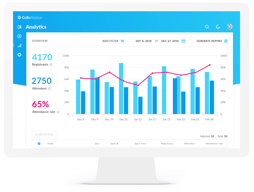
- Provides webinar analytics and exports
- Integration with GoToMeeting
- Costly compared to other alternatives
- Basic plan only accomodates 100 webinar attendees
- Requires presenters and participants to download specific software to be able to use platform






GoTo Webinar is one of the longest-running webinar platforms, and it sells reliability at scale rather than the newest features. If you are running regular webinars for hundreds of attendees and the cost of a technical failure is high, that track record is what you are paying for. If you are running your first webinar for forty people, it is an expensive way to do it.
- What it is: Webinar and virtual event software with registration, automated email sequences, polls, Q&A, analytics, and attendee-facing simplicity.
- Best for: Marketing, training, and enablement teams running webinars regularly at 500+ attendee scale, particularly in enterprise and regulated environments.
- Pricing: Reach $59/month and Elevate $103/month billed annually ($69 and $129 monthly). Complete is custom. A 7-day free trial, no free plan. Verified on GoTo’s pricing page in July 2026.
- The honest catch: Cloud recording, arguably the most basic webinar feature there is, sits on Elevate rather than the entry plan. For most buyers that makes $103/month the real starting price.
What Is GoTo Webinar?

GoTo Webinar launched in 2006 as part of the Citrix GoTo family, later spun out into GoTo as an independent company alongside GoTo Meeting, GoTo Training, and the LogMeIn products. That two-decade history matters more here than in most software categories, because a webinar fails publicly and in real time, and buyers with an audience watching tend to weight reliability above feature count.
The product is built around a straightforward loop: create a registration page, drive signups, send automated reminders, run the event with engagement tools, then follow up with recordings and analytics. It does that loop well and has done it for a long time. What it does not do is compete on innovation with newer platforms that ship more aggressively.
The independent ratings are respectable but not uniformly glowing, and the gap between them is instructive: 4.5 out of 5 on Capterra across 2,073 reviews, but roughly 4.2 out of 5 on G2 across about 801 reviews. Reviewers consistently praise attendee-side ease and large-audience handling, and consistently raise cost and occasional audio and video problems.
How GoTo Webinar Works
- Registration and promotion. Custom registration pages, automated confirmation and reminder emails, and source tracking so you can see which channel produced which registrants. The email automation is mature and is the part marketing teams rely on most.
- Running the event. Presenter tools, screen sharing, polls, surveys, live Q&A, and handouts. Attendees join without installing anything, which reviewers repeatedly call out as a genuine advantage with non-technical audiences.
- Recording and reuse. Cloud recordings on Elevate and above, plus the ability to run a recording as a live event, which is the simulive pattern used for repeatable demand-generation webinars.
- Analytics. Attendance, engagement, and drop-off reporting, plus registration source tracking on the Complete tier, with integrations into HubSpot and Salesforce that reviewers describe as reliable.
- Scale. 500 participants on Reach, 1,000 on Elevate, and up to 3,000 on Complete, with live streaming to unlimited attendees at the top tier.
In 2026 the notable additions are AI summaries and transcripts on Elevate, and breakout rooms. Both are useful, though neither is unique at this price point any more.
GoTo Webinar Pricing
Pricing is per organizer seat and gated primarily on participant count. Figures verified in USD on GoTo’s webinar pricing page in July 2026.

| Plan | Annual (per mo) | Monthly | Participants | Key additions |
|---|---|---|---|---|
| Reach | $59 | $69 | 500 | 1 organizer seat, reporting and analytics, automated reminders and follow-ups, polls and live Q&A, mobile hosting |
| Elevate | $103 | $129 | 1,000 | Branded webinars and custom URLs, cloud recordings, AI summaries and transcripts, recordings as live events, breakout rooms |
| Complete | Custom | Custom | 3,000 | Custom organizer seats, live streaming to unlimited attendees, paid events and certified training, GoTo Meeting license, registration source tracking |
The things that change the calculation:
- Cloud recording starts on Elevate. This is the single most important detail in the pricing. Recording a webinar is table stakes, and putting it on the middle tier effectively makes $103/month the entry price for most buyers rather than $59.
- Branding also starts on Elevate. Custom URLs and branded webinars are not on Reach, which matters if the webinar is a marketing asset representing your company.
- Annual billing saves 14% to 20%. Reach drops from $69 to $59 and Elevate from $129 to $103, so the discount is larger on the plan most people need.
- Per-organizer, not per-attendee. Reach includes one organizer seat. Multiple hosts running independent webinars means multiple seats, which climbs quickly.
- There is no free plan. The trial is 7 days with no credit card required, which is short. Plan the webinar you want to test before you start the clock.
Who Should Use GoTo Webinar
- Teams running webinars as a regular programme. The registration, reminder, and follow-up automation is genuinely mature, and it is the difference between a webinar that fills and one that does not.
- Organizations with large or non-technical audiences. No-download attendee joining and proven handling of 500 to 3,000 participants are real strengths.
- Enterprise and regulated buyers. A long track record, established security posture, and reliable HubSpot and Salesforce integrations matter when procurement is involved.
- Training and certification teams. Paid events and certified training on the Complete tier, plus the sibling GoTo Training product, cover a use case most webinar tools ignore.
It is a weak fit for solo creators, small businesses running occasional webinars, and anyone whose priority is marketing-funnel features like evergreen automated webinars. In those cases you are paying enterprise prices for capabilities you will not use, and the alternatives below serve you better.
Honest Pros and Cons
Strengths
- Reliability at scale is the core proposition. Two decades of running large events shows in a platform that handles hundreds of attendees without drama.
- Attendees do not need to install anything. Repeatedly praised in reviews, and it directly reduces the number of people who register but fail to attend.
- Mature email automation. Registration, reminders, and follow-ups are well built and are the operational backbone of a recurring webinar programme.
- Solid integrations. HubSpot and Salesforce connections are described as seamless by reviewers, which matters for lead routing.
- Simulive. Running a recording as a live event is a genuinely useful pattern for repeatable demand generation, though it requires Elevate.
Limitations
- Expensive relative to the category. The most common complaint in independent reviews, especially from small businesses. Competitors deliver comparable core functionality for less.
- Recording is gated to the middle tier. Hard to defend, and it materially changes the real entry price.
- Occasional audio and video problems. Some reviewers report technical issues serious enough to have driven them to competitors. Not universal, but it appears often enough to note.
- Limited branding and customization. Reviewers want more control over branding and more editing options for pre-recorded content.
- A 7-day trial is short. Barely enough to plan, promote, and run a real webinar, which is the only meaningful test.
- Fewer marketing-funnel features. Evergreen and automated webinar funnels are weaker here than in tools built specifically for that job.
GoTo Webinar Alternatives and How It Compares
- Demio is the strongest comparison for marketing teams. Browser-based, cleaner interface, better suited to demand generation, and generally cheaper.
- Livestorm is browser-based with a genuinely usable free tier and strong analytics, and it appeals to teams that find GoTo’s interface dated.
- WebinarJam targets marketers and online sellers, with strong funnel and evergreen features through EverWebinar, at the cost of a busier interface.
- ClickMeeting is a lower-cost, flexible European alternative worth comparing if data residency matters.
- Zoho Meeting is dramatically cheaper and adequate for straightforward webinars, particularly if you already use Zoho.
- Zoom Webinars is the default comparison for organizations already standardized on Zoom, and often wins on price and familiarity alone.
For a fuller comparison, see our guide to the best webinar software.
The Verdict
GoTo Webinar is a dependable, well-integrated platform that earns its place with organizations for whom a failed webinar is a serious problem. The registration and email automation is mature, attendees join without friction, and large audiences are handled without incident. The 4.5/5 Capterra rating across more than 2,000 reviews reflects a product that does the fundamentals well.
The pricing is the sticking point, and specifically the decision to put cloud recording on the middle tier. Once you accept that Elevate at $103/month is the realistic entry point, GoTo Webinar is expensive against a field where Demio, Livestorm, and ClickMeeting deliver comparable core functionality for less. The honest answer is that you are paying for reliability and enterprise-readiness, and whether that premium is worth it depends entirely on what a failed event would cost you.
If you run a serious, recurring webinar programme in an organization that cares about vendor stability and Salesforce integration, this is a defensible choice. If you are a small team or a creator building a marketing funnel, Demio or WebinarJam will serve you better for less money. Whichever way you lean, plan your test webinar before starting the 7-day trial, because it is too short to waste.
FAQ
Is there a free version of GoTo Webinar?
No. GoTo Webinar offers a 7-day free trial with no credit card required, but there is no permanent free plan. Paid plans start at $59/month billed annually. If a free tier is important, Livestorm offers one with limited attendee and duration caps.
How much does GoTo Webinar cost in 2026?
Reach is $59/month billed annually or $69 billed monthly, and supports up to 500 participants. Elevate is $103/month billed annually or $129 monthly, and supports up to 1,000 participants. Complete is custom priced and supports up to 3,000 participants with live streaming to unlimited attendees.
Does GoTo Webinar record webinars?
Yes, but cloud recording is only available on the Elevate plan and above, not on the entry-level Reach plan. Since recording is a basic requirement for most webinar programmes, this effectively makes Elevate at $103/month the practical starting tier rather than the advertised $59.
How many attendees can GoTo Webinar handle?
Reach supports up to 500 participants, Elevate up to 1,000, and Complete up to 3,000, with the option to live stream to unlimited attendees on the Complete tier. Participant capacity is the main dimension the plans are gated on.
What is GoTo Webinar best for?
Organizations running webinars as a regular programme at meaningful scale, where reliability, mature registration and reminder automation, and CRM integration matter more than the newest features or the lowest price. It is particularly well suited to training, enablement, and enterprise marketing teams.

Compare GoToWebinar with other popular tools in the same category.
i like you can send a direct email invite to attendees from the program itself. additionally during conference calling you can share screens and use it as a 'teaching tool.' the annotation feature allows you emphasize different texts
don't like that it can't be used on smartphones/tablets. one must download java.if you're hosting the webinar, you can't host directly from your own site
attend webinars/presentations
Simple and fluent access to office and staff training.
Occasional audio dropout or poor sound quality.
No problems solved per se; however, Go To Webinar has proved to be a great tool for furtherance of business education and cross training.
Can scale to the size of your meeting without issue. And it clearly indicated to me that I would be entering the meeting with my microphone and video on mute.
User interface felt a little clunky. Not easy to figure out all the controls.
Meeting with a wide range of people between several different organizations and locations.
It is easily accessible and easy to maneuver even for first time users.
I honestly don't have anything specific I don't like about it.
It allows conferences that are easily scheduled.
Any attendee can see who else joined the webinar as attendee. Hence it's fairly useful to check whether one's professional connections share the same interests - in real-time.
Nothing really. Guess it could improve on the following: showing to all attendees which Q&A items have been submitted, which ones are queued for response from a presenter during the webinar and which ones are marked by the host to address later / offline. Could also allow attendees to up-vote or down-vote others' Q&A questions. I feel these would help attendees ask better questions on a better timing and would help hosts better manage the Q&A flow.
Joining vendor and expert webinars
GTW was great for larger conferences. I was able to use this in the company when planning for larger meetings or have to use a presentation to a larger group.
At times there was issues with connectivity, but overall I really liked the product.
Teaching, education, meeting, social space
I love that GoToWebinar allows my company to show presentations for up to 1000 participants.
GoToWebinar does not function well within Citrix and at our company branches with lesser internet strength. Their computers crash immediately at the size of the download.
This allows a cohesiveness in conversation / presentation, while also give me, the administrator, the power to silence audience members if there is background noise, etc.
GoTo Meeting makes cross country meeting and support easy. With this online forum team members can not only meet together but view presentations and even share screens for additional logistic, data or technological support. A quick and easy way to get together from across the country or across the world - this is large company must have!
Due to the nature of the internet and mass market items service can sometimes be limited or interrupted due to outage or slow speeds.
This product solves the issue of the typical conference call by creating a visual and interactive environment for all team members regardless of their location. This affords the opportunity for use in every area from weekly team meetings, to new hire training and back again.

GoToWebinar is powered by Citrix, which is a very well-known company to those in the tech industry. I trust them with my data. The product itself works great with very little lag or connection issues. The iPad app works great!
To join a GoToWebinar via the computer, you must install extra software or browser add-on's. This adds unnecessary hassle and setup time to joining a meeting. Additionally, on a hires display, the standalone app on Windows doesn't scale properly (all text and buttons are TINY).
GoToWebinar allows us to interact with many of our vendors via the internet instead of in-person meetings.

The audio and video quality tends to be consistent and quite good compared to some other webinar and conferencing tools i've used. This is the main I continue to use GoToWebinar. It also has a good integration with HubSpot marketing software.
My main dislike is having to manually convert the webinar recording file and then manually upload it back into the platform - annoying and time consuming and can be missed if your not careful. Would be good if GoToWebinar could automatically convert/attach the webinar recording at the end of each session so that all registrants can receive the link to watch it.
We typically have several hundred registrations for each webinar so we needed a platform that could allow us to easily manage that without being too costly. GoToWebinar does a good job. It allows me to handle all of the "admin" for the webinar and for the presenters to simply login and get started.
I like the ease of use with GoToWebinars' user interface, and the ease of recording webinars for future use. The software integrates well with our recording setup.
I dislike some aspects of multi-user accounts; I would like to be able to have multiple users be able to host webinars on the same account simultaneously.
Collaboration and easily sharing research results with our partners is a key benefit.
Ease of use....very user friendly and it sends out email reminders
I wish I could use it on a smart phone or tablet as I am traveling a lot. It doesn't appear to have that capability.
Our university has campuses in a variety of locations; there are times we have to collaborate remotely and this has been a great tool for that.
GoToWebinar is a straight forward tool with a new interface. The new interface is more modern than before, and I find it easier to navigate. It does its main jobs of hosting and presenting content well. The process of creating sessions is well thought out and easy to execute. The interface while hosting is also easy to interact with.
The audio controls leave something to be desired. If a user has dialed in without an audio PIN, it can be difficult to isolate and eliminate unwanted interference and feedback. I would appreciate enhanced customizability of the registration pages. I would also like recording links to be the same as the original recording. As of now, we have to post to our website twice as we archive recorded sessions.
We use GoToWebinar to host customer and end-user trainings on a variety of topics relevant to our industry. By doing so, we are enhancing our mindshare as well as positioning ourselves as a thought leader in the industry. And well, it feels good to share information with people that will help them in their business and lead to their success.
- Easy to set up webinars - Easy to create and send unique links to guest speakers
- Not fully brower based - Backend user experience is not great when running live webinars and trying to find all the sections needed
Generating more leads for the business without the cost and time of running physical events

While this product doesn't match up to the heavy weights in this category, it does provide a very low cost option. So, price would be the biggest benefit of using this tool.
One of the big issues with using GoTo webinar is the lack of transcription out of the box. Using microsoft teams as a video recording automatically transcribes the video for you.
GoTo webinar is useful for meetings with people outside my org. It's nice to have a backup in place to keep my team productive during microsoft teams network outages.
GoToWebinar allows for high-quality audio and clear communications, and the video does not lag also. The recording feature works well and provides for sharing. We use the Q/A feature during our monthly Zonal meetings to get insights from staff on particular topics to gather more ideas on how to go about our business for the month. I like that the Host can grant permissions to some participants and assign roles to each during the webinar. It integrates well with my google calendar to serve as meeting reminders on specific days of the month.
One problem we often face when using GoToWebinar is that the survey features do not work as effectively as expected during webinars and meetings within the organization. We have had to start the polls and survey process from scratch due to inconsistent results.
GoToWebinar is perfect for meetings with a large number of participants, and with the appropriate and adequate host controls, the entire sessions often go well according to plan. It is an excellent tool for training purposes within my organization that helps us save time and cost and also ensures that the right messages and lessons are passed to the participants or audience.
I like its stability as a broadcast platform. It has generally proved reliable as a tool for hosting webinars.
It lacks ability to personalise - for example, the registration form is quite inflexible. It also lacks richer features that other webinar tools now have - for example, the ability to provide break-out rooms, or even the ability for participants to see all the questions submitted during the course of an event. I am also very frustrated that webinar data is only held for 12 months - this means that valuable analytics data may be lost unless it is proactively downloaded. The analytics function should be much stronger, allowing you to see webinar behaviour by user, instead of only webinar by webinar.
Delivering a programme of B2B webinars to a growing audience of professionals. It has provided a solid albeit basic broadcast channel for live and on-demand webinars.

GoToWebinar is the meeting application we use for weekly or annual meetings in our organization. This application can be used to connect participants worldwide with many parts across the globe. We used to host webinars and meetings with clients through GoToWebinar. The good thing about this application is that we can record the session and use it for later use and polls are available during the call. The host can create polls and participants can vote in that poll. After every meeting feedback link is sent to each and every participant to get valuable feedback about the session.
It has many bugs to be fixed when the presenter uses multiple monitors. When the participants cross 1000 mark we face bandwidth issues. The presenter cannot see the webcam while presenting. There is no virtual background. Bad audio controls
Widely solving to host a webinar with worldwide participants. We can benefit a smooth meeting if the meeting is conducted with a low to a medium number of participants.
As an attendee it functions pretty well but user side is not as good.
It just doesn't function as well as other options out there in the market. Always more confusion when starting up and joining a call.
It works for running webinars where you need to be able to control participant behavior ie video and sound.
The integration with Hubspot makes my life far easier. I am able to develop active lists and then use those as suppression lists for email sends when I am sending invites. I create one for registrants so I don't send them the next invitations. Further it allows me to use active lists after the event to send the correct follow up emails to attendees and registrants. This is a huge time saver as I do not have to download the lists, format them, and then upload them into Hubspot. The data is already there. I am able to use a hubspot landing page that is in brand and all of my required hidden form details and the information is sent over to gotowebinar to enable their confirmation email with access information to be sent. The usage of the two tools together is quite awesome.
It feels dated The user experience has not been updated there is not a way to use a background like in Zoom which is a huge issue given so many people are doing their webinars from home. The user interface could use some updating as well. It doesn't appear that they have invested any money into their UI since I first used the tool 10 years ago.
We are hosting significantly more webinars internally with the need to pivot to virtual events due to COVID-19 restrictions and safety protocols.
The capacity to record meetings, the capacity to invite and host external partners who hadn't already installed software or familiarized themselves with the interface, and the plethora of access/permissions controls are all key features we'd identified as must-haves in the decision making process.
Navigating shared PINs can be challenging, there's not a great scheduling interface or double-booking alerts available. Also, not all external users have experience, can require a bit of support for folks joining your room - this was problematic since the primary reason we wanted it was to videoconference with sales prospects, who it was our job to impress and opening a sales meeting with technical difficulties did NOT reflect well on our team. We had to keep multiple offline resources for our team to troubleshoot in these moments, especially our sales team who were less tech savvy than my immediate admin support team.
It's obviously incredibly valuable to host meetings remotely, especially with a distributed sales team, but I'm not sure GoToMeeting does this better than the competition. We did this partially for internal team meetings to compare notes and plan strategy, but also for prospects and current customers outside of our organization. Recording our sales calls was very useful, but in 2020 this isn't the only platform capable of this functionality and I suspect that if we started over from scratch I suspect we'd end up using Skype.
I like the ease of setting up a webinar. It has many features that make creating your own webinars easy such as registration, email reminders, records your webinars, and more.
The platform lowers your video quality. We film in HD1080, but it compresses it down and will occasionally drop frames. We use the platform for their third party integration and one time when we had a webinar, I tried to connect the platform to third-party source and it would not connect. It completely ruined the webinar and support could never give me a reason why the source would not connect.
It makes registration easier and streamlines most of the customer experience. It would take a while to replicate all the features they off us, on our own.
It has all the standard webinar functions and works consistently.
Many webinar systems no longer require a software download or an app download if on mobile but Gotowebinar does. I really wish this would be updated.
Gotowebinar can solve my webinar trainings and client meetings.
It's easy to set up a webinar, customizable (within reason), and integrates with Salesforce
No matter how many we do, we always have issues starting a meeting - we're constantly checking sound, finding out something was accidentally on mute or not projecting, etc. Yes, some of this is user error, but some of it is also poor UX because we're well educated, successful people and we're still having these challenges.
Trying to get a decent number of people to all hear/view the same thing without interrupting (and then be able to view it back at a later date).
They have decent pricing for the product and it can be easy to use if you use all of their pre set emails.
Terrible integration with Marketo. The API was always broken and it created more manual work than it automated.
Hosting webinars but the benefits don’t really outweigh the terrible integration with Marketo.
it's relatively simple to get started and tracking attendees and their messages is slick and easy
the voice at the beginning and end!! it's also a bit sticky when it comes to casting screens
it lets us communicate messages clearly and concisely across our entire organisation, and keep the recordings on record.
We do live broadcasts at a university with the following needs: capture a lecture with usually powerpoint and a Q&A. The lecture needs to be broadcast and the content needs to be available in decent enough quality to take into post to make a youtube video. We need it accessible to both students and our larger community with ease. I like that GotoWebinar does this and does this in a way that is intuitive. I like the metrics I get with GoToWebinar, I like a lot of the personalization I have access to in regards to polling and branding. The application for a speaker condenses A LOT in a small space and, while at first a bit overwhelming, has good flow to it.
Issues we've had revolve in a way around the way we use GotoWebinar to produce lectures. We use a camera control system manned at the back of the room for our cameras and audio. That person then needs access to test GotoWebinar during set-up. It has been easy in the past to log into the wrong webinar as the desktop application retains information from previous sessions. GotoWebinar also does not provide "test" environments and instead someone with a license is required to set up a testing environment for each session, causing headaches as we don't want those technicians to have access to set up. While this would resolve after the first session or so in the same room, we have yet to find a way for the service to retain seminar preferences and need to make sure both techs and speakers know to configure the necessary settings before going live. This becomes intuitive after a few sessions but as speakers and support change sometimes weekly and the application is very dense we need to make sure to have one sheets out to remind our folks what to check for. Things like the microphone and video camera settings are obvious, but selecting the correct monitor to display and how to display it, Q&A options, etc. are not readily spotted until we're under way. That said, I feel these issues are rather small and highlight the advantages of the platform in that we've been able to resolve them in a one sheet rather than having to really work to get folks up to speed when going live. For me it speaks to a strength I look for in capture technology: the backend can be complicated as it is my job to figure it out. I want the front end to be easy to use and I think GotoWebinar is effective.
How do you create dynamic live content with the best possibility of incident free viewership? GoToWebinar puts the onus of access control squarely on the shoulders of the admin and attempts to make viewing as worry free as possible.
GoToWebinar has an incredible toolset and sophisticated integrations with Marketing tools that makes it simple to build into your workflow. The HubSpot integration is seamless and sends webinar activity to contact's activity log.
The host and attendee panels can feel bloated and overwhelming. When hosting a webinar, you feel like you always need another person (or two) to handle the chat, polls, and controls because they cannot be easily accessed while presenting. The support also is much slower and less delightful than competitors.
GoToWebinar is a reliable tool that helps my business generate leads and facilitate marketing campaigns with ease.
Recognisation by our user base means users are familiar and understand the webinar process etc.
Audio can occasionally drop out but most likely due to connection. Only recently added cloud recordings which has been an issue for us.
Communicating with customers on a regular basis as well as release webinars.
professional look and feel. has a lot of users and familiarity amongst business users
glitches in app make it difficult to connect easily
web conferencing, easily interact with colleagues