

Unclaimed: Are you working at Smartsheet?
Smartsheet Reviews: 4.4/5 — Solid Choice
Priding itself as the trusted work management platform of over 90% of Fortune 100 companies, Smartsheet is a modern work management software that enables businesses to manage projects, automate processes and workflows, and scale up to enterprise-level portfolios and programs. It offers a robust set of views, dashboards, reports, and workflows to track and capture project plans, schedules, and resources. Smartsheet easily integrates with a number of third-party apps and software to allow teams to integrate the platform into their current way of working. Enterprise-grade, it’s one of the most secure work management software in the marketplace, giving managers and IT teams visibility and granular control over data and access.

| Capabilities |
API
|
|---|---|
| Segment |
Small Business
Mid Market
Enterprise
|
| Deployment | Cloud / SaaS / Web-Based, Mobile Android, Mobile iPad, Mobile iPhone |
| Support | 24/7 (Live rep), Chat, Email/Help Desk, FAQs/Forum, Knowledge Base, Phone Support |
| Training | Documentation |
| Languages | English |
Smartsheet Pros and Cons
- Data-driven automation for more efficient workflows
- Easily customizable platform
- A highly visual solution makes task tracking easier
- Critical task management features help drive productivity at scale
- Reliable automation of critical business processes for team and projects
- No time tracking feature
- Doesn’t offer an auto-save option
- Limited calendar view
- No time tracking feature








Compare Smartsheet with other popular tools in the same category.
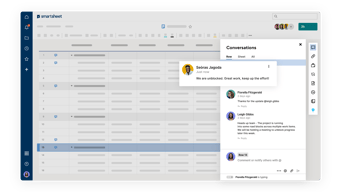
And using Smartsheet in all work related matters is truly out of enjoyment. The first one is smart sheets’ shortcuts and it makes more effective my daily operating. The real-time notifications is a gem; I can inform my team and the investors on the change on the project document or even the crucial milestone met. I also like the fact that these notifications are made for all of us to be within the same page and our targets are met in good time.
The Gantt chart view is sometimes hard to navigate. The columns, and the overall project navigation, seem a bit too simplistic for me, and I think there are more reasonable replacements available.
Smartsheet makes it possible to effectively manage projects, following all the tasks and meeting the deadlines. This reduces the communication barrier among team members hence increasing the effectiveness of collaboration. This has in turn minimized cases of project hiccups, resulting better results delivery from our side.
For the company, Smartsheet has transformed the game in terms of managing projects in my capacity as the manager for such projects. It contains Tier Management System that can help to monitor business metrics. I especially like its visual skills, which make the process of problem solving easier and foster improved clear communication. The project management features are intuitive and their automated notification system is a life saver especially when it comes to due date tracking.
The system is somewhat complicated when working with a big group unless everybody has received vigorous training though it is endowed with excellent visualization tools. Creating certain formulas might be very difficult, and some updates need the attention of the administrator.
Smartsheet tackles the problem of effectively combining various things of project management together. This helps in improved tracking, enhanced communication, and faster problem solving. It has really cut the amount of time that I am doing manual updates and brought it up a notch in terms of getting it to our team alignment.

It helps automate and streamline our work as a team
There is a bit of a learning curve and training is required for the team
Changing our finance workflow, our project dashboards for all of our teams and introducing project management to our teams
The formulas that can be setup to get the best data results. Easy report creation. Great dashboard options. I use Smartsheets daily for managing my projects and keep a data repository. Integrates well with Microsoft Teams. The customer support on the forums are very responsive. From what I understand, our Systems department found it a breeze to implement the system.
Some limitations on the dashboards can make it tough to get the results needed.
Having one system the whole company can use and not each department using a different platform makes Smartsheet a great tool for our business.
All information I submit can be accessed by me and my team in real-time from wherever we are, The team can also add data and collaborate.
currently, I like everything, my team currently only uses it for tracking and date
no emails needed no middle man all information needed is in Smartsheet all you have to do is log in and access the information needed
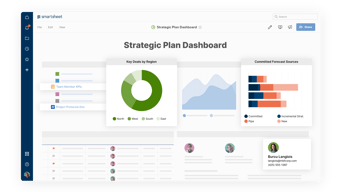
Smartsheet does an amazing job allowing you to add dependencies to any project plan. Project plans can easily be transformed into dashboards for automated, easy reporting.
The gantt chart function in Smartsheets is not very useful. It is hardest gantt function to look at compared to the other project management software I use. I often have to copy my information from the grid view to another software to make it useful for presentations.
I'm not 100% sure what Smartsheet is currently working on improving. It would be really nice if they would make it possible to link cells within the same sheet (this helps when a task applies to multiple parent row goals).

Interactive content. cell linking, dashboards, parent and child sheets thru reports. easy transition in terms of syntax from MS Excel to Smartsheet formulas. Well maintained environment. So far, only experienced 2 outages in a 2 year period.
Not all functions and formulas are available (maybe not yet). Data shuttle cost more and my company's subscription doesn't include it unfortunately.
Linking data together from different sheets is the best solution there is. It eliminates the tedious task of re-entering the same data in 3 or 4 different places. The simplification of the process allows our people leaders to spend more of their time with more important tasks.
I use this product in for several multi-vendor + multi-geo projects!
the gantt chart is hard for non-Smartsheet to digest. most folks wish it looked more like an xls gantt chart, tbh
It is great for controlling & sharing just the right level of access to vendors, customers & key project team members.
User Friendly, integration and feature capabilties. Keeps our business organized and on task. Has improved efficiency accross al departments, and allows for visibility. Accesibility over laptops, desktops and mobile devices is amazing.
I cannot think of any downsides at this time.
Organzing daily tasks Dividing workload Visibility into tasks

It is an easy way to manage simple projects and share files with clients without fuss.
Some functionalities are a little limited.
easy way to collaborate with external colleagues
I can speak from our own experience; Smartsheete has produced vast increments in our project management efficacy. This implies that team members can work together in data analysis without any problem. I prefer the task feature as it minimizes convenience and avails modifications in future. They have a very supportive team, which is always help. As a group, We became more uniformed through working Smartsheet.
My other major complaint relates to the learning curve of some of Smartsheet’s upgrades. Its priority is eliminating operational complexities and expediting various operations, but the continued changing of project management particulars sometimes disrupts our processes.
Smartsheet, in particular, deals with one of the major problems encountered when keeping a well managed arrangement of multiple tasks and projects. It has enabled reduction in the time spent on manual data entry and tracking. This basically makes the entire operation much easier and it is to my advantage, since it has shortened my time of doing admin.
Great tool to help with calobaration! I have used this quite often. All my team members love it as much as I do! Highly recommended.
There are currently nothing I dislike about Smartsheet.
I mainly use this as a planning tool.
Being able to keep all of our project details in one place AND have all parties have access has been a logistical dream.
I do wish some of the features were a bit more intuitive, IE indent allows for the collapsible topic. That wasn't very intuitive.
Keeping all parties on the same page with regard to project management has been the most helpful aspect of smart sheets
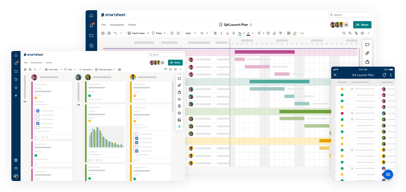
I have used smartsheet to do my daily tasks in the company for sometime now. I also like the crisp flexibility of the software in relation to my team. They have ensured that the cardview and sheets make it very easy to visualize the tasks and progress. Another force is the fact that all teammates obtain a timely picture of all that is ongoing in the generation of reports and dashboards. So, the whole experience has been a nice win and productivity boon.
There is however, the occasional software outages, especially on weekends. It is a little bit inconvenient since we work out of regular Monday-Friday operations and the system is integral in productivity regarding our business.
Smartsheet is filling the void between straightforward task tracking and complex project management. It is facilitating coordination and communication among different teams. This has saved me countless hours of manual tracking and sped up our deployment and maintenance windows.
the Simplicity of creating a project plan. each activity generates a gantt chartwhich heps in visualization of the project timelines
the formula configuration needs to be made simpler. predefined visual should help navigate those issues
a live view of milestones timelines, upcoming tasks, current status and priority items that need work on. it also allows me to look at the critical path. it is easier for me to present to our leadership team on the current status of the project
The ability to add collaborators and share with employees, vendors, and partners who do not have a license is valuable. It is easy to get started with a new project, and add on more detail and features as needed. It is convenient to attach external documents to a line item, and to comment on tasks.
An automatic "save" feature would be useful as new users are not accustomed to manually saving edits in a cloud-based tool.
Ability to track all tasks associated with numerous projects
With smartsheet’s real-time nature, I can know when someone from my team updates a document instantly. This is essential in the management of milestones in multiple projects and ensuring alignment. This allows me to conditionally format the tasks, and highlight them basing on the status. I stay updated on the changes done by people through notifications so that no task is missed. The shortcuts have made my work easy to attend to and without them, it would be very cumbersome to navigate and get things done.
When attempting to control what appears in columns, I feel that the gantt chart view can be a little difficult. At times, Navigation seems somewhat basic for me wanting something with better pointers to project management.
Smartsheet helps monitor all the cloud deployment this task is so intricate. This platform is essential as it mends diplomatic relations between my team members. This guarantees the fulfillment of our deliverables and recognizes the input of each member.
I lke the data presentation and alerts we can set for the reminders and also create the forms. Data can be well soted and grouped in reports and dashboards. I feel it's user-friendly. Applying formulas makes the reports/ data presentation in beneficial manner.
In dashboards may be we can add drop-down option for the data. So any user who uses it can see the required data on the dashboard. Also, i see there are certain limitations on the forms and pdf building with some minor changes, it can make the tool very best.
It helps me to build stunning dashboards as well as reports. Also, I can have the sheets to add the data as needed. I have used to show the burn down and statistics where team can understand the how the work is progressing.
So many things...I like the education part of it. I was able to learn on my own how to use Smartsheet. We now use it for many different reasons. I have become the go to person at our organization due to my abililty to create sheets for a variety of department processes. I was also able to integrate our Excel sheets into Smartsheet which was a very easy process. Their customer service is excellent! They have answered all of my questions and really helped me out.
I could use a bit more information regarding how to use functions and formulas.
Smartsheet allows us to keep all of our study information in one area for all study employees to review.
you can import MSP timelines and be able to share them with a wider audience or senior management without all the low level of details uncessary to make decisions
to complicated to filter data it should be more like Excel - Simple and user friendly
Sharing information amoung team members
It is easy to navigate and implement to others.
I do not have dislike about Smartsheet right now.
It allows all the data to be stored in one secure place for staff and I enjoy it because it is something I can edit and share quickly.
I use Smartsheet daily for tracking student data. It is so helpful being able link information from one sheet to another. It allows us to share details between departments. We use the sheets for tracking compliance and being about to send notifications and setting up the conditional formatting makes sure nothing gets missed and allows someone to look at the sheet and go directly to rows that require immediate attention.
The formulas are the most difficult part, but the community page has been extremely helpful. I would love the option to have a history in case a row gets deleted from a sheet by accident.
Smartsheet allows us to house necessary data for our students and allows us to share information out to different members of the school across departments. I love the ability to create a report to share with staff who don't need access to the entire sheet so it's not overwhelming and keeps "less hands in the pot" to decrease error.
I have used Smartsheet at 3 companies. I love the ability to track data and use sheets with multiple viewers.
Sometimes I have difficulty with the Dashboard data and the 'look' of my dashboards.
Smartsheet is solving the ease of view of data for our team and our executives.
Simple, easy to use software. In addition to it being simple, there are multiple features that make it user friendly. Also has plenty of training videos if you are unsure of what to do or next steps to take.
Using formulas are not easy. Especially cross sheets.
Time management, Resource Management. Helps with tracking, etc
It is easy to use and doesn't require advance coding knowledge to create very useful tools and solutions. It has a good number of components and templates that can easily be adaptable to your needs. It has a community of users where you can find solutions to particular problems.
Although improvements have been made in the last few years, the ability to edit and create dashboards is limited. Last time I checked the training/technical support it is an add-on that has to be purchased for all licensed users, making it not very budget friendly
Building trackers, checklists and simple "databases" combined with workflow options. Overall workplanning for projects and teams.
I could collaborate with my team in real-time using Smartsheet. The centralization of all our data allowed a smooth execution of our project. The custom spreadsheets made the tracking of tasks efficient and helped us to closely monitor calendar events and upcoming deadlines. The process automation has been one of the outstanding inclusions that have reduced the level of manual interventions drastically in my my workflows
Smartsheet has many great features, but the user interface is not always very self-intuitive. The templates can be confusing sometimes, even though they are fully customizable and as you go deeper in project management. I think the charting and reporting features need some sort of simplification.
I, therefore think that Smartsheet is the course to tack in solving issues of keeping my team’ll synchronized and projects on track. Real time updates and automation ensures no tasks are left out. This really increased our efficiency and I like that it is centralised in one point.
I can build my control figures, and the dashboards which make an easy integration between the data and figures. Customer support follow-up.
Required training videos, short, direct videos that can explain the customer needs.
Easy follow up and support getting the best results.
Able to send auto-reminders Automation tool is great
Nothing, I don't dislike anything.It's a perfect software
I can create Gantt charts and update percentage of completion.
Streamlines everything needed to run a company
If a sheet is too big then when you fix a formula, it does not reflect the change until sometimes an hour later.
We have created our budgets with Smartsheet and it greatly improves being able to look at items with a quick glance via reports.
My favourite feature about SmartSheet is the ability to use the tool as part of a core central hub of Project Management resources. It is templatable, transferable and interactive. It allow you to manage vital project functions, such as activity timelines, status trackers and budget trackers working in the open. It is also easy to integrate with the client team and is a tool that they find simple and easy to review. I use it every day in my role as a Senior Project Manager, and it is a vital central source of truth for all my activities.
The most challenging thing about SmartSheet is the coding functionality. I find this a little clunkier and more complex to set-up than Microsoft Word. I would also value a feature whereby you can see when people last accessed each sheet.
SmartSheet is the vital tool for day-to-day Project Management. I use it in conjunction with Trello (via links out) to document a real-time project timeline for all of my client accounts and individual activites, and a real-time budget tracker. Alongside the Trello board these 3x resources are positioned as the central source of truth for the client. This promotes a number of different benefits. Firstly, client experience. The clients value the real-time and centralised view that the SmartSheet affords. It is easy to utilise, consumable and reliable. It also has a much better UX / look and feel than Google Sheets. A happy and informed client makes my day-to-day life much easier. Secondly, for our internal teams it promotes coordination and efficiency. They know what they are doing on any given day, and they have oversight of when future work will hit the studio. This majorly relieves the burden on me having to repeatedly communicate the same information with them. And finally, it promotes accuracy in terms of tracking financials and forecasting in the studio.