

Unclaimed: Are are working at Asana ?
Asana Reviews & Product Details
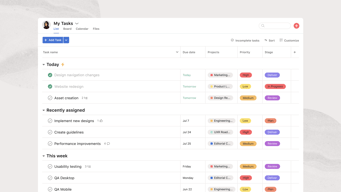
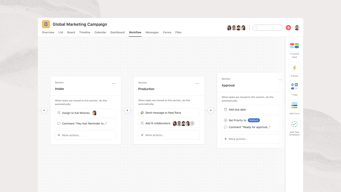
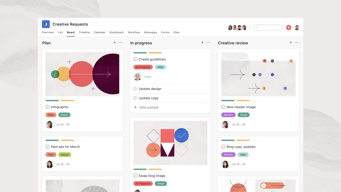
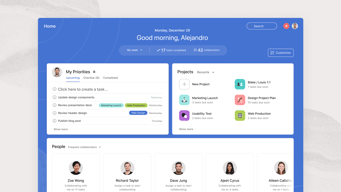
Considered one of the pioneering cloud-based project management tools, Asana offers four views for its users – List View, Timeline, Calendar, and Boards – all of which help teams get both a macro and micro view of all the moving parts of projects and tasks. It provides a comprehensive roadmap of ongoing projects from start to finish, clearly outlining dependencies, project milestones, and feedback and approval processes. For project managers, strong reporting capabilities that show completion rates, individual workloads, and potential delays just to name a few create opportunities for real-time project optimization, collaboration, stronger forecasting, and better planning for future similar projects.




| Capabilities |
API
|
|---|---|
| Segment |
Small Business
Mid Market
Enterprise
|
| Deployment | Cloud / SaaS / Web-Based, Mobile Android, Mobile iPad, Mobile iPhone |
| Support | 24/7 (Live rep), Chat, Email/Help Desk, FAQs/Forum, Knowledge Base, Phone Support |
| Training | Documentation |
| Languages | English |
Asana Pros and Cons
- Tons of great integrations
- Easy to use and clean environment
- Lots of timeline tracking tools
- Automation features built-in
- Various customization options
- No budgeting or invoicing features
- The volume of features can be overwhelming
- No time tracking feature
- The volume of features can be overwhelming
- No time tracking feature







Compare Asana with other popular tools in the same category.
Asana has been a game-changer for our agency. We have set up teams and boards for every account and can assign just those who are on that team to the account. With it, we have become more efficient, on task, and very organized. You can look at your tasks for the day and upcoming in an easy glance. Project managers can look at open tasks and follow up to push them through to completion. It's easy to search through old tasks with keywords and easily see attachments, completed work, notes etc. Task duplication and recurring tasks can be done with ease. Asana integrates with Everhour for time tracking by task and Fellow and Slack for seamless task creation. We are a very large agency with many clients and multiple tasks running simultaneously. It would be not easy to track where we are on items without Asana. Each of our team members uses it all day, everyday.
The only downside I can think of is there is a learning curve with it. At first, users may find it daunting and confusing. That's only because there is SO MUCH you can do with it. Once you learn how it works and how you can use it to its full potential, it is an absolute game changer.
Organization, on-time task completion, time tracking spent on tasks, and employee accountability. All of these things allow us to complete items on time, accountable and collaboratively.
Pageproof integrations and Calendar views. A great time to be a member as they are currently in a fast phase in terms of releasing new product features and automation.
No portal, no SLA system preset. Still a lot to go in terms of features and automation.
Workload and capacity issues.
Asana's intuitive interface and robust task management features are exceptional. The platform's flexibility in creating and organizing projects, coupled with its seamless collaboration tools,
While Asana is a powerful tool, the learning curve for new users can be a bit steep. Additionally, some advanced features are available only in the premium plans, which might be a limitation for smaller teams with budget constraints.
Asana has addressed the challenge of coordinating and tracking tasks across our team. By providing a centralized platform for project management, Asana has improved communication, task visibility, and overall efficiency, leading to more successful project outcomes.
Asana is a great way to get yourself organized, whether for your personal life or business. It's an excellent tool for checklists, collaborating with team memebers, project ideas, getting approvals on social media images, etc.! The list goes on!
There is nothing to dislike about Asana as it is straightforward to use once you get the hang of it. if the email notifications of tasks get too much, you can turn them off and go into the app and check your inbox there! With Asana, you have options!
Asana is great when you work with a team and develop the idea that you want to expand on. Everything is in one place. It is also a great tool to task out projects to other team members. It's a beautiful tool that truly helps you, and everyone else stays orgnaized. It gives you accountability too!
Asana stands out as the best project management software, and it's an incredibly user-friendly tool. The free version is a gem, providing access to a comprehensive set of features, including automation capabilities that have proven to be a game-changer for me. The seamless integrations with Zoom, GitHub, and other tools make collaboration a breeze, and the added advantage of project status reports has been immensely beneficial. As a user, I appreciate the robust features and user-friendly interface that Asana brings to the table.
Asana tends to be pricier compared to other project management software options. Additionally, users have reported challenges with customer service.
Asana stands out as a premier work management platform, offering an array of features and functionalities that enable me to effortlessly track tasks, collaborate on projects, and more. This tool has been instrumental in helping me keep a record of my critical tasks, and I'm pleased with the positive impact it has had on my productivity.
The software is great for teams that include a wide array of career experience and hold various levels across our firm. It's userfriendliness and feature that allows for projects and subtasks makes sure that no item falls through the cracks.
Not much to dislike about this product. Hacving never used a project management tool in the past I have little to compare it to, but I also have nothing to dislike about the product. Would recommend to any person or company that is in the marker.
With a lot of our client work we often have not only multiple work streams but also multiple side projects. This tool helps to make sure work stream leads are putting in place workback plans and ensures that even the smallest item doesn't fall through the cracks.

This tool is very helpful for managing the product in an organized way. The UI of the tool is very impressive. We can see our task in a single place.
It is not an open-source tool. This tool is expensive compared to other similar software.
This tool is very helpful to stay organized and provide visibility to my colleagues with my individual work.
Incredibly useful tool especially nowadays with WFH it is very rare to have everyone on a team in the office and within walking distance to ask questions or stay on top of. Asana allows us the ability to assign and monitor each other's progress. I think even if we all returned to the office full time it would still be used as it just helps us remove so much wasted time and we are able to immediately identify where we are falling behind and support one another as a team to complete our targets and consistently meet deadlines I wish I had thise years ago.
Nothing it did take a little while for me to be comfortable assigning and monitoring a large team but only a few days and I have been the go-to person when hiring new people to ensure they are up to speed with Asana and how our team operates.
Managing multiple projects is always difficult esecially the smaller insignificant ones that often can get away from us. By setting deadlines and reviewing peoples comments and explanations as to why a deadline has or hasnt been met on time I can advise from Asana without the need to meet dozens of people individually saving myself and them time

Interfaz fácil de usar: la interfaz de Asana es fácil de usar e intuitiva, lo que facilita la navegación por la plataforma y la realización de tareas específicas.Gran variedad de funcionalidades: puede crear y asignar tareas, monitorear el progreso de las tareas, colaborar en equipo y comunicarse con los miembros del equipo entre otras cosas. Esto lo convierte en una herramienta extremadamente versátil y útil para una variedad de tipos de proyectos.
Lo que más me cuesta es poder pegar texto en las tareas, como que borra todo el formato y el texto queda feo, eso me complica cuando tengo las tareas para copiar y pegar. Personalmente la forma de borrar tareas me parece un poco tediosa, ya que son dos botones y no es tan intuitivo
Nos ayuda en el trabajo a mantener relaciones todos los equipos. Las integraciones son útiles: Se mejora aún más la colaboración y la comunicación en equipo al integrarse con una variedad de otras herramientas y plataformas, como Slack y Google Drive.

I like that I can communicate with my team.
I don't have any complaints about this tool.
I am not worrying that emails will be marked spam or get lost in the team's inbox.