Unclaimed: Are you working at GoToWebinar?
GoToWebinar Reviews: 4.3/5 — Solid Choice
Best known as the world most popular webinar and webcasting tool, GoTo Webinar is an easy-to-use solution that allows users to host webinars, virtual conferences and events. The platform comes with robust features and integrations that allow users to engage with audiences to drive business growth.
| Company | LogMeIn, Inc. |
|---|---|
| Year founded | 2003 |
| Company size | 1001-5000 employees |
| Headquarters | Boston, MA, United States |
| Social Media |

| Capabilities |
API
|
|---|---|
| Segment |
Small Business
Mid Market
Enterprise
|
| Deployment | Cloud / SaaS / Web-Based, Desktop Mac, Desktop Windows, Mobile Android, Mobile iPad, Mobile iPhone, On-Premise Linux |
| Support | 24/7 (Live rep), Chat, Email/Help Desk, FAQs/Forum, Knowledge Base, Phone Support |
| Training | Documentation |
| Languages | English |
GoToWebinar Pros and Cons
- Hosts automated webinars
- Option to simultaneously host organizers and panelists
- Capable of hosting webcasts
- Provides webinar analytics and exports
- Integration with GoToMeeting
- Costly compared to other alternatives
- Basic plan only accomodates 100 webinar attendees
- Requires presenters and participants to download specific software to be able to use platform






GoTo Webinar is one of the longest-running webinar platforms, and it sells reliability at scale rather than the newest features. If you are running regular webinars for hundreds of attendees and the cost of a technical failure is high, that track record is what you are paying for. If you are running your first webinar for forty people, it is an expensive way to do it.
- What it is: Webinar and virtual event software with registration, automated email sequences, polls, Q&A, analytics, and attendee-facing simplicity.
- Best for: Marketing, training, and enablement teams running webinars regularly at 500+ attendee scale, particularly in enterprise and regulated environments.
- Pricing: Reach $59/month and Elevate $103/month billed annually ($69 and $129 monthly). Complete is custom. A 7-day free trial, no free plan. Verified on GoTo’s pricing page in July 2026.
- The honest catch: Cloud recording, arguably the most basic webinar feature there is, sits on Elevate rather than the entry plan. For most buyers that makes $103/month the real starting price.
What Is GoTo Webinar?

GoTo Webinar launched in 2006 as part of the Citrix GoTo family, later spun out into GoTo as an independent company alongside GoTo Meeting, GoTo Training, and the LogMeIn products. That two-decade history matters more here than in most software categories, because a webinar fails publicly and in real time, and buyers with an audience watching tend to weight reliability above feature count.
The product is built around a straightforward loop: create a registration page, drive signups, send automated reminders, run the event with engagement tools, then follow up with recordings and analytics. It does that loop well and has done it for a long time. What it does not do is compete on innovation with newer platforms that ship more aggressively.
The independent ratings are respectable but not uniformly glowing, and the gap between them is instructive: 4.5 out of 5 on Capterra across 2,073 reviews, but roughly 4.2 out of 5 on G2 across about 801 reviews. Reviewers consistently praise attendee-side ease and large-audience handling, and consistently raise cost and occasional audio and video problems.
How GoTo Webinar Works
- Registration and promotion. Custom registration pages, automated confirmation and reminder emails, and source tracking so you can see which channel produced which registrants. The email automation is mature and is the part marketing teams rely on most.
- Running the event. Presenter tools, screen sharing, polls, surveys, live Q&A, and handouts. Attendees join without installing anything, which reviewers repeatedly call out as a genuine advantage with non-technical audiences.
- Recording and reuse. Cloud recordings on Elevate and above, plus the ability to run a recording as a live event, which is the simulive pattern used for repeatable demand-generation webinars.
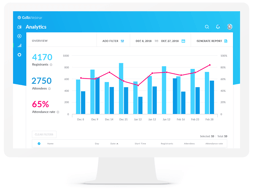
- Analytics. Attendance, engagement, and drop-off reporting, plus registration source tracking on the Complete tier, with integrations into HubSpot and Salesforce that reviewers describe as reliable.
- Scale. 500 participants on Reach, 1,000 on Elevate, and up to 3,000 on Complete, with live streaming to unlimited attendees at the top tier.
In 2026 the notable additions are AI summaries and transcripts on Elevate, and breakout rooms. Both are useful, though neither is unique at this price point any more.
GoTo Webinar Pricing
Pricing is per organizer seat and gated primarily on participant count. Figures verified in USD on GoTo’s webinar pricing page in July 2026.

| Plan | Annual (per mo) | Monthly | Participants | Key additions |
|---|---|---|---|---|
| Reach | $59 | $69 | 500 | 1 organizer seat, reporting and analytics, automated reminders and follow-ups, polls and live Q&A, mobile hosting |
| Elevate | $103 | $129 | 1,000 | Branded webinars and custom URLs, cloud recordings, AI summaries and transcripts, recordings as live events, breakout rooms |
| Complete | Custom | Custom | 3,000 | Custom organizer seats, live streaming to unlimited attendees, paid events and certified training, GoTo Meeting license, registration source tracking |
The things that change the calculation:
- Cloud recording starts on Elevate. This is the single most important detail in the pricing. Recording a webinar is table stakes, and putting it on the middle tier effectively makes $103/month the entry price for most buyers rather than $59.
- Branding also starts on Elevate. Custom URLs and branded webinars are not on Reach, which matters if the webinar is a marketing asset representing your company.
- Annual billing saves 14% to 20%. Reach drops from $69 to $59 and Elevate from $129 to $103, so the discount is larger on the plan most people need.
- Per-organizer, not per-attendee. Reach includes one organizer seat. Multiple hosts running independent webinars means multiple seats, which climbs quickly.
- There is no free plan. The trial is 7 days with no credit card required, which is short. Plan the webinar you want to test before you start the clock.
Who Should Use GoTo Webinar
- Teams running webinars as a regular programme. The registration, reminder, and follow-up automation is genuinely mature, and it is the difference between a webinar that fills and one that does not.
- Organizations with large or non-technical audiences. No-download attendee joining and proven handling of 500 to 3,000 participants are real strengths.
- Enterprise and regulated buyers. A long track record, established security posture, and reliable HubSpot and Salesforce integrations matter when procurement is involved.
- Training and certification teams. Paid events and certified training on the Complete tier, plus the sibling GoTo Training product, cover a use case most webinar tools ignore.
It is a weak fit for solo creators, small businesses running occasional webinars, and anyone whose priority is marketing-funnel features like evergreen automated webinars. In those cases you are paying enterprise prices for capabilities you will not use, and the alternatives below serve you better.
Honest Pros and Cons
Strengths
- Reliability at scale is the core proposition. Two decades of running large events shows in a platform that handles hundreds of attendees without drama.
- Attendees do not need to install anything. Repeatedly praised in reviews, and it directly reduces the number of people who register but fail to attend.
- Mature email automation. Registration, reminders, and follow-ups are well built and are the operational backbone of a recurring webinar programme.
- Solid integrations. HubSpot and Salesforce connections are described as seamless by reviewers, which matters for lead routing.
- Simulive. Running a recording as a live event is a genuinely useful pattern for repeatable demand generation, though it requires Elevate.
Limitations
- Expensive relative to the category. The most common complaint in independent reviews, especially from small businesses. Competitors deliver comparable core functionality for less.
- Recording is gated to the middle tier. Hard to defend, and it materially changes the real entry price.
- Occasional audio and video problems. Some reviewers report technical issues serious enough to have driven them to competitors. Not universal, but it appears often enough to note.
- Limited branding and customization. Reviewers want more control over branding and more editing options for pre-recorded content.
- A 7-day trial is short. Barely enough to plan, promote, and run a real webinar, which is the only meaningful test.
- Fewer marketing-funnel features. Evergreen and automated webinar funnels are weaker here than in tools built specifically for that job.
GoTo Webinar Alternatives and How It Compares
- Demio is the strongest comparison for marketing teams. Browser-based, cleaner interface, better suited to demand generation, and generally cheaper.
- Livestorm is browser-based with a genuinely usable free tier and strong analytics, and it appeals to teams that find GoTo’s interface dated.
- WebinarJam targets marketers and online sellers, with strong funnel and evergreen features through EverWebinar, at the cost of a busier interface.
- ClickMeeting is a lower-cost, flexible European alternative worth comparing if data residency matters.
- Zoho Meeting is dramatically cheaper and adequate for straightforward webinars, particularly if you already use Zoho.
- Zoom Webinars is the default comparison for organizations already standardized on Zoom, and often wins on price and familiarity alone.
For a fuller comparison, see our guide to the best webinar software.
The Verdict
GoTo Webinar is a dependable, well-integrated platform that earns its place with organizations for whom a failed webinar is a serious problem. The registration and email automation is mature, attendees join without friction, and large audiences are handled without incident. The 4.5/5 Capterra rating across more than 2,000 reviews reflects a product that does the fundamentals well.
The pricing is the sticking point, and specifically the decision to put cloud recording on the middle tier. Once you accept that Elevate at $103/month is the realistic entry point, GoTo Webinar is expensive against a field where Demio, Livestorm, and ClickMeeting deliver comparable core functionality for less. The honest answer is that you are paying for reliability and enterprise-readiness, and whether that premium is worth it depends entirely on what a failed event would cost you.
If you run a serious, recurring webinar programme in an organization that cares about vendor stability and Salesforce integration, this is a defensible choice. If you are a small team or a creator building a marketing funnel, Demio or WebinarJam will serve you better for less money. Whichever way you lean, plan your test webinar before starting the 7-day trial, because it is too short to waste.
FAQ
Is there a free version of GoTo Webinar?
No. GoTo Webinar offers a 7-day free trial with no credit card required, but there is no permanent free plan. Paid plans start at $59/month billed annually. If a free tier is important, Livestorm offers one with limited attendee and duration caps.
How much does GoTo Webinar cost in 2026?
Reach is $59/month billed annually or $69 billed monthly, and supports up to 500 participants. Elevate is $103/month billed annually or $129 monthly, and supports up to 1,000 participants. Complete is custom priced and supports up to 3,000 participants with live streaming to unlimited attendees.
Does GoTo Webinar record webinars?
Yes, but cloud recording is only available on the Elevate plan and above, not on the entry-level Reach plan. Since recording is a basic requirement for most webinar programmes, this effectively makes Elevate at $103/month the practical starting tier rather than the advertised $59.
How many attendees can GoTo Webinar handle?
Reach supports up to 500 participants, Elevate up to 1,000, and Complete up to 3,000, with the option to live stream to unlimited attendees on the Complete tier. Participant capacity is the main dimension the plans are gated on.
What is GoTo Webinar best for?
Organizations running webinars as a regular programme at meaningful scale, where reliability, mature registration and reminder automation, and CRM integration matter more than the newest features or the lowest price. It is particularly well suited to training, enablement, and enterprise marketing teams.

Compare GoToWebinar with other popular tools in the same category.
I like that you can conduct a webinar or online demonstration easily with this tool. You can create a registration form, send reminder emails and share your screen as you speak to your audience. People can use their computer audio or they can call in to hear you and they can ask questions along the way.
You can print reports, but it would be nice if you could easily integrate the attendee list with your database directly from GoToWebinar.
We use this software to provide training to our customers. It's a great way to get new people on our list and it also adds value for our existing customers.

I am a big fan of dedicated registration pages that have 2 sections for branding. Often I host guests on my webinars and it's very useful being able to promote my company as well as the guest's company.
I'm not a big fan of the process to run reports after a webinar. There are multiple reports you can run, but you have to set the criteria for finding the webinar you'd like even if it had ended a few minutes prior. There should be defaults to run reports on the most recent webinar instead of forcing users to find the webinar every time they want to run a report.
Registration for web-based meetings and presentation is critical. GoToWebinar sends automatic and custom follow ups to attendees and a separate one for people who registered but didn't attend. This is really useful in freeing up time following a webinar. The screen sharing quality is better on GoToWebinar than any other option out there and that makes all the difference when showing detailed collateral. Couldn't do my job without it!
I think GoToWebinar is as good as it gets.
There really is not much to dislike its a simple straight forward tool.
I wouldn't say it solves problems as much as making it easy to have group calls and collaborate.

This platform is complex enough to work with a number of different types of webinars - involving poll questions, handouts, multiple speakers, etc - but simple enough to be able to explain to a novice in a short amount of time. I like the design of the control panel and way various modules can be detached for more focus.
The platform can be a bit buggy and its functionality can be very dependent on the robustness of your internet connection. While it's a little detail, I also don't like how the presentation goes to a hold screen when changing presenters. I think it would be more fluid to stay on the current presenter's screen and then transfer directly to next presenter's screen, without a holding slide.
Our business is based around providing webinars for our clients, so finding a dedicated software was very important to us. Attendees have the option of downloading the software or viewing the webinar in our browser which allows us to have a broader reach for our events.
Ease of use, interface layout & design. The great thing is that you don't really notice the program so you can focus on the content at hand.
Connection issues, & audio levels drop out from time to time which causes me much irritation.
It's great to be able to professionally setup meetings with the comforts of your office and/or studio.
It always works well all the time when I use it.
Nothing to report regarding Citrix GoTo Webinar.
Meetings/Conferences with remote personnel.
This product is very easy to use. The display is easy to manuever.
Sometimes it is difficult to see all users and all aspects of the screen.
Training
I like the ability to remotely log into a webinar and watch a talk without having to open software like skype. Webinar is easy to use, features the ability to follow along live with a presentation and download whatever material the presenter shares, all in one place. It's convenient to be able to ask questions via text as well as microphone as well. Easy learning curve for viewers.
There isn't anything in particular that I disliked about webinar.
I, along with mulitple other students, was able to tune into a seminar from various locations across canada with minimal effort. There was no need to download a huge program or create an account or go through any kind of trouble to use webinar, and this makes web conferencing effortless and convenient and quick to jump into. I would definitely go to more webinars through this service as I have seen how easy to use and convenient the program is.
The interface is fantastic and very simple to use; don't take that to mean that it is lacking in features however. It is a feature rich product indeed.
A few unnecessary features exist, but honestly, that is just me perfering a very minimalist approach to all of the software that I use.
It has allowed us to have greatly expanded professional development opportunities for our staff.
Great for bringing together audiences that are far away, whether it be a national conference, or training for new employees. Its ease of use and multiple features make it great for companies of any size, or those looking to reach a broad, widespread audience.
Unfortunately, it does not have the best interface for new users. Also, sometimes participants lose connection for either audio or video, which leads to buffering, making them fall behind in the conference.
We were attempting to train employees on new software that we had acquired, but had offices in multiple states.
Clean and simple interface that is easy to use even for non-techies.
Would like a bit more customization options and some basic editing tools for recordings.
Communicating with a large globally dispersed workforce.
Webinars are easy to access by PC or phone-in. The platform is stable and reliable during sessions and features during Webinars are easy to navigate.
Having to enter Meeting Code by cutting-and-pasting or referring multiple times to the invitation email and typing it in.
Conferencing with multiple members of a team on a conference call, being able to share ideas by sharing screens.
We use GoToWebinar to disseminate specific and interdisciplinary clinical education across a vast health region. I like GoToWebinar's simple and almost seamless registration and subsequent reminder system - very useful for people who are providing care and trying to balance professional development. The controls and layout are generally user friendly and approachable for audiences with lower digital literacy or are unfamiliar with web-based education. It is also reasonably priced for the number of webinars we host and the average number of attendees (about 50-100 per course)
I haven't few to no issues using GoToWebinar. Occasionally with very large group sessions there may be some lag and skips when using the record feature, but this is likely more a connectivity issue than a software.
GoToWebinar offers a reliable and responsive system for staff and physician education. This is a aligned with our goal to support the continual growth and development of our employees, which ultimately benefits and improves patient care. GoToWebinar improves our reach and allows more employees to participate in professional development and shared learning.
It works on all devices. You can view on phones, tablets, PCs and Macs - or you can call into listen.
It doesn't uninstall previous versions on my Mac when an update happens.
We teach classes four days per week via the webinar.

This platform is great for video conferencing. It's easy for the leader to use their webcam to present themselves and do a screen share.
i have not found anything i dislike so far!
web conferencing with international clients
I like the fact that presentations can be shared to many people in different places.
Sometimes there is a freeze ups or the presentation is going and no sound.
It's a great way of showing presentations to many people in different places. No need to have people in the same room or place.
The ease of scheduling reoccuring webinars.
If the host disconnects from the conference without saving the recording, getting that recording back seems to be a struggle.
We use GoToWebinar for all our weekly calls for coaches since we have coaches all over the world.
We can now listen to a webinar remotely instead of traveling/having the speaker come in. Easy to mute all lines
So many people on one line. Sometimes have audio problems hearing the speaker.
No longer need to hire a speaker to come in for our annual continuing education.
It's so easy for me to learn from home or anywhere. I use it mostly for online training with my job. I am a Realtor and it's awesome for checking out classes.
I don't have any dislikes. I think the product works as needed.
I no longer have to drive to a place for a meeting. It's so simple to just hope on anytime from any where and just join the conversation or class.

The interface is very user friendly and I appreciate the easy to use tools that are offered such as mute, chat, record, choice of phone or VoIP. I also like the easy process for the attendee to sign into sessions.
I don't like that we cannot set a cutoff time for late entry. This allows attendees to join late and cause a disruption during the session. What is available is the ability to dismiss any attendee but when this is done, the attendee gets a message stating "the organizer has dismissed you" Giving polls is an awesome tool but I'd like to be able to save the pools so that I can use the same pool in every session instead of creating the poll everytime I schedule a session.
I conduct online training to businesses around the world who have or are interested in our software. The ability to conduct this online saves money and time. Our members do not have to come to our locations and we have minimized traveling for our training specialists.
Very easy interface to use and some customization features are appealing. The ease of recording is also very nice. I don't usually use their registration system but the few times I have I find it easy and have not heard many complaints from my users. I also like the mobile access features.
The lack of decent video streaming (if I wanted to play a video during my presentation). Although I hear they are fixing this with a new release, I'm still listing it here. I also don't care for the fact that I can't use my phone/tablets camera as a webcam when I use the mobile version.
Running an education program, we were looking for a solution that allowed many of our attendees outside of the metro area to attend trainings. GTW turned out to be a great solution for a variety of reasons: 1) inexpensive (when compared to others) 2) recording feature allowed us to share with those whose schedules didn't allow for live attendance and 3) Chat Logs capture questions (and answers) allowing us to go back and follow up with attendees that needed extra attention.
I like that GoTo Webinar is simple to use and has integrations with other products.
The user interface is not very intuitive at times.
GoTo Webinar solves the problem of needing somewhere to host external webinars. This benefits CAPTRUST in getting our message out to clients and prospects.
Great enterprise-level solution with good support
A bit pricey compared to other solutions
running webinars with large audiences

It enhances chances for potential clients to discover our most engaging content.
Goto webanir has no space I can complain for.
We are able to see who is watching our content and how they are engaging with it.
Automates events planning and execution which saves time and finances. With GTW, I am able to share codes with colleagues from anywhere with just a click.
GoTo Webinar seldom sync data when offline and iOS app doesn't have tutorials for features.
Registration and ticketing attendees for events Event marketing boost our brand.
recording options, options to leave and re-enter meeting
can't zoom in to see the screen larger, can't comment/chat
can't always see the screen with all the presenter pics

As an event planner, its very easy to configure and manage webinars in GTW
Limited out of the box options to integrate with third-party systems
Event planning and analytics
Robust and dependable product, effortless to use. This was a good experience with no significant drawbacks; some features are absent from my liking, but the overall performance fulfills what I have been seeking and solves problems in a timely and realistic manner. What I enjoy best about this is that we may pay yearly or monthly and receive a rebate. GoToWebinar's reporting functions are my favorite. I may download enrollment records, assess participation, and examine pre- and post-webinar questionnaires, polling, and survey responses.
Some hassles while giving a presentation on full-screen mode; I've had various issues with certain audio and mic settings over the previous 2 years. GotoWebinar includes a lot of choices, which may be confusing for some customers. As a participant, I've experienced trouble accessing the system on a few occasions, however, this only occurred once or twice in all the instances I've utilized it.
Different methods for searching for and locating highly secure meetings throughout the previous 2 years I've had no big issues talking with folks from different groups or joining numerous sessions with remarkable consistency. GoTo Webinar provides all of the features needed to effectively deliver a presentation to a public of 250 - 3000 people, based on the package that we select.
My Point of view, the best service of webinar is brand awareness or Lead that help us more. Another thing is improve our sales using effective leads. Overall its very nice.
Interface should improve. And time not over one an hour of overall presentation time.
Lot's of problem that is solved by webinar. Organize many event and fullfil using this and it was more beneficial for us.

Anyone can join the GoTo webinar without any account needed and it's completely free to use. Additionally, all their features are secured and encrypted. I'm a HubSpot user so I like the integration part.
Not very impactful landing pages and not too many ways to personalize the experience. The product can be made better with more intuitiveness for mobile users and improving the customer support.
Integration with online event software. Reporting and Analytics that saves cost. Saves time and effort with online events collaboration and marketing events online.