

Unclaimed: Are you working at Pipedrive?
Pipedrive Reviews: 4.2/5 — Solid Choice
Pipedrive is a web-based sales CRM platform that provides users full visibility of all active sales pipelines. It’s best known for its interactive user interface that displays detailed progress stages for every deal, along with key details an actionable items. The platform was specifically built using activity-based selling-methodology. Its mailing system also seamlessly integrates with major email service providers.
Pipedrive is also often used as CRM of choice in Venture Capital and Sales tech stacks.

| Capabilities |
API
|
|---|---|
| Segment |
Small Business
Mid Market
Enterprise
|
| Ease of use |
Beginner
Intermediate
|
| Deployment | Cloud / SaaS / Web-Based, Mobile Android, Mobile iPad, Mobile iPhone |
| Support | 24/7 (Live rep), Chat, Email/Help Desk, FAQs/Forum, Knowledge Base, Phone Support |
| Training | Documentation, In Person, Live Online, Videos, Webinars |
| Languages | Dutch, English, French, German, Italian, Polish, Portuguese, Spanish, Turkish |
Pipedrive Pros and Cons
- Straightforward and intuitive user interface
- Unlimited custom fields for collecting customer information
- Easily track deals, values, and win probabilities
- Access custom reports to track recurring revenue
- Examine individual sales calls, emails, and demos
- Limited functionality for bigger businesses
- Problems with list separation







Pipedrive Review: Does This Popular CRM Live Up to the Hype?
Sales reps need to be able to juggle a lot of information—especially on high-velocity teams where they’re dealing with 400+ leads per month. How do they manage?
By using a reliable sales CRM to help them manage the work better.
One of the more popular CRM options out there is Pipedrive—but does it live up to the hype? In this Findstack review, we’re taking a deep dive to answer that very question.
What is Pipedrive?
Pipedrive describes itself as “the first CRM designed by salespeople, for salespeople”.
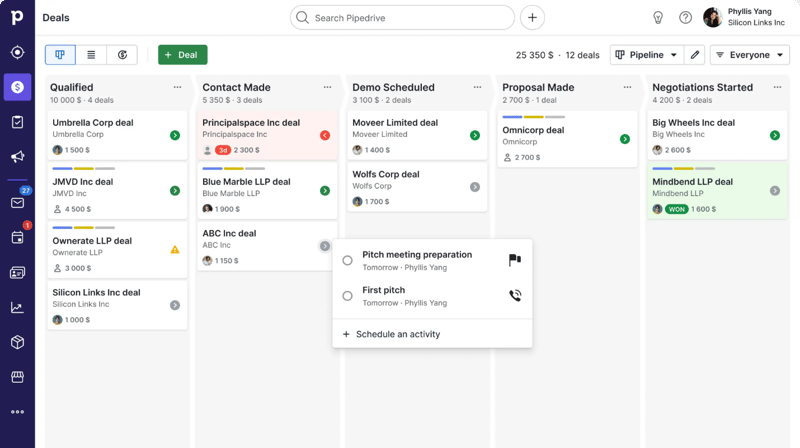
While it probably isn’t the first, the rest is true—it’s a CRM specifically designed to fit a sales team’s unique needs and processes. The software is designed to help teams better manage their sales pipelines, making it easier to track leads and opportunities, manage customers, and automate busywork—all in one place.
Getting Started with Pipedrive
Getting started with Pipedrive is a super easy process. Before diving into the tool’s actual features, there are only really three things you need to do:
- Set up your pipeline stages. Stages are fully customizable, so they can reflect the specific process you have in place.
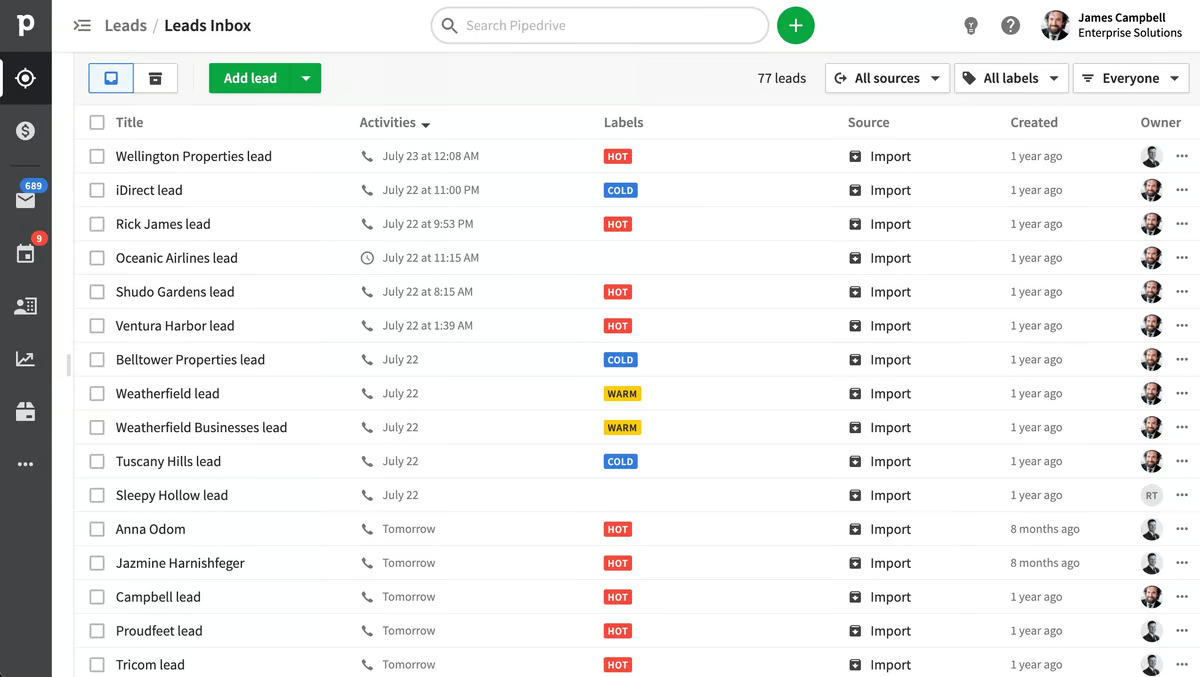
- Add deals and contacts. You can add deals and contacts manually, import them via a CSV file, or import them from another tool.
- Invite your team and set access controls. You can invite users to the platform via bulk email invitations. You can also choose which team members will have access to certain data points.
Once you’ve completed these three steps, it’s time to start exploring the platform.
Pipedrive Key Features
Sales Pipeline & Deals
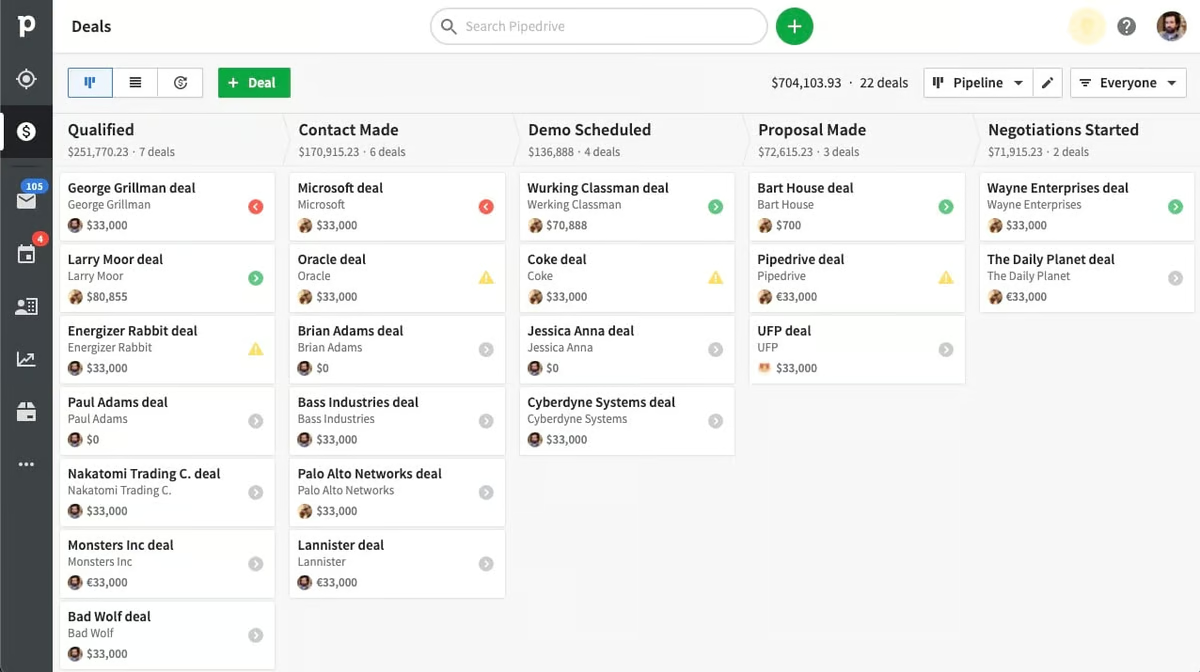
Pipelines and deals are Pipedrive’s (and every other sales CRM’s) bread and butter. They’re visual representations of your sales process, including stages, deal flow, and the status of your current deals.
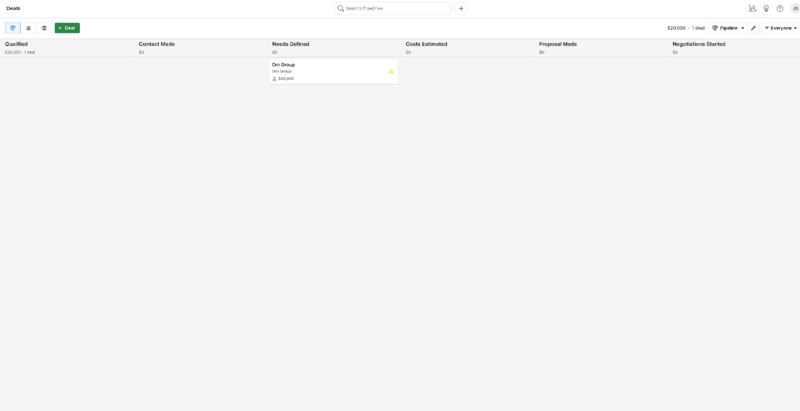
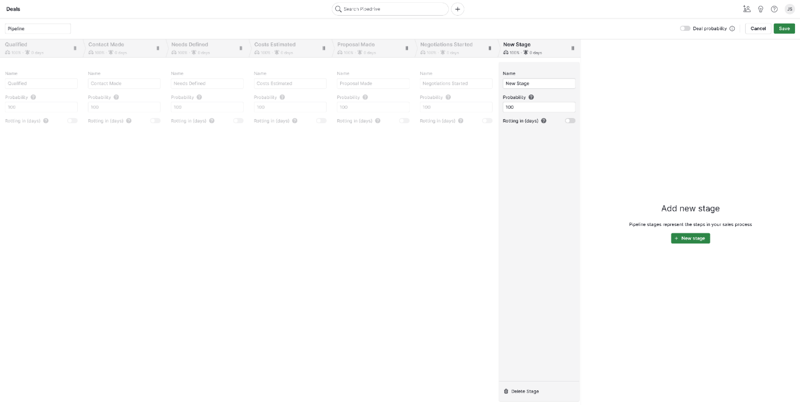
In Pipedrive, pipelines are completely customizable. You can easily add new stages to the pipeline and adjust the order of stages by dragging and dropping—just click “Edit Pipeline” in the upper right-hand corner.
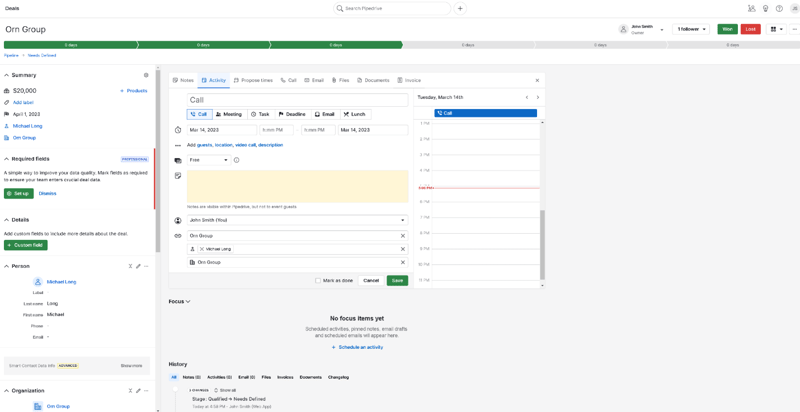
You can also easily add new deals and view existing ones from the pipeline view. The option to review every deal’s details is especially useful and accessible simply by clicking on it in the pipeline. This includes:
- Contacts
- Labels
- Notes
- Products
- Communication history
You also have the option to define custom fields for your deals. These can either be marked optional or required—perfect for helping your sales team prioritize key pieces of information in their talks. The “Deals” tab is also where your team will write notes, schedule sales activities, and track availability.
Communication Tracking
Pipedrive’s communication tracking features are great.
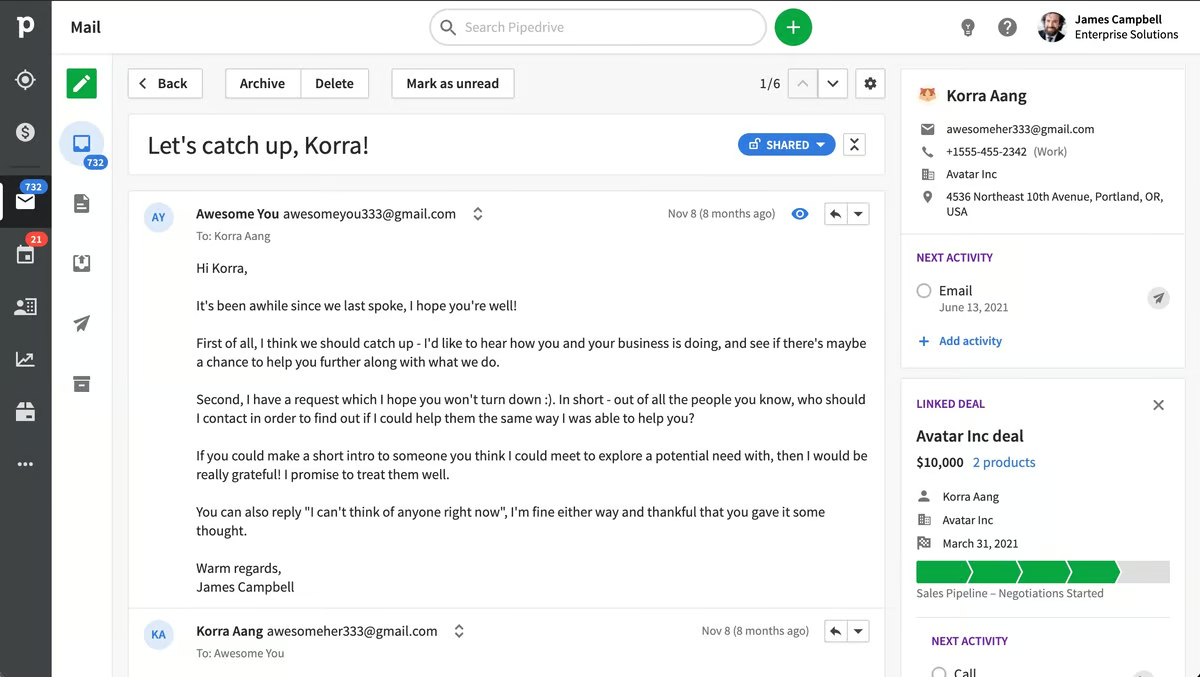
For starters, the underlying organizational system is super intuitive—contacts are organized by dividing them into “people” and “organizations”. You can then link these to the deals they’re associated with and easily check your history of calls, emails, and activities with any of your contacts or deals.

Pipedrive’s email inbox is sales-focused and super intuitive, too. It has a ton of features that speed up the process of managing and sending emails, including:
- Email synch
- Email tracking
- Email distribution groups
- Email scheduling
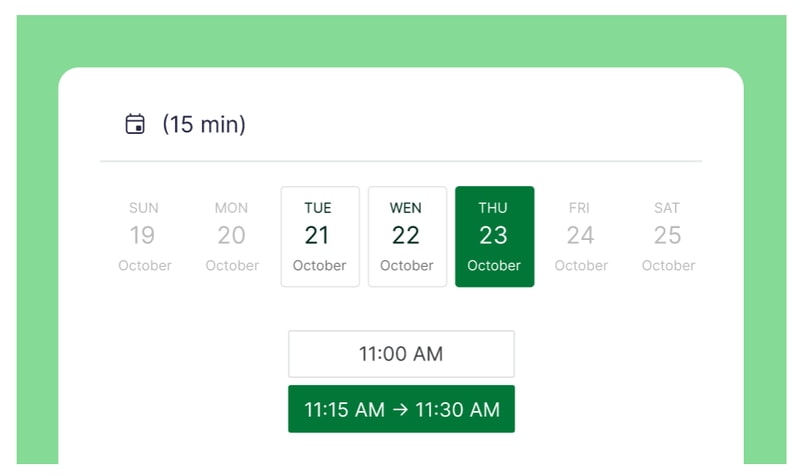
There’s also Scheduler—a feature that helps you set up meetings without annoying back-and-forths by sharing your availability and letting invitees book time slots that work for them. You can also automatically set up video calls for scheduled time slots on Zoom, Microsoft Teams, and Google Meet.
Last, but (definitely) not least, Pipedrive integrates with a ton of great phone tools, so you can place calls from within the platform. This makes it easy to track your activity, record data, and even automate certain call-related processes—but more on automation in a moment.

Automation
One of Pipedrive’s main selling points is its automation features. There are quite a few to unpack here, but there are two main types:
- Sales automations
- Workflow automations
Sales automations are features designed to help you optimize your business’ sales process. Take Sales Assistant, for example—this automation tool creates custom behavior-based cards with performance tips, notifications, and progress updates for each team member on your roster. It also notifies everyone affected by changes to settings and deals, so no one’s left wondering where their recent deals went.

Smart Contact Data is another sales automation tool that pulls in data from sources like LinkedIn, Google, and X to help you get a better understanding of your contacts.

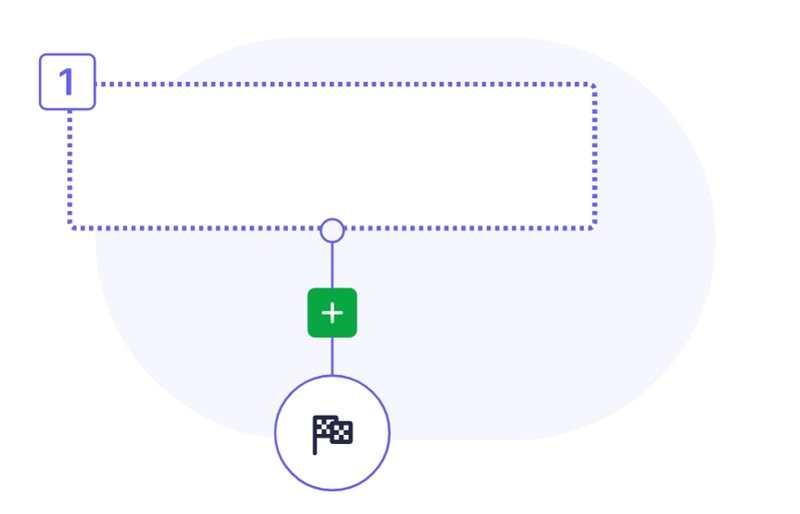
On the workflow side, Pipedrive’s Automations let you create custom actions and processes that are triggered automatically when a certain action is taken (e.g., when a deal changes pipeline stage). These are great for cutting down on admin work and freeing up your team to focus on bigger and better things (like actually closing deals).
Insights & Reporting
Finally, it’s time to talk about Pipedrive’s reporting features.
Starting with the basics, Pipedrive’s sales reports are totally customizable. You can track whatever data points you need, and cut out the ones you’re not s interested in. Plus, there are a few pre-built reports you can use, including:
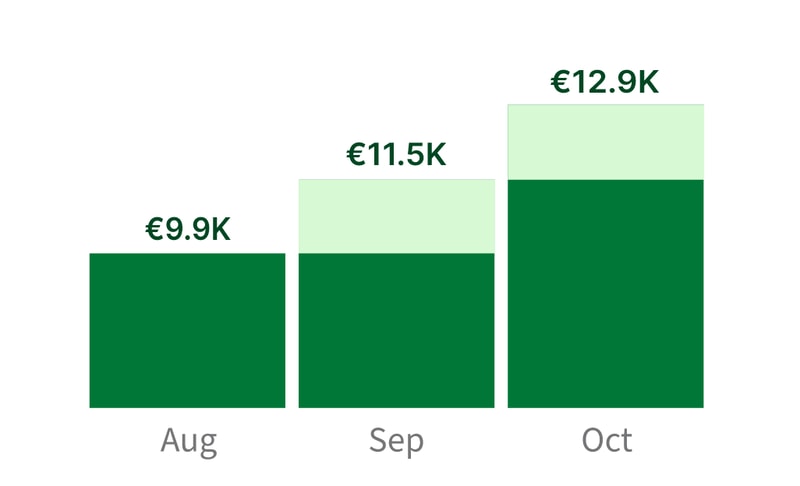
- Revenue forecasts
- Performance reports
- Conversion reports
Pipedrive’s Insights dashboard is great, too—you can turn all your data and metrics into beautiful, interactive charts and graphs that are easy to read (and share).

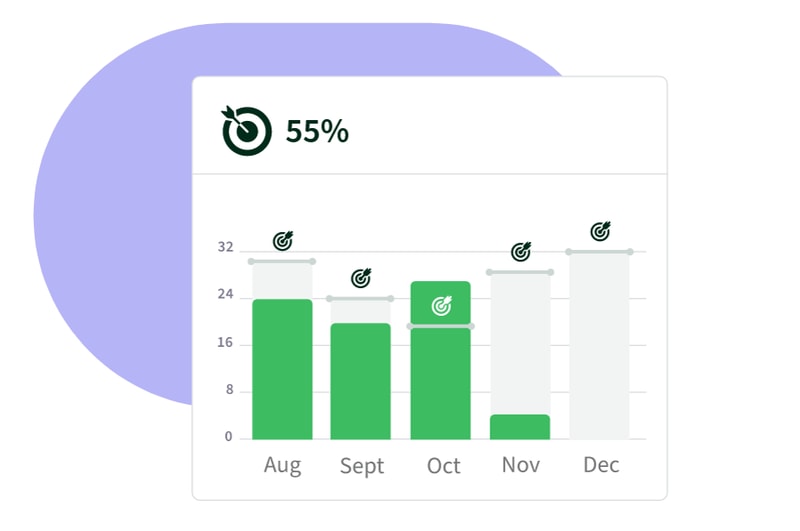
If you want to set goals for your team, Pipedrive has you covered there, too. You can create goals based on deals or activities, and specify them by adding key details like assignees, types, pipelines, durations, and intervals.
Oh, and if you’re looking for even more customization, Pipedrive has an open API. That means you’re free to build custom integrations that meet even the most specific of reporting requirements.
What Makes Pipedrive Stand Out from Other Platforms?
Time-Saver
Pipedrive is one of a select-few CRMs that genuinely feels like it’s saving you time. Its automation features and intuitive interface make it easier to manage contacts, deals, emails, calls, and activities—all without having to manually enter every single piece of data.
Visualization & Reporting
It always helps to see information presented visually—and that just so happens to be an area where Pipedrive excels. From the visual pipeline to the Insights dashboard and interactive reports, Pipedrive is packed with features that make it easier to interpret your data.
Impressive Integrations
Pipedrive’s Marketplace is massive. At the time of writing, there are more than 300 integrations available. Plus, the listed tools range from video calling platforms to lead generation tools, so you’re sure to find something that fits your needs.
Pipedrive Pricing
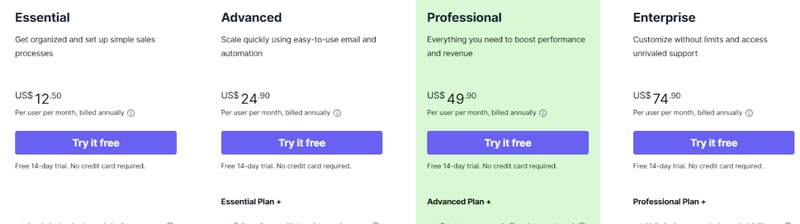
Pipedrive has four paid plans that you can choose from.
- _ Essential _ includes lead, deal, calendar, and pipeline management, simple data import and customization, and 24/7 support with over 300 integrations.
- _ Advanced _ offers all the features of Essential, plus full email synch with templates and scheduling, group emailing with open and click tracking, and customizable automations with an in-depth automation builder.
- _ Professional _ includes all the features of Advanced, plus the ability to create, manage, and eSign documents and contracts, revenue projections, forecasts, and enhanced custom reporting.
- _ Enterprise _ includes all the features of Professional, plus unlimited user permission and visibility settings, additional and heightened security preferences, an implementation program, phone support, and no feature usage limits.
See Pipedrive pricing for current rates.
Still on the fence? Don’t worry—all four plans come with a 14-day free trial. No credit card required.
It’s not all good news, though. In addition to the plans, you’ll also need to think about which add-ons you need. Quite a few great features (e.g., Scheduler) are pay-walled behind pricey add-ons that don’t come packaged with the base plans.
Pipedrive Pros & Cons
Pros
- Highly customizable pipelines and fields
- Highly visual dashboards
- Massive selection of integrations
- Easy-to-use automation builder
- Extensive reporting capabilities
- Affordable paid plans
- 14-day free trial (no credit card required)
Cons
- No free plan for light users
- Automations not available on the Essentials plan
- The add-on system increases the cost dramatically
- No ticketing system and spotty customer support
What’s the Verdict?
Pipedrive is one of the top sales CRMs for a reason—a few reasons, actually. It packs in a lot of features designed with sales teams in mind, and most features are executed well.
The only real downsides are the result of the company behind the product, not the product itself. If you can overlook them, you’re in for a great experience.
Overall, Pipedrive’s well worth considering if you’re shopping for a CRM—but it isn’t even close to the only option.
If you haven’t found the CRM you’re looking for, Findstack can help. We’ve compiled a list of the best CRMs (complete with reviews and comparisons), all in one place. Start browsing for your new CRM today!

Compare Pipedrive with other popular tools in the same category.

It stores data for sales org and the UI is pretty easy to maneuver through the platform.
Limited to what processes can be built out and the dashboard section is a joke! They have a lead section that doesn't do anything with leads and they do a poor job of making features better than what they could be. Definitely not the most effective/efficient tool to have for a business
Company currently uses it as a CRM to store accounts and contacts and opportunities. It would be good for a start up to have something in place but if you have a complex sales cycle/process it is NOT the tool to go with.
Simple to use with a fair range of integrations that are mostly easy to set up and work pretty well
Lacks a lot of agility. Many functions are locked to admin users only with little functionality to enable certain functions to specific team members. Workflow is pretty basic with little functionality with managing groups of contacts, companies or current deals within your pipeline making it difficult to manage broadcasting activity that may requires different follow activity for each contact - Making lead generation and 'in mass' rather slow moving or ABM workflows time consuming.
To be honest not many that a simple spread sheet could solve in the same amount of time. I will say that logging automation workflows within email works well saving to have to update each contact with the specific email sent but I would expect that from most CRMs.

adkakñdfkñlsdklfklñasdklñfakñsdfklasfkañsdfklñakñkñdlfklañsdfklaklsdfaklñsdfkñqiopwqweklqñwerkklasdkadklklfklñaklñfasdlfkñasdf
afkoadfkaskldfklñasklñdfklñafklñklasdfaklñfoqipwpriowoqeiprqweroqopierklñasfklaklalñsdfklañklafd
apfaofoqweriopiopwerpioiopqerioperiopioqerioqweprklqerklkñqwerklqwerñlñklaqdklñakñlfklñdasfklñadf
It looks cute and can be a fun way to move around your leads. If you want to pay to play this is the software for you.
Actually managing data takes a lot of practice as customer service won't help you. If you can maange that, you're still up for a challenge because if there are any problems whatsoever, there isn't anyone to help you. All of our leads were deleted when we uploaded new leads from a spreadsheet. When we asked for help we were told someone would help "as soon as possible." As lead generation is an imperative portion of our business operations this lack of assistance was a illustration of pipedrive's lack of understanding of the role CRM software plays in a business's ability to succeed. For pipedrive to be apart of our business operations would require them to respond urgently and adaptively. We can't simply wait and see when it comes to the day to day ability for our business to see even a minimal return. Finally, we are an agency that sets our clients up with CRM, lead nurturing, an additional SaaS. We bring business to partners such as Pipedrive and they were completely unwilling to work with us as a collaborative team. If lead nurturing and sales aren't a priority for customer service reps when dealing with their clients (and agencies who could potentially bring them endless clients) then this is a business who does not have an intention to grow with their clients. Maybe they are good for a small business who just wants to manage leads (something that can easily be done in as spreadsheet) but anything beyond that is not what they prioritize.
Cute, no benefit if you have the ability to manage a spreadsheet.
I was the CRM admin at a 20 person start-up and Pipedrive was lacking several features. The tool had a nice UI, but that was one of the only benefits.
Pipedrive lacked customization options that are needed for any company that isn't a mom and pop shop. Pipedrive integrated with very few external services, terrible customer service and offers only extremely superficial features. It may be inexpensive, but don't let the price entice you; Hubspot and Zoho are much much better options for a similar cost.
Moving off of Pipedrive was one of the best decisions the company made.
Easy to use, customizable fields, integrated with mailchimp
I have been experiencing the same issue for the third time. Only this time it has been 10 days now and the issue is not fixed. The issue is: my new contacts from Gmail do not get automatically added to pipedrive. This create a significant work overload for me as I rely on my CRM"s full integration with Gmail. I have lost sales because of this issue. And after 5 days a solution was offered but it didn't fix the issue. Now we are at 10 days and no solution to fix the issue has been offered.
I'm using it as CRM only.
Simplicity, but tobacco fault. It is over simplified in the most important feature that I rely on for planning and marketing research -REPORTS are severely lacking.
The reporting feature is horribly simple.
CRM. Follow-ups and activity planning.
Easy to use and update. Fairly intuitive, requires very little training to get up and running.
It appears buggy. Names get garbled somehow, dropdowns sometimes disappear in the UI, slow.
Keeping track of deals/leads. good for organizing contacts
I don’t like much about Pipedrive. It’s not the best system
It’s very hard to find anything. Search function isn’t the most efficient.
Hard to search without a Pipedrive number.
Simple dashboard view and the use of sales funnel visuals
most everything - price, lack of features, lack of support via phone (have to pay almost 5X more monthly to get the package that allows you phone support!!), missing mission critical/crucial parts of a CRM and reporting for any management, constant glitches, constant failures of the system and outages, the list goes on and on and on.
we needed an affordable crm solution and it's only better than pad and paper - but not much and on some days, most of us would prefer the pad and pen!
The color coding and sales funnel is a great set up and user friendly.
I wish the reports were easier to create and access. They are not great.
Keeping track of clients and prospects is easy with Pipedrive.
Relatively simple and straight forward, fairly solid CRM. Good email integration, glitchy at first but worked in the end. The app is okay, not that we use it very much but I guess its a bonus to have an app for the platform. Forms for collecting data work okay and feed in to pipedrive which is pretty useful. Has a good a mount of integrations which can make it more interesting for advanced users.
I used to constantly recommend Pipedrive and think it was an extremely good piece of software. I've recommended the CRM to plenty of friends and clients and no doubt created a lot of business for them. I have however recently had so many issues moving data between our accounts that I'm close to giving up. The data export is far too complicated and I can only assume is designed to prevent people from moving data. Data reverts dont work for me due to a glitch and support are refusing to try upload/revert themselves. The whole process is incredibly frustrating and their support is designed so that the user has to fix issues themselves. It's incredibly sad to see a company lose its way like this. To go from being a huge fan who would refer business to having to write negative reviews as im sick and tired of trying to liaise with their support and move data around. It feels like they've forgotten who the customer is. Looks like as a company we will probably end up leaving them now, unfortunately.
Used to be good to be able to see different work across all users, setting permissions was as a whole prety good. However due to the issues we've had recently with the system it's hard to name many benefits anymore.
The interface is easy to use and I enjoyed the left to right grid that shows how deals physically move through a pipeline.
The individual deal-level documentation is so limited compared to salesforce. The tech is missing a full CRM system.
Tracking sales. I like having all deals in one place but it was really difficult to show new leads and where deals actually were in the pipeline.
The colors. There really isn't much I like about it and I guess that's it
Importing records features - very cumbersome
CRM needs
It is quick and easy to navigate. Keeps things organized in a linear fashion.
Lack of needed analytics. Can't get the reports that I need. Lack of sync with marketing technology.
Keeping leads organized.
Clean UI, Lightweight reporting, Easy to build in new fields, some integrations already built
Reporting is subpar for a CRM, no way to track leads without putting them into pipeline, freezes out all the time, inaccurate statistics, terrible support
Pipedrive has helped us manage our inbound lead flow, but it has been very difficult to scale with us as we grow. If you are looking for a lightweight CRM, this could work. This is not a tool for any sophisticated sales organization. I've used Salesforce for years and this was a very difficult transition to make-very much numerous steps back. Needless to say, we have since implemented Salesforce to accommodate a full Sales cycle (leads & pipeline).
I like that pipedrive makes it easy to create fields on contact, company and deal pages, and that they send an automated email every day with all activities that are due in a simple format.
When trying to pull a report for more than one sales rep, it is impossible to do in the platform as they only have the options for "is not", "is empty", "is not empty", or "is". There is also no possibility to create date ranges for reports and there is no Year to date option, as in this year or last year, etc. It's also very difficult to report on the length of no contact because emails aren't calculated as activities (that are BCC'd), there is no accurate way of seeing how many touchpoints each contact has received. Additionally there is no way to make any fields mandatory, thus sales people don't have to enter anything to create a deal and it leaves a lot of holes in the data. There is no way to create custom dashboards and visualise data, everything has to be exported to excel and manipulated.
With pipedrive we are finding it extremely difficult to measure our activities and where they lead. Business benefits are that it is extremely cheap as compared to other CRMs and it's really easy to set up and doesn't require consulting.
Good email integration. Great to have different pipelines available.
Accounts and all data get deleted after two weeks after trial end.
Investor Relations.

At first glance, the UI seems intuitive, but it quickly proves otherwise. Being able to drag and drop is nice. Automatically prompts you to create a next step after you complete an activity. That's about it.
Not robust enough to function as an actual CRM. Very buggy UI. Often times objects (e.g. notes or logged emails) won't load. Very difficult to create comprehensive dashboards. Can't create proposals, can't be used to support tickets, generally very bare bones.
Just a sales guy trying to manage my pipeline. I've convinced my company to move to Salesforce.com based on the lack of functionality in Pipedrive.
For whatever reason, Pipedrive seems to be the only CRM software that (sort of) allows you to accurately upload contacts from an excel spreadsheet. I still ended up having to convert it to a .csv file to get it right, but that's till better than PayPanther, Nutshell, or (gag) Clio. So I'm not giving it a zero.
As simple as you might think it would be to design software that allows you to click on a few clients to whom you would like to send thank-you cards, holiday cards, or a newsletter, Pipedrive has found a special way to say that they don't care. Need to export 30 names out of your 300 contacts to excel so you can make labels? Well, make sure you make note of those thirty names on a piece of paper and then prepare to manually filter each individual name. Had plans this morning? Not any more, you don't! You have 150 holiday cards to send, time to get filtering. Someday, there will be CRM software designed by actual sales professionals, and not by IT professionals who have seen movies about what sales people probably do.
The problems I anm not solving with this software are staying top-of-mind with my relationships, clients, and former clients.

The product started out great. It is clean, simple, and easy to use. Our sales team had an easy time using it and it made entering deals less of a chore. There's still some weirdness in the interplay of deals, organizations, contacts, etc, but that is generally true with most CRM. Overall, functionality and interface were great and we went all-in on the product.
Once we went all-in, that's when trouble started. Everyone started randomly noticing that their list view was incomplete. Filters didn't show all deals, activities and deals became tougher to track down. It became apparent that filters, lists, and anything other than the pipeline view didn't show everything, and the pipeline view gives you very limited searching and sorting options for large data sets. Then we reached out to support. And found out there is no support. After some executive escalations, I got some sporadic answers, shots in the dark, wild guesses, and general unhelpfulness. One tech even went so far as to forge a past email response after I complained that they had gone dark on me. So that's where we are - stuck with major problems, a huge time investment in the product, and searching for a way to transfer our dataset to a product that works. I can see why this service has good reviews, but if you stick with it, you will get burned eventually.
Trying to streamline our sales process and improve follow-ups. Our progress has been stymied by huge technical limitations in the product.
Pipedrive CRM is a traditional CRM with Accounts, Opportunities, and Contacts. It's only a worthwhile solution for companies that are managing a very small number of deals and work in very small teams. The one "advantage" or differentiation for Pipedrive is that the interface is heavily drag and drop. As opposed, to setting the "Stage" in SFDC, you drag deals to different stages and Pipedrive helps you visualize your deals better.
It's a very simplistic CRM with a lack of the robust ecosystems and partners of SFDC and Dynamics. It's great for small teams, but anything outside of a small business should not consider this CRM.
Not provided