

Unclaimed: Are you working at Zoho CRM?
Zoho CRM Reviews: 4.1/5 — Solid Choice
Zoho CRM is a leading customer relationship management platform that businesses of all sizes can rely to manage sales, track marketing campaigns, and gain customer insight within a centralized, collaborative environment. Using Zoho CRM, users can set up and customize that platform according to their personal preferences and incorporate all necessary data and workflow to maximize its features. Zoho CRM is also available on a free plan and scales gradually depending on features needed.
| Company | Zoho Corporation |
|---|---|
| Year founded | 2000 |
| Company size | 10,001+ employees |
| Headquarters | Chennai, Tamil Nadu |
| Social Media |

| Capabilities |
AI
API
|
|---|---|
| Segment |
Small Business
Mid Market
Enterprise
|
| Deployment | Cloud / SaaS / Web-Based, Mobile Android, Mobile iPad, Mobile iPhone |
| Support | 24/7 (Live rep), Chat, Email/Help Desk, FAQs/Forum, Knowledge Base, Phone Support |
| Training | Documentation |
| Languages | English |
Zoho CRM Pros and Cons
- Extensive omnichannel customer support via live chat, phone and email
- High-level automation options for various sales tasks
- Tons of integrations with third-party tools like Outlook and LinkedIn
- Mobile version with access to visual reports
- Data security, integrity, and regulatory compliance built-in
- Not the best tutorials for beginners
- Integrations can be a little clunky






Compare Zoho CRM with other popular tools in the same category.
user interface and user experience are my favorite things with zoho
customer support for developers is lacking
clients are organized in a much better fashion than others
its ui friendly to the users basically in my company it is used for managing the software development related so it easy to use its ui friendly easy to track the status
i face the dificulties in logging hours in zoho when i was new to it i was not able to log hours on task basis
we used to track the projects staus its good for allembers to view the whole status of the project and progress
As a CRM it can be really helpful. I've used it with a few clients and used it alongside Zoho Surveys, Zoho Forms and Zoho Projects (plus other Zoho and other products). It can do some really clever stuff.
The navigation isn't always that easy for some people and some of the functionality you would perhaps expect (if you look at it alongside things like Act) are not there or only available on certain paid subscription levels.
Keeping track of lead activity and processes for conversion / follow up. Zoho Analytics is also great for understanding data.

Zoho CRM offers a complete project management solution combined with sales management, marketing automation, and customer support used by employees to manage customer-centric activities. We've started saving money by eliminating the need for individual tools for each feature. At Zoho CRM, you get it all together at once for the right price.
Although adding and removing modules is quite user-friendly, there are some additional levels of customization that require intensive IT support to create / modify. It would be interesting to have more options at a user-friendly level to customize the software. A little more intuitiveness. would do Zoho CRM very well.
We use Zoho CRM in our company to restrict our leads and customers. It is being used throughout our company primarily in the sales, marketing and support industries. It allows us to keep all data under one roof, instead of having to use multiple pieces of software to do so so we have more organization, agility and ease when we need to access some of this data.
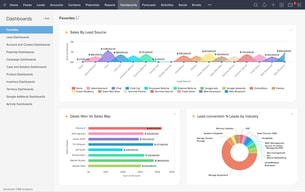
I like the Leads Management abilities of Zoho CRM the best. The ability to separate out clients into different categories, input various kinds of information, and customize the dashboard to act according to the business requirements of my company has been immensely useful for me. I also find their reporting dashboards really easy to implement and share with the rest of my firm - they compare sales well and the graphics are effective.
I think that zoho has gone up in price recently, which can cause problems for a lot of smaller businesses that rely on zoho but cannot afford the employee access for every single employee because of these prices. In our real estate firm, we were forced to cut off access for our newer employees to ensure that they did not create a negative profit for the company overall.
I have been using the Leads Management interface to make the process of creating, processing, and prioritizing clients far more straightforward in the long run. We have been able to create a process flow of prospects, converted clients, add potential homes being considered, and finally move them to invoicing, where zoho processes invoices that are sent to brokers automatically - this has saved tons of time overall.
Sales applications that which is provided to the small businesses are awesome.
Sometimes mailing from zoho won't get delivered and stop working and while trying to contact there team they will say it's a problem with our server or the gmail server etc.
Most of the works that which happens in the company is going through the Zoho CRM only. Sales, Delivery everything got automated and professional after implementing Zoho CRM in our company.
I think that the best thing about zoho is how easy the complex features are to use. The leads management interface is not at all hard to organize according to my needs as well as integrate into the other dashboards that I have - such as pending work categorization. I think that the interface is really nice and visually appealing as well. Lastly, I also like that the custom reporting features are efficient and easy to implement across the board with employees in the organization.
I think that Zoho needs to be more aware of how its pricing is impacting customers. Because of its recent rising prices, it has gotten really expensive to maintain large amounts of employees on the platform; however, in an industry like real estate, all of our agents need to be on it and work with it, even the ones that are not generating significant profit.
I have been using Zoho CRM to help manage my client flow and business flow through the leads management dashboards. This allows me to separate out my clients into bins based on where they are in leasing as well as send the documents to them or brokers through zoho itself. Zoho does a great job at this invoicing and document data entry - a task I would otherwise have to do manually for all of my clients.
I have been using Zoho CRM mostly for leads management and dashboarding regarding my business generation and I love it so far. I think that leads management has so many functionalities for handling clients such as different groups, different process, and more, that it is a very versatile tool. Further, I have been using the dashboarding feature to generate ways for me to measure my sales against the top agents, and I think the service works very well and very easily
I think that Zoho CRM needs to bring its prices down to a more manageable level for smaller firms like mine. Because we do not have enough residual income, we are forced to ration zoho accounts to the bigger agents because of their individual costs. This has made getting new agents with zoho really tough because of the high investment it requires.
I have been using zoho for leads management with my clients- I can create dashboards that let me see the clients that I have prioritized to contact, my notes for them, and what the next steps are. I can also see where in the process of leasing they are, thus allowing me to separate my work out better. Lastly, I have seen real benefit and drive in showing agents the numbers that they are generating through sales in the reporting dashboards.
The platform looks very modern, and is an economical, pragmatic one to replace Salesforce and similar CRM giants.
Some features are not completely intuitive and require a learning curve, especially around managing your sales funnel.
We're soon migrating to it and would be using it as our in-house, default sales/CRM management application.

It offers a lot of features EVEN in free version and there is very very nice time hystory and iterdependent data fields which offers you a comprehensive view.
Support is not in plain english and for those who is not native english are a little bit stressfull
We can keep all information together
I think the thing that I like about zoho the most is that it has a bunch of different dashboards that real estate agents can use. I am able to view my leads processing times and other reporting at the end of the month to see how I did without any sort of manual calculation. I also really like the leads management interface, as this is always a difficult thing to keep track of for real estate agents who have many clients across the city.
I think that zoho has become a little bit expensive to create an account for every single person, however, I would say that it is definitely worth the price for users that will make complete use of zoho often. For those that sign a few leases per year, this is definitely not necessary to automate processing and invoicing because there is no profit made due to its pricing.
I have been using zoho crm to process my business leads and keep a tally of what customers are where in the process of buying homes and what I have done to help them. I am able to prioritize calls and run through the list efficiently in my free-time without having to create a large excel doc to manage contacts(what I used to do). I also love being able to compare myself against other good leasing agents that work in our market through the dashboarding
what i like most they have all optiob for standard bussiness requirement.
user interface can be more attractive for free versions
Paid versions are quite high price for start up organisation and individul bussiness.
The pricing is really nice and affordable
The role management in the portal could have been better
Tickets management from leads and already converted customers
Zoho CRM can be used easily by common people
Pricing structure is not very attractive they can improve
It is not very difficult CRM even normal employee can use it without much problem
Zoho CRM tool really helps to manage all the sales and marketing related activities. The best part of this tool is its lead management module is really efficient and easy to manage. Second, it helps sales people to capture all the details of a customer life cycle starting from the first stage. You may also send the email messages from this tool for better communication.
This CRM software is ok for the small and medium enterprises. Though the customization as per your specific requirements needs some high end skills to perform.
The customer life cycle has been made so simple to manage and remember on a single platform. No longer cumbersome excel sheets now but simple and easy CRM tool in place boosting our sales and marketing activities.

You will access the tool via using mobile phone. There is a mobile phone app of the tool. You can manage all the functions of the tools via using this app. It makes the managing function more vibrant and useful for the development of your business. Another very important facility of the tool is that it is directly connected with the Google app.
There are very wide ranges of efficient features that are strictly concerned with professional edition. This complexity refers to the pure professional functioning of the tools.
Zoho CRM is a very vibrant tool that makes your sales more effective. It includes contacts and sales leads. These will help in making the business growing faster. The tools are easily accessible on the home screen and you can find these tools within a second. The tool is effective for any kind and size of business.
The mangament of zoho has everything covered from zoho people To the sales management
Zoho spreadsheet it does have all the best needs but sometimes the sheet has a bug the undo and redo is still not a fixed if you face a network issue
You manage a potential lead for a company that needs. Keep a good records of your leads and multiple options that be customised to your own requirements

That is is very customizable - I can arrange screens however I want, as well as create custom modules/scripts.
Sometimes tech support gives me the code to insert into wherever to create my own custom button to populate custom modules. I would rather not be handling script code, responding that it doesn't work, having them fix it, etc. That's their job, not mine. But it isn't too bad.
Managing sales pipeline from prospecting to closing a sale, to future follow-up client-retention activities.

As specified by its name, Zoho CRM is designed to attain, retain and satisfy a customer for a longterm relationships. It helps the businesses to grow instantly. Zoho is really easy to use, helped me in engaging customers from different platforms with help of numerous activities or offers
As main focus of this web is to raise your sales day by day to reach your profit line so all departments of your organization like it, sale or HR stick at one point by sacrificing their other main responsibilities.
It also an award winning web that is automatically update users data on daily basis. Moreover it is very easy to use.
The most helpful part of Zoho is the easy access to all contacts. We originally used an excel spreadsheet and the system has made things much easier.
The initial upload of our 300+ contacts was a bit shaky at first, because I had to make sure the formatting/labels in excel were complimentary of how things would upload in the system. It wasn't a biggie though.
Anything related to contact updates, follow ups and just any necessary updates. This makes life easier when you have so many contacts to manage.
Fantastic value for money, all basic features are included in the software
Could use more advanced features for more specific purposes
Streamlining my customer service the right way
The cost per feature is cutting edge and it is a complete crm
Not usable at all, needs a high learning curve to understand all sections
I implemented the crm for a real estate company to track leads across selling from lead generatio
I like the integrations of so many services
Prices are lightly high for a service that is offered by someone else
Really good implementations
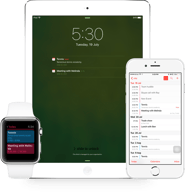
Mobile Access - It is so convenient to use the CRM App in my phone that I sometimes feel it's a sales assistant rather than the Phone App. I save a lot of time with this App. It keeps the call records as well.
For various features, new users need training but unfortunately, no online training is available
My most frequently used features are, Calendar or a Reminder System, Lead Scoring, Segmentation, Task Management, etc.

Wonderful CRM , its budget friendly a and integrates other applications . Used it for my business case study.
The number of free users could be improved (to more than 3 free users). Also functionality is a bit lagging .
ZOHO CRM helped me to do the otherwise time consuming operations in my business case study . I have seen goof ROI for my investment.
Zoho provide easy navigation for each functionality and it's helps to track everything easily and the best thing is that it's transparent so we can access easily we want for what we are allowed
The UI. It should contain some animation
Sales and marketing
Calendar, templates, tasks from emails.
Email gets shut down if too many emails are sent at one time.
High influx of emails from patients, the email provider will remind you and add to calendar what people ask you.

It’s very user-friendly. The UX and design and platform are all very intuitive.
Rare to export and import data from other CRM tools.
to be able to follow up with sales: from lead management to prospecting and finalizations.
I have used this application while working with my previous company in the field of recruitments.
While working on zoho that time I haven’t felt any issues
To filter out the different profiles for the different openings it was very useful and strong application

Ease of use and accessibility is another strong point. There are video tutorials and manuals but in general things are intuitive so you can easily figure it out. From an access standpoint it's also nice to have the web and mobile support.
No dynamic form layouts or multiple forms - watch out for this especially if you have more than one workflow and would like to have an additional type of form for the same layout. For example, if you were a graphic design companies that designs print items and websites, you would have to capture all of the information on one long form unless you were to use zoho creator which would incur additional fees. I was very sorry to lose Zoho's integration with Outlook, which I loved. One day it just stopped working and the technician was never able to fix it. The problem is undoubtedly something on my laptop and I don't blame the tech -- he really tried -- but I miss the feature a lot.
Zoho CRM can be easily integrated with Zoho's other services -- campaigns, support, etc. All of those services deliver good value. However, most interestingly, Zoho's API make this product a dynamo. Using the API I have integrated Zoho deeply into web sites where I have combined Twitter and LinkedIn functionality to pass identity information into the Zoho CRM. The information can also be linked to web site traffic tracking systems like Visistat.