
Unclaimed: Are you working at EngageBay?
EngageBay Reviews: 4.6/5 — Highly Rated
EngageBay is a CRM platform that helps companies streamline their customer relationship management using a single integrated platform. As an all-in-one solution, the software provides great automation capabilities and a generous free-forever plan that already include essential features and tools that are often only found on paid tiers from competitors. EngageBay offers custom forms, email sequences, web pop-ups, and a landing page builder.

| Capabilities |
API
|
|---|---|
| Segment |
Small Business
Mid Market
Enterprise
|
| Deployment | Cloud / SaaS / Web-Based, Mobile Android, Mobile iPad, Mobile iPhone |
| Training | Documentation |
| Languages | English |
EngageBay Pros and Cons
- 'Robust ‘free forever’ plan
- All-in-One approach to CRM, with live chat, forms and landing page tools
- Great automation capabilities
- Offer a range of integrations (Gmail and Office 365 integrations included in the free plan)
- Interface is not the most intuitive at times
- Onboarding process could be improved

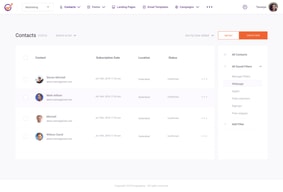
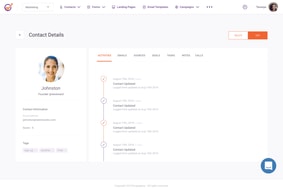
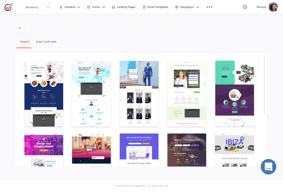





EngageBay sells itself as the affordable HubSpot alternative, and on price it delivers: marketing, CRM, and service in one platform from around $15 per user. Two things the pricing page does not make obvious deserve your attention. The figures shown by default are two-year commitment prices, and reviewers report daily email sending quotas that can catch out anyone treating it primarily as an email tool.
- What it is: An all-in-one CRM and marketing platform covering email, automation, landing pages, live chat, and helpdesk.
- Best for: Small businesses that want HubSpot-style breadth on a small budget and will use several of the modules.
- Pricing: Free for 250 contacts. All-in-One from $12.74 per user per month on a two-year commitment, or about $14.99 monthly. Verified in July 2026.
- The honest catch: The pricing page defaults to the Biennial toggle at 15% off, so the headline figure assumes you commit for two years.
What Is EngageBay?
EngageBay is built around a straightforward competitive argument: HubSpot’s architecture is good and HubSpot’s pricing is not, so offer the same shape of product at a fraction of the cost. Marketing automation, a sales CRM, and a service desk sharing one contact record, sold as either an All-in-One suite or as separate Bays.
That structure is genuinely useful for a small business. You can buy Marketing Bay or CRM & Sales Bay individually from around $11 per user, take the Service Bay help desk for free, or bundle everything in All-in-One. Few competitors at this price let you assemble the platform that way.
The independent rating is excellent: 4.7 out of 5 on Capterra across 908 reviews, with customer support scoring 4.8 and ease of use 4.5. Value for money is the most consistently praised attribute, which is exactly what the positioning targets.
How EngageBay Works
- One contact record across three Bays. Marketing, sales, and service share data, which is the HubSpot architecture and the reason the comparison holds.
- Marketing. Email campaigns, autoresponders, sequences, landing pages, web pop-ups, lead scoring, SMS, and a social suite.
- CRM and sales. Pipeline management, proposals, call records, and appointment scheduling.
- Service. A help desk with live chat, offered free as a standalone Bay.
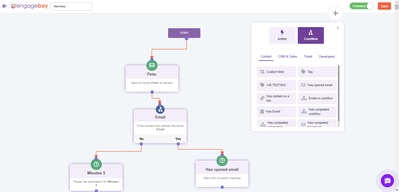
- Marketing automation. Visual automation arrives on the Growth tier, which is the main upgrade trigger.
- Modular purchasing. Buy the whole suite or just the Bay you need.
EngageBay Pricing
Four tiers on the All-in-One suite, and the billing basis matters more than usual. Figures verified in USD on EngageBay’s pricing page in July 2026.
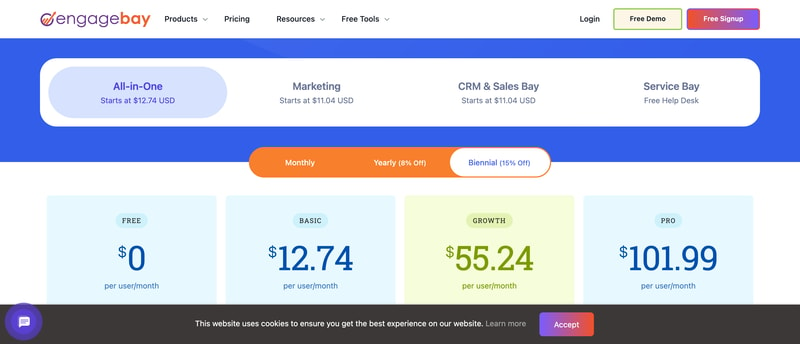
| Plan | Biennial (default) | Approx. monthly | Contacts | Key additions |
|---|---|---|---|---|
| Free | $0 | $0 | 250 | Email marketing, autoresponders, sequences, landing pages, CRM, helpdesk, live chat |
| Basic | $12.74/user/mo | ~$14.99 | 500 | Email templates, web pop-ups, landing page builder, lead scoring, SMS, integrations, social suite |
| Growth | $55.24/user/mo | ~$64.99 | 5,000 | Marketing automation, push notifications, A/B testing, custom domain, call records, proposals |
| Pro | $101.99/user/mo | ~$119.99 | 50,000 | Web analytics, SSO, role management, custom reporting, dedicated account manager, uptime SLA, phone support |
What to understand before buying:
- The default prices assume a two-year commitment. The billing toggle offers Monthly, Yearly at 8% off, and Biennial at 15% off, and Biennial is pre-selected. Capterra’s listing shows $14.99 per user as the standard rate, which matches $12.74 plus the 15% discount. Compare on the term you actually intend to sign.
- Marketing automation requires Growth. Basic at around $15 covers email and landing pages but not automation, and Growth is a 4.3x jump. This is the same gating pattern seen across this category, and it means the realistic price for an automation-led business is $55 to $65 per user.
- The free plan is unusually broad. 250 contacts with email marketing, sequences, landing pages, a CRM, a helpdesk, and live chat is more functional coverage than most free tiers, even if the contact limit is small.
- You can buy Bays separately. Marketing or CRM & Sales from around $11 per user, and the Service Bay help desk free, if you do not need the full suite.
- Daily email quotas are a real constraint. Reviewers report sending limited by daily quota, with one describing a limit of 100 emails per day above 100 contacts. If email volume is central to your plans, confirm the quota for your tier before committing.
Who Should Use EngageBay
- Small businesses wanting HubSpot’s shape at a small price. The clearest case, and the reason the product exists.
- Teams that will use several modules. The value comes from consolidation. Using one Bay only makes the comparison against specialists much harder.
- Budget-conscious buyers who need a help desk. The free Service Bay is a genuine offer.
- Companies that value responsive support. 4.8 for customer service across hundreds of reviews is a strong signal, and unusual at this price.
It fits poorly for analytics-driven teams, where reviewers consistently report reporting depth as lacking, for high-volume email senders, given the daily quotas, and for organizations unwilling to commit two years to hit the advertised price.
Honest Pros and Cons
Strengths
- Excellent value. The most-cited strength, and credible against HubSpot at roughly a quarter of the seat price.
- Very high satisfaction. 4.7 on Capterra across 908 reviews, with support at 4.8.
- A broad free plan. CRM, helpdesk, live chat, email, and landing pages at no cost for 250 contacts.
- Modular Bays. Buy only marketing, only CRM, or the full suite.
- Responsive support. Email, phone, live chat, and 24/7 availability, praised repeatedly.
- Genuinely easy to adopt. 4.5 for ease of use, with minimal onboarding complexity for small teams.
Limitations
- Advertised pricing assumes a two-year commitment. The Biennial toggle is pre-selected, and the monthly rate is roughly 15% higher.
- Daily email sending quotas. Reported by reviewers as a significant constraint, including a described limit of 100 emails per day above 100 contacts.
- Reporting lacks depth. The most consistent functional criticism, and a real issue for analytics-led teams.
- Marketing automation is gated to Growth. A 4.3x jump from Basic for the feature most buyers eventually need.
- Intermittent bugs and slow performance. Reported by some reviewers as disrupting workflow.
- Deliverability concerns. Raised alongside the sending quotas, and worth testing on your own list.
EngageBay Alternatives and How It Compares
- HubSpot CRM is the product EngageBay is priced against, with a better free tier for two users and a Starter bundle at around $7 per seat.
- Brevo charges by emails sent with unlimited contacts, which suits large lists better.
- Freshsales includes built-in telephony at $9 per user and is stronger as a pure sales CRM.
- Zoho CRM offers comparable breadth inside a much larger ecosystem.
- Systeme.io is the better pick for creators selling courses, with 0% transaction fees.
For a broader survey see our guide to the best CRM software.
The Verdict
EngageBay is a genuinely good deal for a small business that will use more than one of its modules. The 4.7 rating across 908 reviews, with support at 4.8, reflects a product that does what it promises, and the free tier covering CRM, helpdesk, live chat, and email marketing is more generous than most.
Price it on the term you will actually sign, though. The pricing page defaults to a two-year commitment at 15% off, so the $12.74 figure is not what a monthly customer pays; expect around $14.99. And if marketing automation is why you are looking, that is a Growth feature at roughly $55 to $65 per user, which is a different conversation from the entry price and closer to what competitors charge.
The one issue to resolve before committing is email volume. Reviewers describe daily sending quotas, including a reported cap of 100 emails per day above 100 contacts, alongside some deliverability complaints. For a CRM-led business that is irrelevant; for anyone planning to run email marketing as their main channel it is potentially disqualifying. Ask EngageBay directly what the quota is on your tier, and test with your own list on the free plan before you commit two years.
FAQ
How much does EngageBay cost in 2026?
The pricing page defaults to a two-year Biennial commitment at 15% off, showing All-in-One Basic at $12.74, Growth at $55.24, and Pro at $101.99 per user per month. On standard monthly billing expect roughly $14.99, $64.99, and $119.99. Yearly billing sits between the two at 8% off. A free plan covers 250 contacts.
Is EngageBay’s free plan any good?
Unusually broad for a free tier. It covers 250 contacts with email marketing, autoresponders, email broadcasts, sequences, lead grabbers, landing pages, a CRM, a helpdesk, and live chat. The contact limit is the main constraint rather than the feature set, and the standalone Service Bay help desk is also offered free.
Does EngageBay limit how many emails you can send?
Reviewers report daily sending quotas, with one describing a limit of 100 emails per day for accounts above 100 contacts, alongside some deliverability complaints. EngageBay does not present this prominently in its pricing. If email is your primary channel, confirm the quota for your specific plan before subscribing and test deliverability on the free tier.
Is EngageBay a good HubSpot alternative?
On price and structure, yes. It offers the same shape of platform, marketing, sales, and service sharing one contact record, at roughly a quarter of HubSpot’s per-seat cost. HubSpot remains stronger on reporting depth, ecosystem, and integrations, and its own free tier and $7 Starter bundle are competitive at the low end, so the comparison is closest in the mid-tier.
What is EngageBay best for?
Small businesses that want an affordable all-in-one platform and will genuinely use several modules rather than one. It rewards consolidation and is harder to justify if you only need a single tool, where specialists generally do that one job better.

Compare EngageBay with other popular tools in the same category.
all encompassing database and customer journey
daily sending limit, just very time consuming and un helpful with recording stats when sending out on differnt days
customer support have been great

The Engagbay is a user-friendly solution. The best of this solution is that I have a simple GUI, which makes the user experience very pleasant and as a user, I don't have to refer to any manual document to understand the solution it self explanatory.
There was nothing I didn't like about this solution since the experience was pleasant and so smooth that I could not recall that I had any bad experience or anything which I didn't like.
They are expertized in helping organizations to engage their customer at multiple touch points which are not paid attention to by the enterprise. By using this solution, enterprises have achieved high sales growth.
Ease to use Able to Track customers and leads Finance Foresee for leads
Limited access if not paid user. Some are confusing
I have not have chance to use full.
Sales automation feature, which solves a lot of problems and saves time. Like once you assign the task to your sales guy, you can see the real time status of the work done & because of this it improves efficiency of reporting and employee work.
Really tough to say what I didn't like in Engage because as of now all the needed tools are there at the moment. If we regularize this then we would be able to say about improvements.
By Automating sales, it solves most of the problem for the advertising companies like us. Other thans sales automation email sequencing is one of the most liked feature in our companies which helped in increasing efficiency of work.
It's robust and can provide most automated sequences you will need as you develop your online marketing.
Creativity in email templates - fonts specifically
Total automation and the specifics of detailed communications
EngageBay is an all-in-one CRM software that enables you to store infinite contacts and build a strong relationship with your customers by keeping track of their details in one place. It possesses contact management and marketing automation features which save a lot of your time as you can automate all your marketing processes. It also offers other CRM tools like targeted marketing, workflow automation, automatic data entry and much more.
It can be a little bit confusing to use it for the first time because the software is with a lot of features but the customer support is always there to help you out. Its landing pages do not support a reuseable header and footer. It is also hard to edit e-mail templates and landing pages. Furthermore, additional E-mail purchases may also be expensive for you. Contact management should be improved. Social software analytics should also be Included. A calendar view can also be integrated straight onto the e-mail template. It will help their users a lot. Additional e-mail purchases should be made affordable.
One of the most beneficial things about EngageBay is that t provides complete free CRM with an automation platform, live chat and video template features. Furthermore, it is very easy to set up and its customer support is very responsive who are always eager to solve your implementation issues and all other queries.
Engagebay is having so many useful functions for sales and marketing campaigns yet at much affordable pricing range compared to other providers.
Can be added more email templates Better resending options in campaigns
I am able to send email campaigns to my subscribers I am able to create sign up forms I am able to manage leads more efficiently
Customer Relationship Management is a powerful tool that allows businesses to understand who their customers are and why they shop. I recently started using this one, and I am super impressed. With features that go far beyond what I am expecting, this software provides a deep understanding of customers. The customer service team also solved my issue quickly. For both small and mid-sized businesses, I highly recommend it.
My previous CRM was difficult to set up. It required a lot of time and effort. This new one, on the other hand, is incredibly easy to use. You can import data from other systems, as well as get detailed help from customer service if you need additional guidance.
The automation and workflows in EngageBay are truly amazing. I’ve been using them for a while and truly believe they are an indispensable tool for any business to use. Another feature that makes Salesforce such a powerful CRM is its contact management, especially when combined with the template system. This is just one example of how you can improve your writing in a way that doesn’t require you to come up with completely new material.
This platform is perfect for the small business owner seeking an all-in-one platform for free and for reasonable paid plans. It is chocked full of advanced features that many do not offer until at paid plan level.
I found that the responsiveness to service was slow to respond, but that was likely due to the time zone versus a real service issue.
I was able to create all I needed to launch my online business: email automation, CRM, campaigns, automation, forms, and landing pages.
We where looking for a easy to use CRM for our sales and marketing dpts. Tried various CRMs, Few where very complicated and a few didn't serve our purpose. Signed up for a free trail with Engage bay and tested the same on real time basis. Its user friendly and didn't have to request for a Demo. The UI and features are really very easy. Any one with basic knowledge will be able to understand it, Customize it as per thier requirement. I have recommend the same to all my sales divisions and so far everyone seems to be happy about it.
Noting during my testing phase. If I encounter anything will review it again here.
Lots

It has a robust feature set, and it "just works".
Lack of a "test" mode to try things out.
Managing leads from different places for my co-founder and me. We are both inexperienced with marketing and sales.
The fact that I can run multiple businesses, on multiple domains, from one tool. This was critical to me and I love this feature. I also love the calendar synchronisation, the appointments feature (no need for Calendly) and the deal tracks (yes, tracks, plural - you can run multiple deal pipelines, each for different businesses if you want). Support is also very responsive and the package is great value for money.
So far, nothing particularly leaps out - it is, like many such tools, only as good as the info you can gather and the info you enter, as well as how well you use features. The email marketing feature, for example, seems brilliant, but I haven't even begun to use it yet. This is on me, not Engagebay. All in all, I am happy I signed up.
Running more than one business under the same software, without having to pay extra. This, for me, was critical.

It has lot of automation options and decent free on-boarding plans.
We had a few issues initially with integration with wordpress and support was a bit slow. But eventually it was resolved.
Managing newsletters and integration across platforms. So far we have setup our company integrated to our website using wordpress. The list creation is smooth and efficient. We will soon create newsletters as well.
The all in one functionality that includes sales, marketing and service, but mostly I like that the platform has a pricing model that isn't continually an upsell. You don't run out of emails or contacts or something else and are asked to upgrade only to run out of something tomorrow that you have to upgrade to as well.
For an all in one platform there isn't a lot to not like. Like any tech system there are quirks here and there and some functionalities are not super intuitive so you have to learn what these are and work through them. Their live chat icon often gets in the way of things :(
Predominantly we are using the platform for sales funnel creation with landing pages and forms to generate users from ad campaigns and then re-target those contacts we generate through engagement whether through email or other means.
Having all your most essential business functions (sales, marketing, service) under one roof makes a lot of sense. Flick a button and you're in a different mindset. No need to log in to another system. This type of all-in-one product holds great promise for the future. EngageBay also offers excellent support. I was in contact with them on almost a daily basis during setup and they were always there for me. They care about the customer experience.
It's still a relatively new product. There are a few things that still need polishing, but to EngageBay's credit, they paid attention to everything I asked about, and fixed anything needing it.
Having a single point of focus, rather than multiple software vendors doing different things.

The best experience I've had regarding email marketing. It is a very complete and intuitive tool, you do not need to spend a lot of time watching tutorials to be trained, you can use the tool as an expert from the first steps. You build meaningful relationships with your customers thanks to their CRM process. I can get information on every interaction I've had with my potential clients, it's fascinating. While I access my contacts, I can make a call to any of my contacts by simply clicking on the call icon.
I think it has no errors or negative characteristics. I think it is the most complete tool in the current market. I think they underestimate it and that it is a strong pillar to take into consideration.
Thanks to Engagebay we have been able to increase the opening rate of our email campaigns. We have also increased the number of our potential customers, the work becomes more fun using Engagebay. It satisfies the needs of our colleagues, easy to use.

I like EngageBay which is a new way of doing email marketing, in addition to a wide range of features that gives us as the complete personalization of your emails for your campaigns, I can also schedule the date and time of sending so that Nothing escapes him. Your support staff is quite efficient.
The only thing I could say in a negative way is that I think the prices are a bit high compared to the other software in the market. And sometimes in the editing process it slows down.
The company can better channel its potential customers, in addition to keeping our current customers happy. With EngageBay we have the tools we need in one place, we save time in the configuration and automation of email marketing. We are quite pleased to have it.
I have everything i needed to market my business. From gathering leads to nurturing them.
I think for the thing i need, everything is there and within reach.
Generating leads was one of the challenges we've faced. With engagebay, traffic are converted into possible leads, which is a lot helpdul and easier for us to market.
I like the whole process from lead generating to lead nurturing. It's everything a marketeer needs.
i have nothing that i feel like is lacking or least of this software. I'm provided of what i currently need and I'm satisfied with that.
It is efficient and easy to use.
Comprehensive marketing solution for new businesses and extremely affordable. The customer care team is extremely proactive and loves taking and implementing feedback provided to them. The platform is easy to use once you've got hands on experience with the tool.
A little difficult to use at first, however the team is always there to help and support. Requires a few more marketing analytic tools especially to understand your audience and message uptake.
We were facing a challenge in reaching out to our current user base, Engagebay assisted us in solving that issue instantly.
We have been using Engagebay as our email service provider for past 3 months. The product is easy to use and simple to understand. It's been very reliable. Our emails get through and we have been able to send a TON of emails. We store all of our graphics that we use in our newsletters on the site. We've never run into any hiccups with the use of this product.
I would like them to work on adding more responsive email templates and landing page templates. I would also like to see more reporting capabilities added.
We used many other marketing tools earilier, but we were not satisfied with those tools. Started using Engagebay before three months. As a result, we have a well-established system that removes part of the work of the marketing department.
Engagebay is a good tool for creating simple HTML emails, nurture campaigns and lead scoring that provide your sales team with better overall leads. Overall the user interface is pretty nice for the creation of campaigns. Engagebay enables the use of templated landing pages and emails to make it easy to create messages and landing pages.
There are difficulties with integration. I must contact the support of the tool. But the support team works very well and quickly responds to the request. Before you start working with the service it is better to read the instructions, the interface is good but not all functions are immediately understood. In general, the service is good and multifunctional, it greatly simplifies the work.
We switched to Engagebay from another tool, since we had the opportunity to sell more than one brand, but here it is quite possible. We can also extract more detailed information about our customers and transfer them to our sales representatives more efficiently.
Its a very comprehensive suite at an excellent price. Not paying for things you dont need. It comprehensively handles our large email volume, GREAT support!
It does a poor job on link tracking. I can't pick contacts on the basis of links clicked. Hard to put together a list of repeat clickers.
Excellent HubSpot alternative

For those looking to just get started – in our case, we are starting a small software company, EngageBay offered the best value for their free plan that would allow us to scale in a way that minimized risk on our end.
I have been contacted insessently by sales. The most shocking element is that if you do not log in your account 1 time per week, they threaten to shut down your account. I could see 1 time per quarter or even per month. Becuase this is a side business we are running, I just don't need to be in there every week.
I needed a simple CRM to keep track of our sales calls and emails. Further, I wanted a platform that I could grow on if sales began to take off.
Lots of features to help do all I need in marketing sales and service
Sales flows could use fine tuning to be more functional
I am using it for marketing emails, campaign measurement and marketing reporting
The software does everything a small biz marketer needs, even sales functions.
It needs to be polished, the design is OK, but the email templates are just average or worse ):
A small biz marketing team is only 2-3 people, we need software that helps in every situation. With many roles, it's easier to maintain a single software.

I signed up for EngageBay because I of their CRM features. It has so many promising features like tracking deals, contacts, list, email marketing and automation. I like that I can manage all marketing in my business in one place + Integrate with Zapier.
At the time of writing it looks as if the product is not polished enough. I am having glitches with sequences and email marketing automation, plus Zapier integration doesn't include deals yet (expected soon). Support is great answering all my question and fixing all the problems I encounter, but still it looks like some job is still missing.
I get to run all my marketing activities in one place, and integrate with Zapier

Engagebay has all the features necessary to automate your marketing for small to medium businesses. They have a fast range of features
I find the backend clunky and I feel like the design of the backend does not flow like other competitors
Engagebay is providing a one stop solution for companies that needs marketing automation at a very reasonable price.